
 Tutorials


 Ahura
Ahura Plugins

 Blog
BlogWhat Is Pop-Up Advertising? A Complete Guide to Using Pop-Ups
- Tutorials
- Updated on

These days, when every business has a steady foothold in the online space, just having a good-looking website isn’t enough anymore. You need to be able to hold on to your visitors and turn them into customers or loyal followers. This is where on-site advertising tools step into the arena — and one of the most talked-about among them is popup advertising.
You’ve probably run into it plenty of times yourself: that window that suddenly pops up in the middle of reading something and asks you to enter your email or use a discount. So here’s the question: is this popup your friend or your enemy? Does it really help your site grow, or does it just drive users away?
The answer isn’t all that simple. Some people swear that the popup is the best tool for growing an email list; others believe it’s nothing but a nuisance to users. The truth sits somewhere between these two views. In this article, without any exaggeration and based on real data, we’re going to look at everything about popups so that by the end, you can decide for yourself, with complete peace of mind, whether or not to use them. So stick with us to the end.
Table of Contents
What Is Popup Advertising?
A popup is a small window or box that appears over the content of a page while a user is visiting it. Its main goal is to grab the user’s attention and encourage them to take a “specific action” — something like entering their email, using a discount code, signing up for a newsletter, or clicking on a particular product.
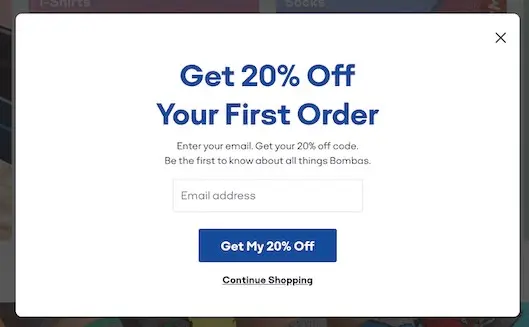
Here’s a point many people overlook: a popup is inherently neither good nor bad — it’s just a tool. Just like a knife, which you can use to make a meal or to hurt someone, a popup’s outcome depends entirely on where, when, and how you use it. In the rest of this article, we’ll look at exactly those things together.
The Difference Between a Marketing Popup and a Revenue-Generating Ad Popup
Before we go any further, let’s clear up a very common misunderstanding. The phrase “popup advertising” is usually used to mean two completely different things, and a lot of people mix the two up. Although these two types look and function similarly, their purpose and impact are worlds apart:
Marketing Popup
This is the popup that you yourself, as the site owner, design in order to reach a specific goal — for example, to collect emails, grow your newsletter, announce a special discount, or guide users toward a bestselling product. In this case, the popup serves the growth of your own site, and if it’s done right, it can be one of your most effective marketing tools. This article’s main focus is on this type.
Revenue-Generating Ad Popup (Popup Ads)
This one’s a different story. In exchange for money, you hand over your site’s popup space to another business so they can show their ad there. Here, your goal is to earn income from advertising, not necessarily to help the user experience. For that reason, this kind of popup usually carries a greater risk of annoying users and damaging your brand.
So when someone asks, “Should I use a popup or not?”, we first have to figure out which type they mean. Because the answer can be completely different for each. In this article, we’ll mostly go with the first type — the marketing popup — since that’s the one that can help your business as a growth tool.
How Does a Popup Work?
Now that we understand what a popup is, it’s worth taking a simple look behind its technical scenes too, so you know exactly how it appears on the page.
Popups are usually built with the help of JavaScript. JavaScript is a programming language that lets web pages be interactive and dynamic — meaning they can react to events like a user arriving, a few seconds passing, scrolling, or mouse movement. When one of these events happens, JavaScript gives the command for the popup to be displayed.
In the standard, proper method, the popup appears right there, inside the site’s page, as a floating layer over the content (also called a modal or overlay). The user can close it with a single click and go on reading. Most professional sites and reputable WordPress plugins use this very method.
But there’s also a second method that you’re better off staying away from. In this approach, instead of a simple floating layer, the popup opens a completely separate browser window. This model, a relic of the early years of the web, both thoroughly annoys the user and works against you SEO-wise — to the point that many browsers these days automatically block windows like these. That’s why it’s not recommended at all, and the subject of our discussion in this article is that first method: in-page popups.
What Are the Types of Popups?
One of the biggest mistakes many site managers make is thinking a popup only comes in one form: that annoying window that blocks the screen the moment you arrive. But the reality is that popups come in various types, and each one is built for a specific purpose and situation. Choosing the right type matters just as much as the decision to use a popup in the first place. Let’s get to know the most important types.
Entry / Welcome Popup
This type is displayed the moment a user enters the page. The entry popup is both the most popular type and the riskiest. Why? Because while it’s the fastest way to get your message to the user, if it’s done badly, it blocks their view at exactly the moment they haven’t even had a chance to see your content yet. This both annoys the user and — as we’ll explain in detail later — can lead to a Google penalty. So if you do want to use it, you have to run it very carefully and with an appropriate delay.
Exit-Intent Popup
This is one of the smartest types of popup. The exit popup appears right at the moment the user intends to leave the page — for example, when they move their mouse toward the browser’s close button. The logic is simple: the user is leaving anyway, so there’s nothing left to lose, and a good offer might change their mind. Because this popup doesn’t get in the way of reading the content at all, it’s both one of the lowest-risk types SEO-wise and has a good conversion rate. According to the data, exit popups convert, on average, around 4% of leaving users — that is, users you would otherwise have lost forever.
Timed Popup
This type is displayed after a few seconds of the user being on the page. The idea is to first give the user a chance to engage a little with your content, and then show them your offer. Setting this timing correctly is very important; experience has shown that a delay of around 6 to 10 seconds usually gives the best result. If you show the popup too early, it becomes annoying like the entry popup, and if it’s too late, the user may have already left.
Scroll-Triggered Popup
The scroll popup activates when the user has scrolled down a certain percentage of the page — for example, when they reach 30% of the content. Its logic is even smarter than the timed popup’s: someone who’s scrolling through the page has genuinely become interested in your content. For that reason, even though fewer users might see this popup, the quality of the sign-ups you get from it is usually higher, because you’re dealing with a truly interested audience.
Click-Triggered Popup
This type only opens when the user clicks on a specific button or link — for example, on a “Get Discount Code” or “Download Free File” button. Because the user themselves asked for this popup to open with their click, it’s not only free of any annoyance but also has the highest conversion rate of all the types. The reason is clear: someone who clicks has already shown their intent, and that “intent” is the best lead-in to a conversion.
Sticky Bar / Slide-in
This last one isn’t exactly a full-fledged popup, but it has a similar use. The sticky bar is a thin bar that usually clings to the top or bottom of the page and stays with the user as they scroll. The slide-in type is a small box that gently appears from the corner of the screen. It’s the least intrusive format of them all, because it doesn’t block the content at all. It’s true that its conversion rate is usually lower than mid-screen popups, but for sites that are very sensitive about user experience and SEO, it’s a fantastic option.
If you’re after a balance between “effectiveness” and “respect for the user,” the exit and scroll popups are usually the best choices. And if you want the highest conversion rate, the click popup is the winner. Try as much as possible to stay away from the immediate entry popup.
Uses of Popup Advertising
When the word “popup” comes up, the first thing most people think of is that “enter your email” box. But the reality is that the popup is a much more flexible tool, and depending on your type of business and your goal, it can do a variety of things for you. Let’s review its most important uses together.
Collecting Emails and Growing Your Newsletter
This is the most common and best-known use of popups. With an appealing offer — for instance, a free educational file or a discount code — you encourage the user to enter their email. This way, your email list grows and you build a direct communication channel with your audience, which is pure gold for future sales.
Announcing Discounts and Special Sales Campaigns
Imagine you’ve launched a seasonal sale. A good popup can deliver the news of this discount to the user at exactly the moment they enter the site. If you add a countdown or a time-limited offer here, it creates a sense of urgency and pushes the user toward acting more quickly.
Reducing Cart Abandonment Rate
This use is specific to online stores and is one of the most effective. Many users put a product in their cart but, right at the moment of payment, back out for reasons like shipping cost and leave. An exit popup that shows a small offer at that very moment (say, free shipping or 10% off) can change the user’s mind and rescue the purchase. It’s worth knowing that popups designed for abandoned carts have an average conversion rate of around 17%, which is a very high number.
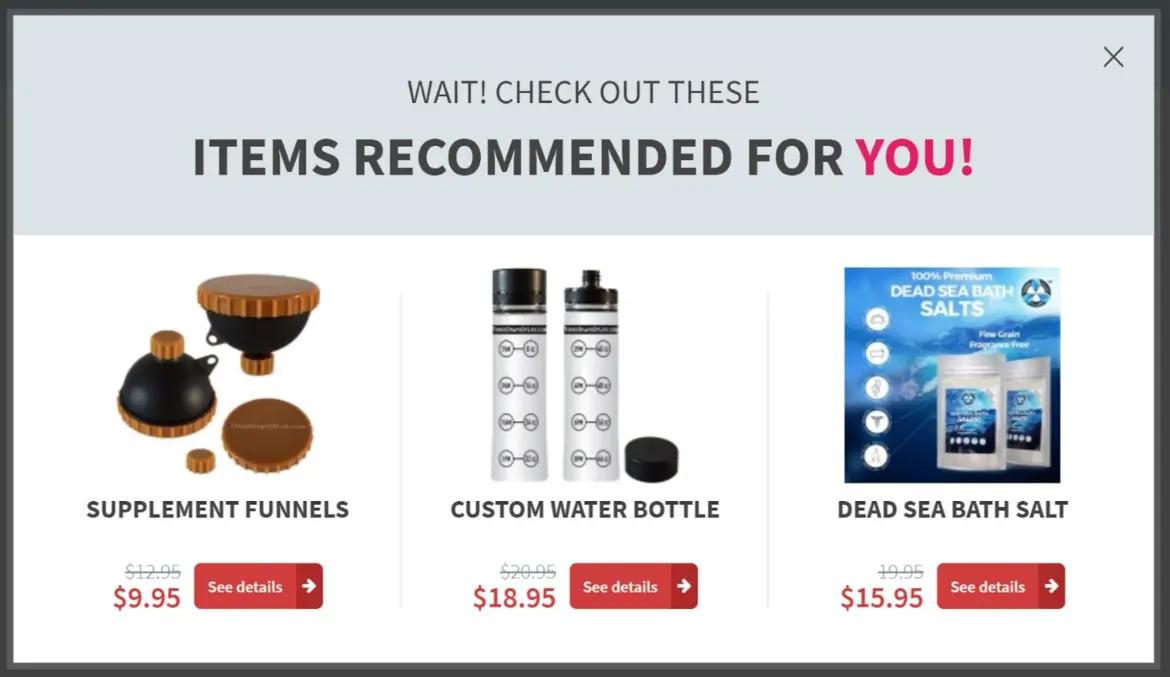
Suggesting Related Products
Smart popups can suggest a related product based on the page the user is on. For example, if a user is choosing a meal, a popup can suggest a drink or a salad to them. This both helps increase sales and improves the user’s shopping experience.
Important Site Announcements
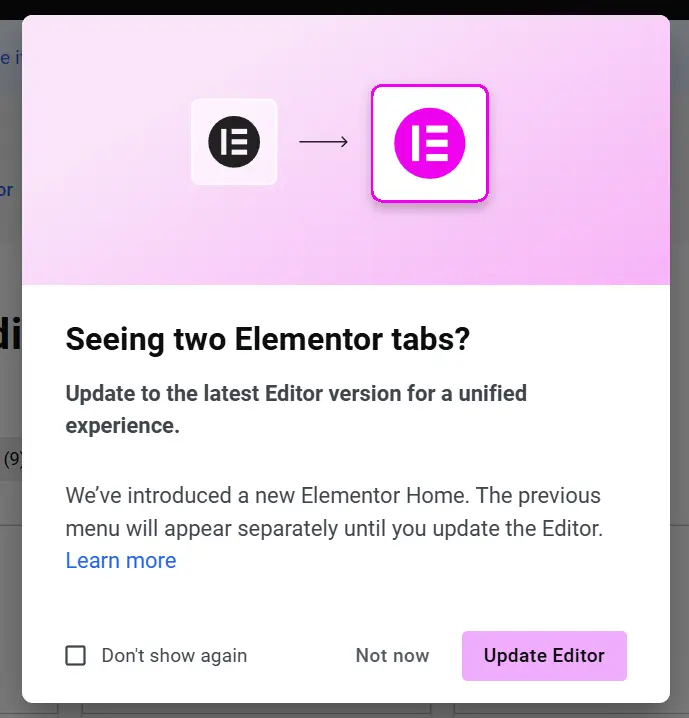
Sometimes you just want to get an important piece of news across to all your users — for example, “free shipping on orders above a certain amount” or notifying them about an important change. A simple announcement bar at the top of the page is perfect for this and doesn’t bother the user at all.
Getting Feedback and Running Surveys
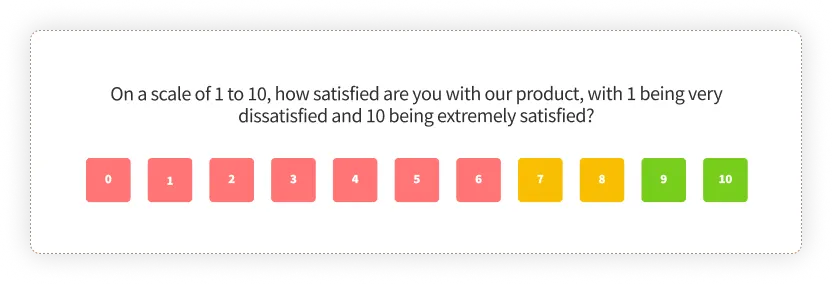
Popups aren’t just for “taking” — sometimes they’re useful for “listening” too. With a short survey in a popup, you can ask users how their experience of the site was or what they’re looking for. This data is incredibly valuable for improving your site and products.
As you can see, the popup is much more than a simple email box. The secret to its success is combining the right use with the right type of popup — something we’ll get into more in the following sections.
The Benefits of Using Popups
Even though a lot of people don’t have fond memories of popups, the reason they’re still so popular among site managers is a simple one: when used correctly, they really do work. Let’s go over three of their most important benefits together.
A Considerable Conversion Rate
Contrary to what you might think, good popups really do turn users into customers and followers. Based on studies conducted in 2025 and 2026 on billions of popup impressions, the average conversion rate of popups — depending on the source and measurement method — is somewhere between roughly 2% and 5%. This number might seem small at first glance, but let’s make it concrete with an example: if your site has 1,000 visitors a day, even a simple popup with a 3% rate adds around 30 new emails to your list daily — that is, about 900 new contacts a month, and at almost no cost.
But the story doesn’t end there. Optimized popups can go well beyond this average:
Gamified popups (like a “wheel of fortune” that the user spins to see their discount) can reach a conversion rate of around 10% to 13%. Popups designed for abandoned carts convert at an average of around 17%. Click popups, which the user opens themselves, have the highest conversion rate, because you’re dealing with a user who has already shown their intent.
The interesting thing is that small details make big differences. For example, the data shows that adding a suitable image or a countdown to a popup can boost the conversion rate dramatically.
Very Low Cost
One of the biggest advantages of popups over other advertising methods — like banner ads, sponsored posts, or pay-per-click ads — is their nearly negligible cost. To set up a functional popup in WordPress, you don’t have to spend any money. Just install one of the free plugins from the WordPress repository, and within a few minutes you can build a professional popup.
Of course, if you need more advanced features like more precise targeting or A/B testing, you can go for the paid versions; but the truth is that for most sites, the free plugins are completely sufficient and there’s no need to spend. This means the popup is one of the lowest-cost tools for attracting an audience and increasing sales.
Precise Audience Targeting
This benefit might not make as much noise as the others, but in practice it’s one of the most powerful. With a popup, you can specify with high precision what message is shown to the user, on what page, on what device, and at what time.
For example, you can set a particular offer to be shown only to mobile users, or a discount to appear only on the product pages of a specific category, or a popup to be displayed only to users who are entering the site for the first time. This level of control means the right message reaches the right person, and that both raises the conversion rate and prevents needlessly annoying users.
The Downsides and Risks of Popups
So far we’ve talked about the good sides of popups, but if we only said these things, we wouldn’t have given you the full picture. A popup is a double-edged sword; just as much as it can help your site grow, if used badly it can deal serious blows too. Let’s take a clear-eyed look at its downsides as well.
A Negative User Experience
The biggest criticism leveled at popups is how annoying they are. Let’s look at the matter from an ordinary user’s point of view. Imagine someone is searching Google for the specs of a phone — they just want to get information and have no intention of buying at all. They enter your site, and before even a few seconds have passed, a full-screen “Special discount! Buy now” popup suddenly blocks their view.
This experience is annoying for the user. They came to read something, but before they got the chance, they ran into an obstacle. Not only does this make the user close the site right then and there, but it also builds a negative feeling toward your brand in their mind. And this damage to brand credibility is very often greater than the short-term gain of the popup.
An Increased Bounce Rate
Bounce rate means the percentage of users who enter a page and, without any interaction, quickly leave the site. When a user runs into an annoying popup the moment they arrive, the odds that they’ll close the page and leave right then go way up — and that means an increased bounce rate.
This isn’t just a number in your reports; take a look at a real example: a cooking blog added a full-screen newsletter signup popup to its site, and in that very first week, its mobile bounce rate went up by about 18%. But when it turned that same popup into a small bar at the bottom of the page, something interesting happened: the bounce rate dropped, yet over the course of the month roughly the same number of emails was collected. This means the annoying popup, without delivering any more gain, was simply hurting the site.
A Negative Impact on SEO
This is the most important and, at the same time, the most overlooked risk of popups. Many people don’t know that improper use of a popup can directly harm their site’s ranking on Google. When users quickly leave a site because of an annoying popup, Google picks up the signal that this page’s experience wasn’t good, and that alone can cause a drop in ranking. On the other hand, Google has specific rules for popups, and violating them can lead to a penalty.
This matter is so important that we’ve dedicated a whole separate section to it. In the next section, we’ll explain exactly which popups Google penalizes, which ones it ignores, and how you can use popups without fear of a penalty.
The Impact of Popups on SEO: Does Google Penalize Popups?
This is a question that occupies the minds of many site managers, and unfortunately there are a lot of wrong answers floating around about it. Some people, out of fear of a Google penalty, give up on popups entirely and lose out on a powerful tool. Others casually throw any popup anywhere and then wonder why their ranking dropped. Let’s clear this matter up once and for all.
First off, the good news: Google does not penalize all popups. Millions of the world’s top-ranked sites use popups every day without their ranking taking the slightest hit. So the question isn’t “should I have a popup or not,” but rather “how and when should I use it.”
As of January 10, 2017, Google put into effect a rule called “Intrusive Interstitials,” which is still active to this day (as of 2026). The key word here is “intrusive.” Google has no problem with the popup itself; its problem is with a popup that comes between the user and the content they came for. In fact, this penalty depends on three things: when it’s displayed, the user’s device, and how much of the content it covers.
Before we go further, know this very important point: this penalty only applies to mobile. That is, a full-screen popup on the desktop version of a site is not penalized SEO-wise (though it may not be a good idea in terms of user experience). The reason is that Google put this rule in place to improve the experience of mobile users, who are dealing with smaller screens.
Which Popups Get Penalized?
Google specifically recognizes these cases as “intrusive interstitials” and may lower your page’s ranking because of them:
A popup that covers the main content immediately after the user arrives from search results. That is, the user clicks on your site’s link in Google and, before they even see a single line of content, runs into a popup. A popup that takes up a large part of the screen and makes access to the content difficult. As a general rule, if a popup covers more than about 30% of the screen, it can be problematic. A layout in which the main content is pushed down the page and the top of the screen (the part that catches the eye first) has effectively become a full-screen ad.
Which Popups Don’t Get Penalized?
And now the real good news; these cases are completely safe and Google has no issue with them:
Exit-intent popups that only appear when leaving the page. Because they don’t get in the way of the user’s initial arrival at the content, they’re outside the penalty zone. Delayed and scroll popups that are displayed after the user has had a chance to see and engage with the content. Legally required and essential notices like a cookie consent message, age verification, or a login window. Because these are legally necessary, they’re considered exceptions. Small bars and banners that take up a reasonable amount of the screen. Per common industry practice, if these bars occupy around 15% to 25% of the screen or less, they’re fine.
The Golden Rule to Remember
If we wanted to sum up all these explanations in one sentence, it would be this:
If the user can see and read your content before the popup appears, you’re almost entirely outside the range of a Google penalty.
With this one simple rule, you can enjoy all the benefits of popups without worrying in the slightest about your ranking. Just set your popups with an appropriate delay, on scroll, or as exit popups, and make sure that on mobile they don’t cover the entire screen. That’s it.
The Best Popup-Building Plugins in WordPress
Since WordPress runs about 43% of all the websites in the world (and not 80%, as is sometimes wrongly quoted), it’s natural that its plugin ecosystem is incredibly rich too. For building popups as well, you have a variety of options that don’t require you to write a single line of code to use. Let’s compare a few of the best of them together.
| Plugin | Free / Paid | Best For | Standout Feature |
|---|---|---|---|
| Popup Maker | Free (with a paid version) | Beginner to professional | The most popular free plugin, with extensive features |
| OptinMonster | Paid | Serious businesses | Advanced targeting and powerful Exit-Intent |
| Elementor Popup | Part of Elementor Pro | Elementor users | Fully visual design, integrated with the page builder |
| Layered Popups | Paid | Animation enthusiasts | Animated elements and high visual customization |
| Hustle | Free | Blogs and simple sites | Lightweight and easy for collecting emails |
Free Plugins
If you’re just getting started or have a smaller site, the free plugins fully meet your needs. Popup Maker is the most popular option in this category; even though it’s free, it gives you good features for various triggers (timing, scroll, click, and exit). Hustle is also a lightweight, simple option that works especially well for blogs and collecting emails.
Professional (Paid) Plugins
If your business is more serious and you need features like very precise targeting, A/B testing, and advanced analytics, go for the paid versions. OptinMonster is one of the most powerful in this area and has a fantastic Exit-Intent capability. And if you work with the Elementor page builder, Elementor Popup (which is part of its Pro version) lets you design popups fully visually and in harmony with the rest of your site.
But to tell you the truth, for most sites the free plugins are completely sufficient and there’s really no need to spend — unless you need very specific, advanced capabilities.
A Step-by-Step Guide to Building a Popup in WordPress
The good news is that building a popup in WordPress isn’t hard at all and doesn’t require any programming knowledge. In short, the general path of the work goes like this:
First, you install and activate your chosen plugin (say, Popup Maker) via Plugins → Add New. Then you create a new popup and design its text, image, and form. In the next step, you specify the trigger — that is, you decide whether the popup is shown on a timer, on scroll, on click, or when the user is leaving. Finally, you specify which pages and which devices this popup appears on, set its display frequency, and test the output on mobile and desktop. That’s it!
Of course, each of these steps has its own details and fine points, and explaining them fully here would make the article needlessly long.
In our article introducing and teaching the top 5 WordPress popup-building plugins, we’ve explained all these steps step by step and with images. If you want to get to work right now and build your first popup, that practical guide is exactly what you need.
Golden Tips for Building a Non-Intrusive, Effective Popup
By now we’ve understood that a popup can be either your friend or your enemy. The difference between an annoying popup and a money-making one lies in these very fine details we’re about to get into. If you follow these few tips, you can get the most out of it without scaring your users off.
Take Correct Timing Seriously
Showing the popup immediately is the worst thing you can do. Give the user a chance to engage with the content a little first. The data shows that a delay of around 6 to 10 seconds usually gives the best result. Even better than that, you can set the popup on scroll so it’s only shown to a user who’s genuinely reading the content.
Keep the Form as Short as Possible
Every extra field you ask the user to fill in is a new obstacle in their path and lowers your conversion rate. In most cases, just getting the email is enough. You can collect the name, phone number, and other information later, in the next stages of communicating with the user. Experience has proven that simpler forms with a single field perform much better than crowded ones.
Give a Valuable Offer
A user won’t hand you their email for no reason. You have to give them a convincing reason. This can be a discount code, a free educational file (a lead magnet), or a special offer. The data shows that popups offering a discount or a specific value have a significantly higher conversion rate.
Don’t Underestimate Mobile
Remember that Google’s penalty is specific to mobile, and today a large part of sites’ traffic comes from mobile. So design a small, lightweight, dedicated popup for mobile; don’t just shrink the desktop version. Make sure the close button is easy to tap and that the popup doesn’t cover the entire screen.
Don’t Forget A/B Testing
Never make decisions based on guesswork. Try two different versions of your popup (say, with two different texts or two different colors) and see which one gives the better result, then keep the winning version. This simple trial and error can, over time, multiply your conversion rate several times over.
Control the Display Frequency
Nothing frustrates a user as much as seeing a repeated popup on every page. Set it so that if a user has seen the popup once (or closed it), they don’t run into it again for a while. This is a matter of respecting the user and prevents needless annoyance.
An effective popup is one that’s displayed at the right time, with a valuable offer, in a simple way, and with respect for the user. If you follow these four principles, you’ll get results and keep your users happy too.
Frequently Asked Questions
Does a popup harm SEO?
Not necessarily; only one particular type is problematic. If a popup covers the main content immediately after a user arrives from Google, on mobile, it may cause a drop in ranking. But exit popups, delayed popups, and small bars pose no risk to SEO.
What’s the average conversion rate of a popup?
Depending on the source and measurement method, the average conversion rate of ordinary popups is around 2% to 5%. But optimized types like gamified popups or cart-specific ones can reach as high as 10% to 17%.
When is the best time to show a popup?
Usually the best result comes when you show the popup with about a 6-to-10-second delay, or set it on scroll so it’s only displayed to a user who’s reading the content. Showing it immediately is usually the worst option.
Do I need a paid plugin to build a popup?
No. For most sites, free plugins like Popup Maker are completely sufficient. Only if you need very advanced features like precise targeting or A/B testing should you go for the paid versions.
Is an entry popup better or an exit popup?
In terms of respecting the user and SEO safety, the exit popup is usually the safer option, because it doesn’t get in the way of reading the content. The entry popup has a higher display rate, but its risk of annoying the user and of a Google penalty is also greater.
Does a popup perform the same on all devices?
No. User behavior and Google’s rules differ on mobile and desktop. Google’s penalty is specific to mobile, so be sure to design a lighter, smaller version of your popup for mobile.
Wrapping Up
If we wanted to sum up this whole article in one sentence, that sentence would be: a popup is neither a “bad” tool nor a “magic” one; rather, it’s a tool whose outcome depends entirely on how you use it.
We saw that a popup can, at very low cost, grow your email list and your sales, and even produce remarkable conversion rates. But this same tool, if run recklessly and intrusively, can both scare users away and put your site’s ranking on Google at risk.
The key to success lies in the very tips we went over together: choose the right type of popup for the right goal, mind your timing, give a valuable offer, keep an eye on the user experience, and don’t trample on Google’s rules. If these are followed, the popup turns into one of the best friends of your online business.
Now that you’re fully acquainted with the benefits, downsides, types, and SEO rules of popups, the ball is in your court. Make the smart decision yourself. Wishing you success. 🙂

Ahura WordPress Theme
The Power to Change EverythingElementor Page Builder
The most powerful WordPress page builder with 100+ exclusive custom elements.
Incredible Performance
With Ahura’s smart modular loading technology, files load only when they are truly needed.
SEO Optimized for Google
Every line of code is carefully aligned with Google’s algorithms and best practices.

To post a comment, please register or log in first.