
 Tutorials


 Ahura
Ahura Plugins
 Blog
BlogStep-by-Step Yoast SEO Settings Guide for 2026

The Yoast SEO plugin is one of the oldest and most well-known SEO tools for WordPress, used by site administrators for many years. Despite the abundance of tutorials available, the reality is that in recent versions, the menu structure and various sections of Yoast have changed, leading to confusion for many users during configuration.
In this article, we intend to examine the Yoast SEO plugin settings step-by-step and in a completely practical manner, explaining exactly what each section does and which options are truly vital for a site’s SEO. The focus of this tutorial is on the fundamental configuration of the plugin, not merely introducing options or repeating general descriptions.
Whether you have used Yoast before or are activating it on your site for the first time, this guide will help you configure the settings in a way that is both user-friendly and optimized for the best results in search engines, especially Google.
In the following sections, we will explore all the important parts of Yoast SEO in simple, jargon-free language so that by the end of this article, you will have a clear vision of this plugin’s settings.
Table of Contents
What Exactly is Yoast SEO and What is it Used For?
Yoast SEO is an SEO plugin for WordPress that helps site managers configure the structure of their pages and content in a standard and understandable way for search engines. This plugin is not meant to boost a site’s ranking on its own; rather, it helps the site stay on the right track technically and content-wise. In fact, Yoast acts like a guide that prevents many common SEO mistakes and ensures the site doesn’t unintentionally run into issues like indexing low-value pages or generating duplicate content.
The primary job of Yoast is to create a transparent communication channel between WordPress and search engines. It explains to Google and other search engines what the topic of each page is, which pages are more important, which sections should not be indexed, and what the overall site structure looks like. This is particularly important for sites that produce content consistently.
What Does Yoast SEO Do for a Site’s SEO?
Yoast SEO provides a collection of practical tools, each covering a specific part of site SEO. The plugin enables the management of SEO titles and meta descriptions, allowing you to specify exactly what title and description each page should display in search results. Additionally, Yoast automatically creates an XML sitemap and provides it to search engines so they can crawl the site’s pages faster and more accurately.
Another critical task of Yoast is controlling page indexing. You can specify which posts, pages, categories, or custom post types should appear in Google and which sections are better left out of search results. This feature plays a significant role in preventing the creation of thin content and duplicate content. Furthermore, the SEO and readability analysis tools help you better manage text structure, heading usage, and keyword placement while writing, although these analyses should not be viewed as absolute laws.
Is Yoast SEO Still a Good Choice?
Despite the emergence of newer plugins, Yoast SEO remains one of the reliable options for WordPress SEO. It has been under development for years and is in good standing regarding stability and compatibility with WordPress. In recent versions, the Yoast user interface has improved, and many of its settings have become more logical and understandable.
However, the free version of Yoast offers fewer features compared to some competitors, making certain capabilities available only in the paid version. Therefore, choosing Yoast or not depends largely on the site’s needs and the administrator’s experience level. If your goal is to have a stable and reliable plugin for managing core SEO settings, Yoast can still be a suitable choice.
A General Overview: Yoast SEO vs. Rank Math
Yoast SEO and Rank Math both share a common goal: managing the SEO of a WordPress site. However, their approaches differ slightly. Yoast focuses more on simplicity, stability, and basic settings, trying not to overwhelm the user with excessive options. In contrast, Rank Math provides more features even in its free version and offers greater freedom to adjust SEO details.
In terms of the final result on Google, there is no specific or miraculous difference between these two plugins. What matters is the correct use of the plugin and the site’s content strategy. Choosing between Yoast and Rank Math is more of a matter of preference and project requirements rather than a definitive decision based on SEO superiority. Be sure to read the article “Yoast SEO or Rank Math: Which One is Better?”.
Which Sites Should Use Yoast SEO?
Yoast SEO is most suitable for sites looking for a simple and reliable solution to manage their SEO. Educational sites, blogs, corporate websites, and projects with a regular content team usually find Yoast easier to work with. This plugin is especially appropriate for individuals who are new to the world of SEO or do not want to get involved with complex settings.
If you have a site with a structure that isn’t overly complex and your goal is primarily to control indexing, manage titles, and prevent common SEO issues, Yoast can cover your needs well. Ultimately, more important than the choice of plugin is a correct understanding of SEO principles and the conscious use of tools—something Yoast strives to simplify.
Installing Yoast SEO and Important Pre-Activation Tips
Before we head into installing the Yoast SEO plugin, it is necessary to keep one important point in mind. SEO plugins are directly connected to the index structure, meta tags, sitemaps, and many sensitive parts of the site. For this reason, installing and activating them without considering the current status of the site can cause disruptions in your SEO. Therefore, it is better to perform this step with care and awareness.
Why Shouldn’t Two SEO Plugins Be Active Simultaneously?
Having two SEO plugins active on a site at the same time almost always leads to conflicts. Every SEO plugin tries to manage titles, meta descriptions, index settings, and even schemas independently. When two plugins are active simultaneously, a page might generate multiple SEO titles or different meta descriptions, or multiple sitemaps might be introduced to search engines. This situation not only fails to help SEO but can also cause confusion for Google and decrease the indexing quality of pages.
Furthermore, many technical settings such as noindexing pages, controlling archives, and managing internal links might be applied separately by both plugins. The result of this is usually a disorganized site structure and the emergence of problems that will be harder to diagnose and fix in the future.
Deactivating Rank Math or Similar Plugins
If you have previously used plugins like Rank Math, All in One SEO, or other SEO plugins, be sure to deactivate them before installing Yoast SEO. Deactivating the previous SEO plugin ensures that full control of SEO settings is handed over to a single plugin and prevents conflicts.
If you intend to preserve previous SEO settings, it is better to export settings from the previous plugin before deactivating it or ensure that Yoast provides the capability to import previous data. Otherwise, proceeding without two simultaneous plugins is the best and safest choice.
Installing Yoast SEO from the WordPress Repository
After ensuring that previous SEO plugins are deactivated, you can enter the WordPress dashboard and select “Add New Plugin” from the Plugins section. By searching for the term “Yoast SEO,” the official plugin will be displayed in the WordPress repository. Always ensure you install the plugin where the official developer is “Yoast” to avoid security and update issues.
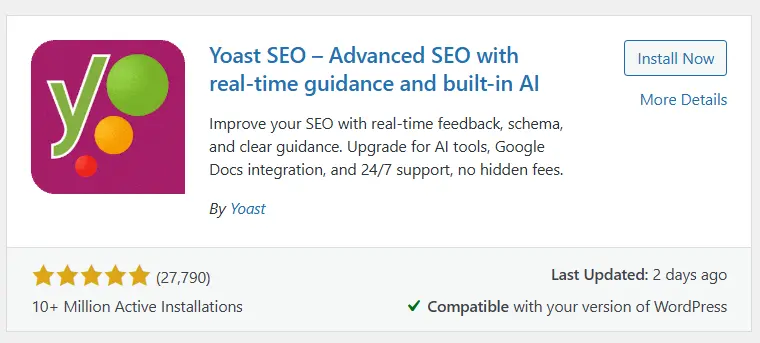
After installing the plugin, WordPress allows you to activate it, but it is better to take a general look at the site status before heading into settings to ensure the plugin was installed without errors.
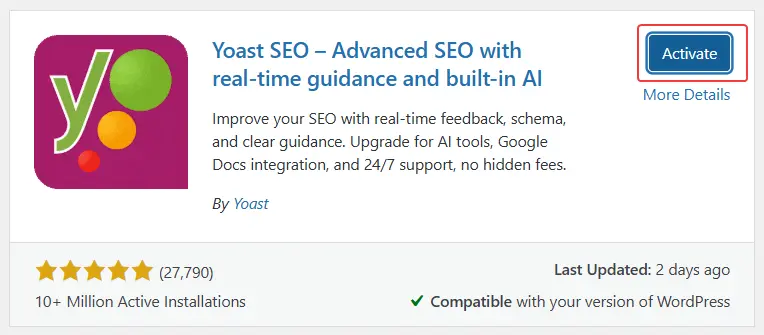
Activating the Yoast SEO Plugin
Upon activating Yoast SEO, a new menu named “Yoast” is added to the WordPress dashboard. At this stage, the plugin is active by default, but no specific settings have been configured for your site yet. This means Yoast does not yet know your site structure, which pages are important, or which sections should not be indexed. Therefore, activating the plugin is only the beginning, and the main settings are performed in the subsequent steps.
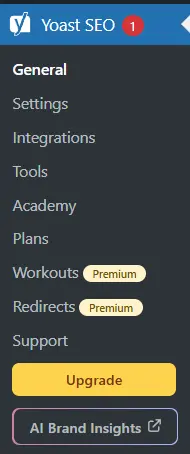
Why is it Better Not to Use the Initial Installation Wizard for Now?
After activation, Yoast SEO provides a first-time configuration wizard that applies recommended settings step-by-step. Although this wizard can be useful for absolute beginners, in many cases, its settings are applied in a general and non-customized way that does not perfectly align with the actual needs of the site.
Using the wizard might cause certain sections to be enabled or disabled without you knowing the reason. For this reason, in this tutorial, we prefer to perform Yoast settings manually and consciously so that we have full control over the site’s SEO and know exactly what effect each option has. This method is a more logical and professional choice, especially for sites that take SEO seriously.
Familiarity with the “General” Section in Yoast SEO
After activating the Yoast SEO plugin, the first section you usually encounter is the “General” section. This part is essentially the management center of Yoast and provides an overview of the site’s SEO status and the plugin’s basic settings. Rather than being a place for heavy configuration, the General section acts as a guide and reminder, helping you understand the overall state of the site from Yoast’s perspective.
In this section, Yoast attempts to convey general information and important SEO tips to the site manager in relatively simple language. If you are entering this section for the first time, it is better not to rush; first, familiarize yourself with the environment to understand exactly what each message and notification means.
The Yoast Dashboard and the Information it Displays
The Yoast Dashboard shows a summary of the status of the plugin and your site. This section usually displays messages about initial settings, general suggestions for improving SEO, and notices regarding the site’s status. These messages do not necessarily mean there is a serious problem with the site; they are more for guidance, telling you what actions you can take to make the site more optimized.
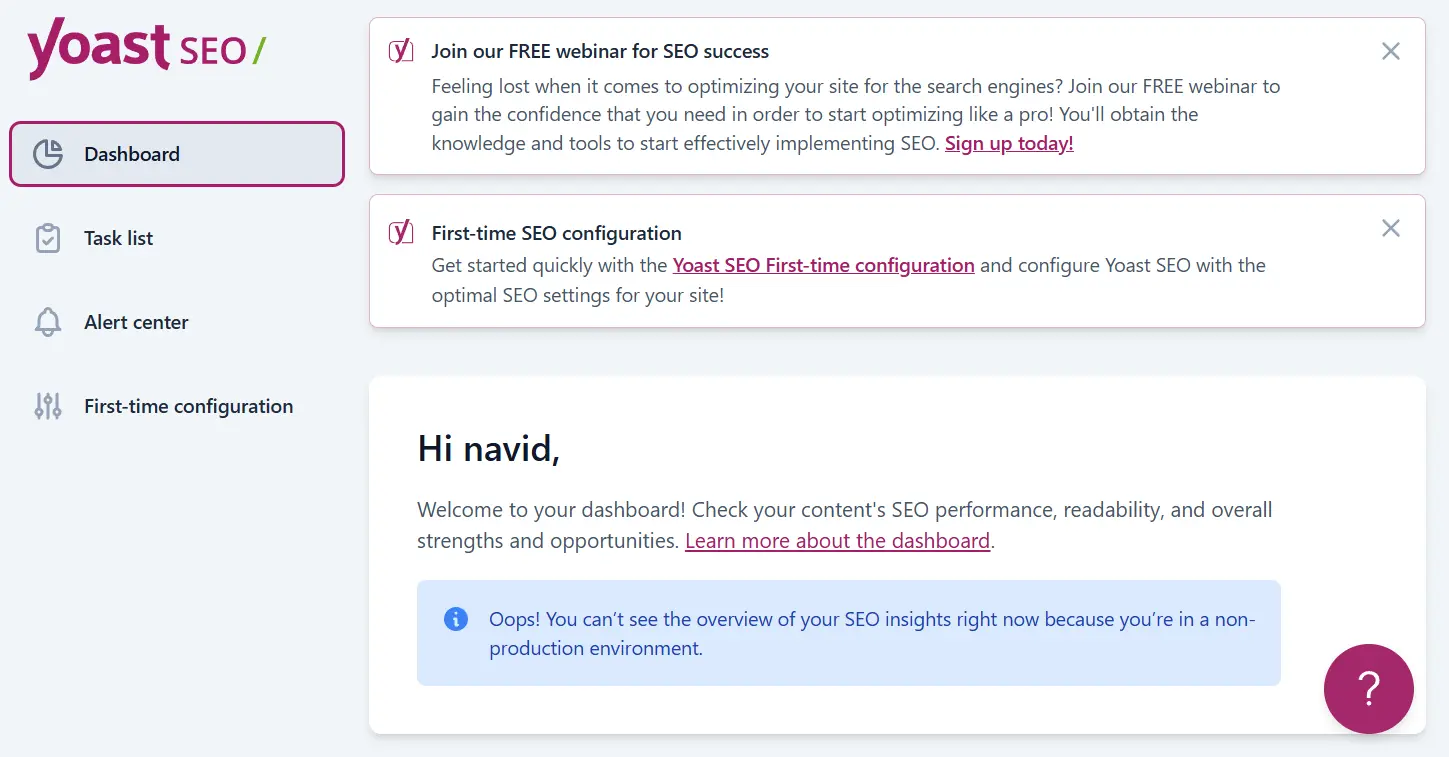
You might also see notifications in the dashboard about new Yoast features or suggestions to use the Premium version. These items are mostly for informational and promotional purposes, and you don’t necessarily need to take all of them seriously. The important thing is to be able to distinguish practical messages from purely suggestive ones.
What are Warnings and Task Lists For?
In the General section of Yoast, you will usually encounter warnings and task lists aimed at reminding you of important SEO tasks. These task lists can be particularly useful for newly launched sites or sites that have recently installed the Yoast plugin. For example, Yoast might remind you that the initial site settings haven’t been completed or that some important sections haven’t been reviewed yet.
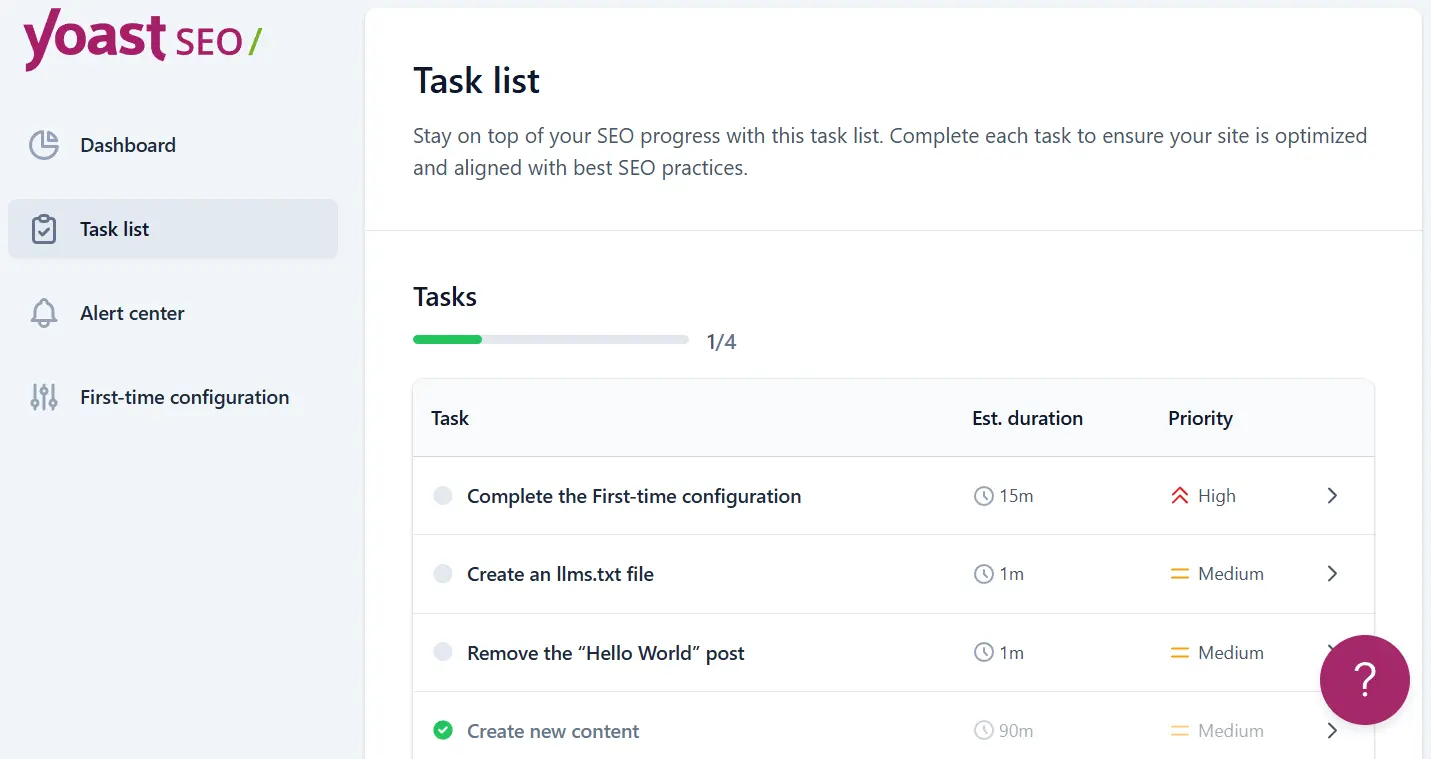
Warnings usually mean the plugin has noticed a specific situation on the site and suggests you investigate it. These warnings are not necessarily indicative of an error; rather, they serve as a preventative alert to avoid potential problems in the future.
Which Warnings are Truly Important and Which Aren’t?
Not all warnings displayed by Yoast carry equal weight. Some warnings are truly important and should definitely be checked. For instance, warnings pointing to the blocking of search engine bot access or indicating that the site is unintentionally set to “noindex” are items that must be addressed immediately. These types of warnings directly affect the site’s visibility on Google.
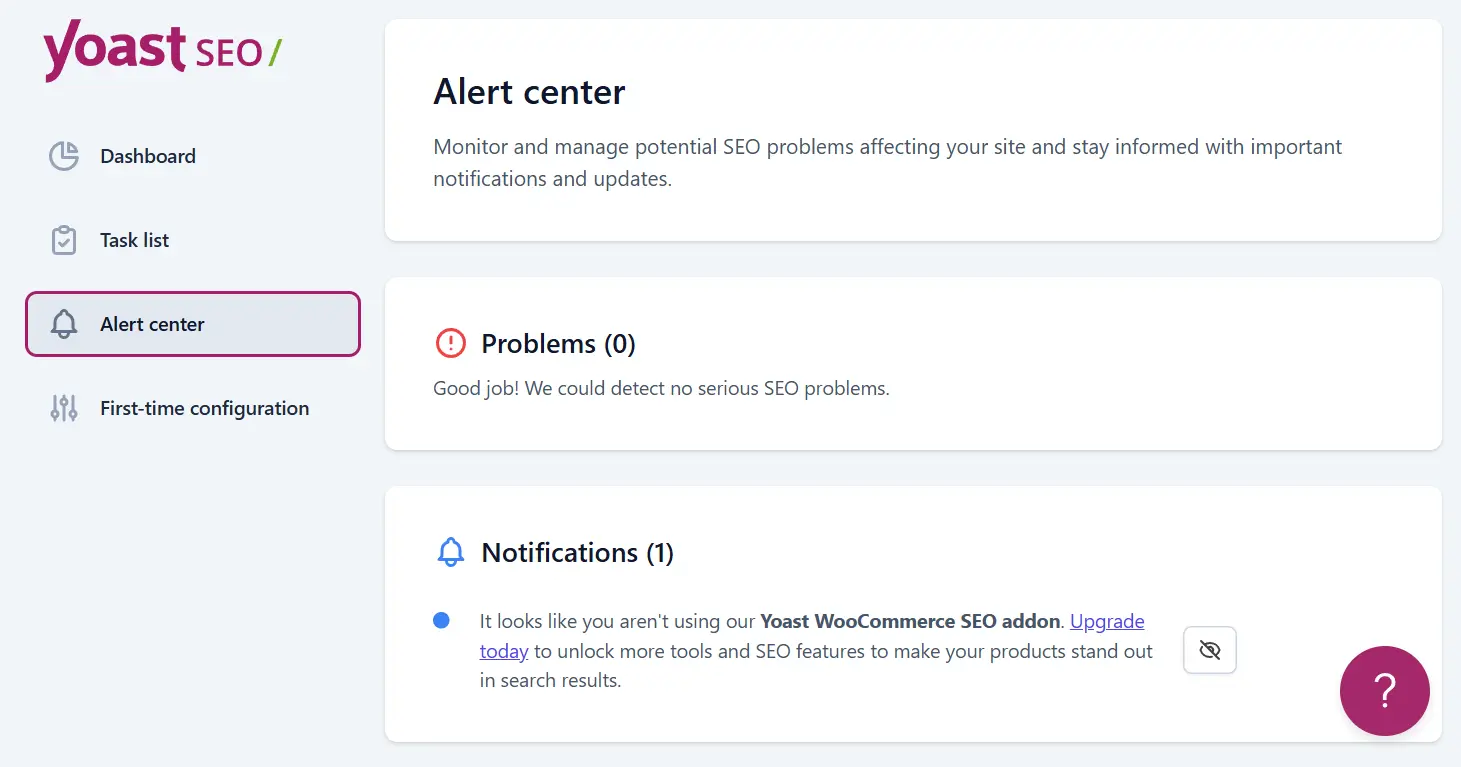
On the other hand, some warnings are more suggestive or informational. Suggestions to install the Premium version, reminders to use specific features, or messages merely pointing to the completion of a task list usually do not have high priority. The correct approach to this section is to read the warnings carefully but, without obsession or excessive worry, focus only on items directly related to indexing, bot access, and the core site structure.
The Yoast General section can be viewed as a control dashboard showing the overall status of the site. If you know which messages to take seriously and which to consider merely as suggestions, this section can turn into a useful tool for better SEO management rather than a source of confusion or anxiety.
Free or Premium Yoast SEO? A Realistic Look
One of the questions that arises for almost all Yoast SEO users is the difference between the free and premium versions of this plugin. In the free version, Yoast provides the basic and essential SEO features, while in the paid version, it attempts to encourage users to upgrade by adding more capabilities. However, the important point is that not all these features are necessarily essential for every site, and the choice between free and premium should be based on the actual needs of the site, not just the plugin’s advertisements.
Differences Between the Free and Paid Versions of Yoast SEO
The free version of Yoast SEO offers features such as SEO title and meta description management, XML sitemap generation, page index control, archive management, and SEO and content readability analysis tools. These features actually form the main pillar of a WordPress site’s SEO and are completely sufficient for a large portion of websites.
In contrast, the premium version adds capabilities like redirect management, internal link suggestions, dedicated support, and certain schema-related features. Additionally, the paid version allows the use of multiple focus keywords for each page. While these capabilities can be useful in some projects, it should be noted that their absence does not mean the site has an SEO weakness.
Why the Free Version of Yoast is Sufficient for Most Sites
In practice, many sites can cover all their main SEO needs with the free version of Yoast SEO. If the site structure is correct, high-quality content is produced, and SEO principles are properly followed, the free version imposes no serious limitations on site growth. Index management, title and meta description control, and sitemap generation are the most important parts of SEO, and they are all available in the free version.
Moreover, many features offered in the premium version can be implemented through other means. For example, redirect management can be handled with lightweight free plugins, and internal linking can be managed manually and purposefully, which in many cases even yields better results. For this reason, for most educational, blog, and even e-commerce sites, the free version of Yoast is considered a logical and sufficient choice.
Schema, Redirects, and Features that are Mostly Promotional
One of the topics Yoast emphasizes in the premium version is schema and structured data. While Yoast also automatically adds a significant portion of basic schemas to the site in the free version, for projects requiring advanced schemas, using specialized schema plugins or manual settings usually provides the site manager with more control.
Regarding redirects, it must be said that the existence of this feature in the premium version is not necessarily a vital advantage. Redirects can be managed with simpler and free tools without the need to purchase the paid version of Yoast. Some other premium features are more for convenience or promotional purposes, and their absence does not have a direct impact on the site’s ranking in Google.
Choosing between the free or premium version of Yoast SEO comes down to what your site needs and to what extent you want to manage SEO settings yourself. For many sites, the free version is not only sufficient but also a more logical and cost-effective choice.
Site Features Settings in Yoast SEO
The “Features” section is one of the most important parts of Yoast SEO settings because it is here that you determine which capabilities are active on your site and which are disabled. In recent versions, Yoast has designed this section modularly so that the site manager can activate only the required features. It is suggested to follow this part along with screenshots so you know exactly where each option is located and what effect it has on the site.
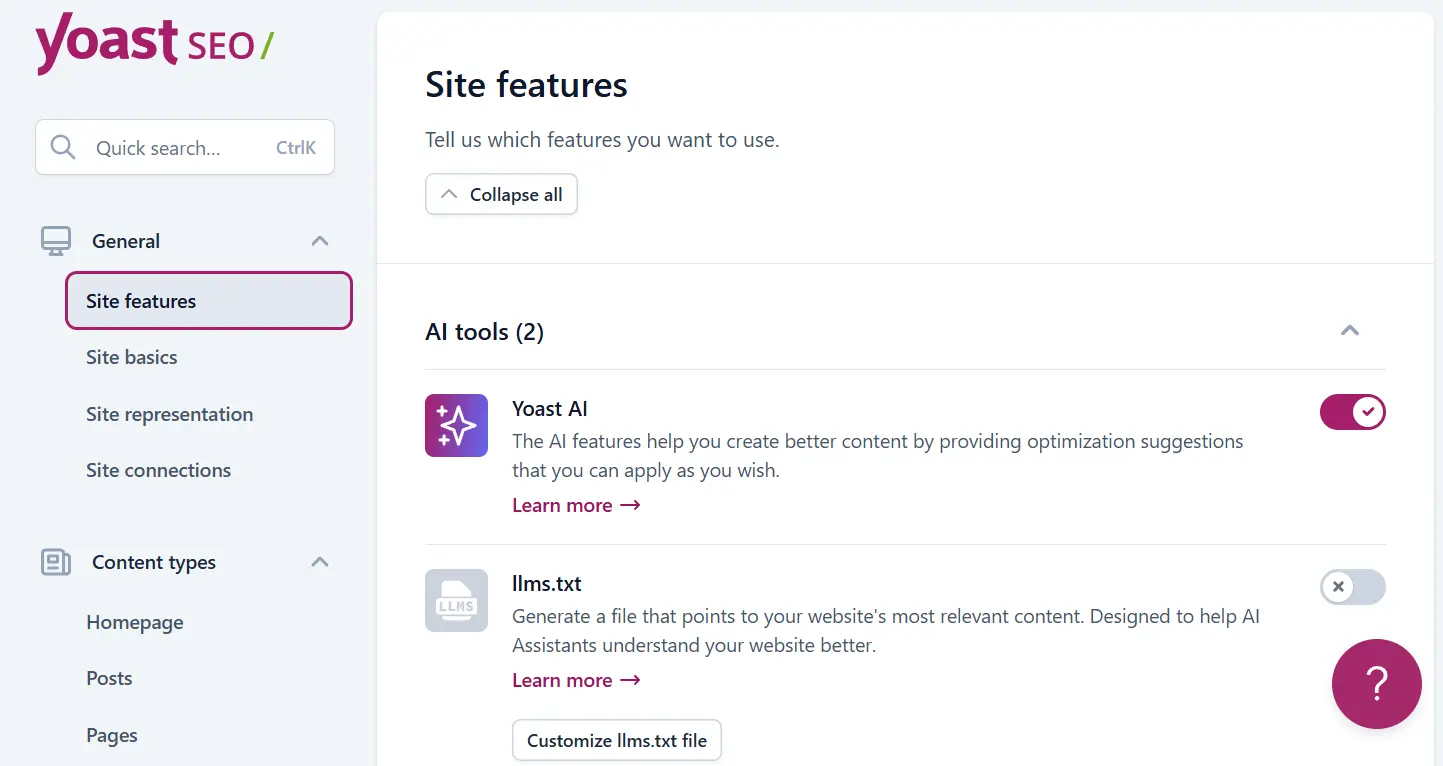
Yoast AI; To Activate or Not?
The Yoast AI feature provides the possibility of using artificial intelligence to suggest improvements for titles and meta descriptions. While this feature seems attractive, in practice, its use requires purchasing credits and paying fees. Therefore, if you do not have a specific plan to use Yoast AI, you can keep this option disabled without harming the site’s SEO.

The llms.txt File and Its Use
The llms.txt file is one of Yoast’s new features introduced with the aim of better site interaction with AI bots. This file helps bots better understand the site structure and how content is used. Having this feature active does no harm to the site and may play a more important role in the future. Therefore, it is recommended that this option be active, allowing Yoast to manage this file automatically.

SEO Analysis
SEO analysis is one of Yoast’s core features and should ideally always be active. This section examines your content based on the chosen focus keyword while editing posts and pages and offers suggestions for improving the content structure. While these analyses should not be taken as definitive laws, they can serve as a good guide for preventing common mistakes.
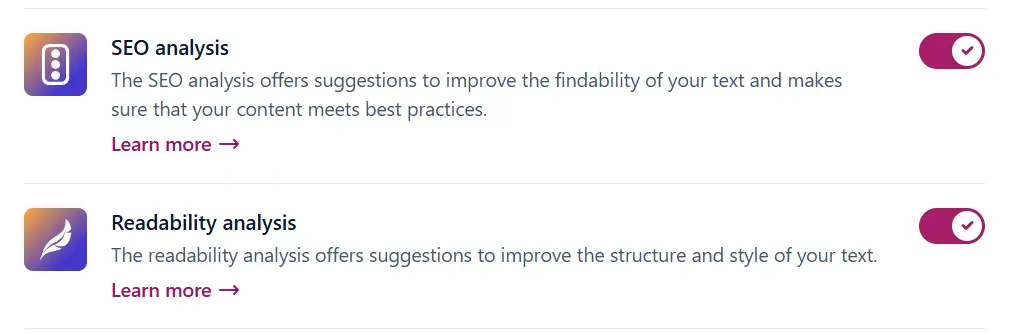
Content Readability Analysis
Readability analysis examines text structure, sentence length, paragraphs, and the use of headings. This feature is primarily designed for the English language, but it can be somewhat useful in Persian as well. Having it active does no harm and can help make the text structure more organized, although the final decision should not be made based solely on the scores in this section.
Cornerstone Content
The cornerstone content feature allows you to identify the most important pages of your site. These pages are usually reference articles or main pages that hold the most SEO value. Activating this option is recommended because it helps you focus more on key site pages during content production and perform internal linking more purposefully.
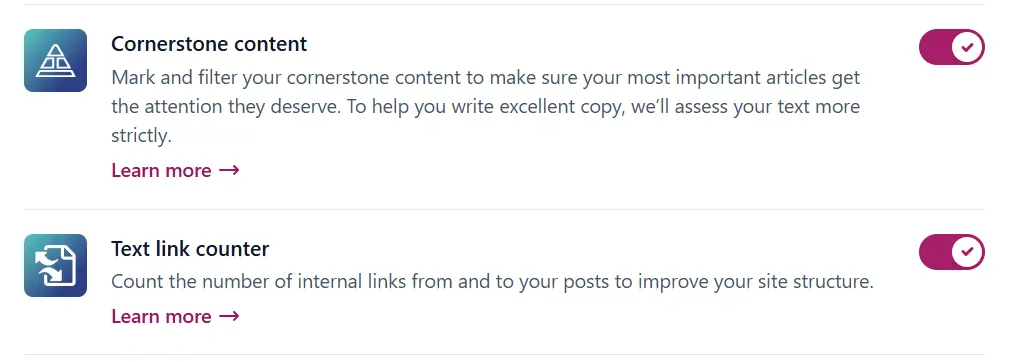
Link Counter
The link counter displays the number of internal links present in each post, providing a better view of the site’s internal linking status. This feature is simple yet practical and should be active. Using it, you can identify which pages are too “lonely” and require more internal links.
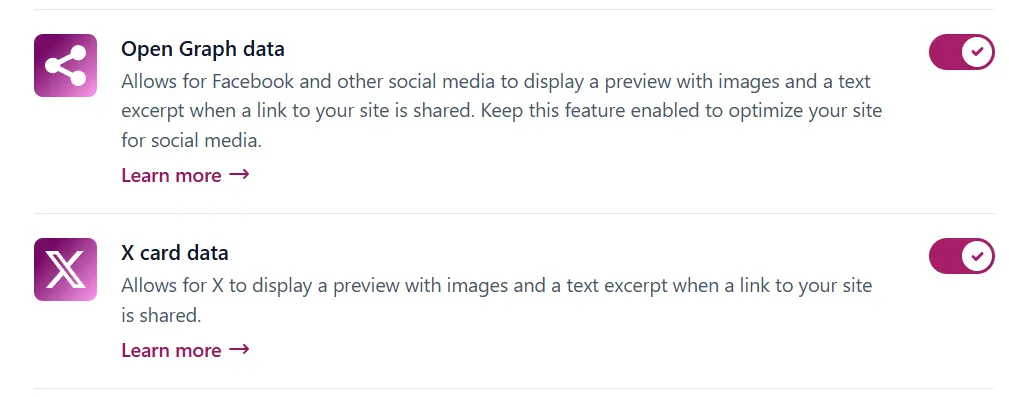
Open Graph and Social Media Cards
Open Graph and social media card capabilities determine how your site’s content is displayed when shared on networks like Facebook, LinkedIn, or X. Having this option active helps site links be displayed professionally and neatly. Even if your main focus is not on social media, activating this feature is recommended as it has no negative impact on SEO and improves the user experience.
REST API
Yoast provides the possibility of using a REST API for some of its features. This option is mostly used for tools and services that communicate with the site via API. If your site has no specific need for these communications, disabling the REST API can be a more logical choice from a security perspective, without causing problems in SEO performance.
XML Sitemaps
The XML sitemap is one of the most critical features of Yoast SEO and must be active. This map helps search engines better understand the site structure and index pages faster. Yoast creates and updates this map automatically, and usually, no complex settings are required in this section. Having a sitemap active is considered the most basic step for technical SEO.
In summary, the Site Features section in Yoast SEO is where you can tailor the plugin’s performance exactly to your site’s needs with a few simple decisions. If you know what each capability does, activating or deactivating them becomes a conscious decision rather than a random choice.
Basic Site Settings in Yoast SEO
The “Basic Site Settings” section in Yoast SEO is where your site’s identity and default information are defined. These settings might seem simple at first glance, but they play an important role in how the site is displayed in search results and social media. If this section is configured correctly, many items will be managed automatically and standardly, eliminating the need for constant corrections.
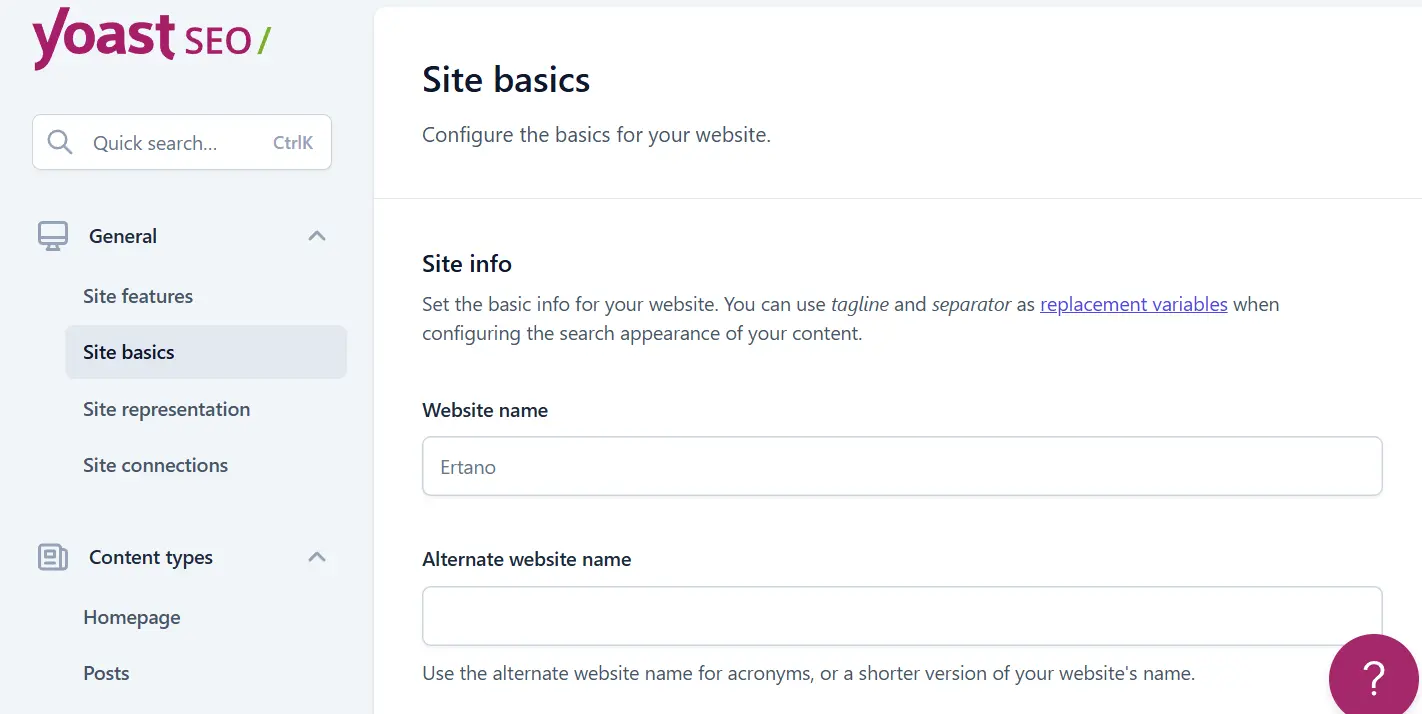
Site Name and Alternate Name
In this section, you can specify the main name of the site and an alternate name for it. The site name is your brand title used in various parts of Yoast and sometimes in search results. It is better for the site name to be accurate, clear, and consistent with your brand.
The alternate name is usually used for occasions when display space is limited or Google decides to use a shorter version of the site name. It is suggested to enter the alternate name in a simpler form, preferably in English or without special characters, so that no issues arise in different displays.
Title Separator
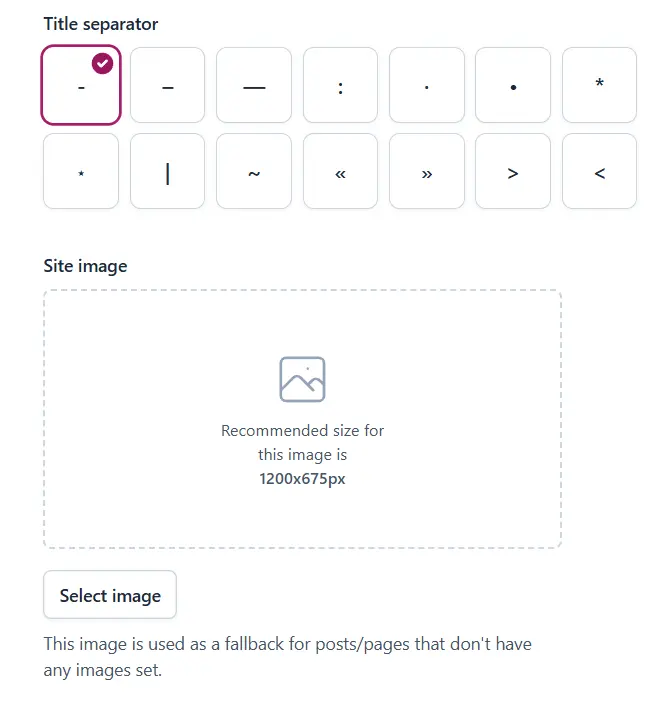
The title separator is a character that appears between the page title and the site name in search results. Choosing this separator is mostly aesthetic, but it can affect the readability of titles. Usually, using simple separators like a hyphen or a vertical bar (pipe) are appropriate choices. It is better to choose a consistent separator and keep it the same across the entire site so the title structure looks organized and professional.
Default Share Image
Yoast allows you to set a default image for sharing content on social media. This image is used when a post or page does not have a featured image or is not correctly set up for sharing. Choosing a standard image with appropriate dimensions ensures your site links look better on social media and prevents the display of inappropriate or random images. It is better for this image to be coordinated with your brand’s visual identity.
Restricting Author Access to Advanced Settings
On sites with multiple authors or content producers, it is better to restrict access to advanced SEO settings. Yoast makes it possible for only site administrators to access options like “noindex” or sensitive settings. This prevents unintentional mistakes and ensures the site’s SEO structure remains under control. In most sites, activating this restriction is considered a logical and professional decision.
Sending Usage Data to Yoast
Yoast optionally asks you for permission to send anonymous data regarding how the plugin is used. This data is usually used to improve performance and develop the plugin and has no impact on site SEO. Activating or deactivating this option is entirely up to your preference. If you wish to contribute to the improvement of Yoast, you can activate this option; otherwise, having it disabled will cause no problems for the plugin’s performance.
Overall, basic site settings in Yoast SEO help you create an organized and standard framework for your site’s SEO. If you configure this section carefully, many details will be managed automatically without the need for constant intervention.
Site Representative Settings in Yoast SEO (Personal or Organizational Site)
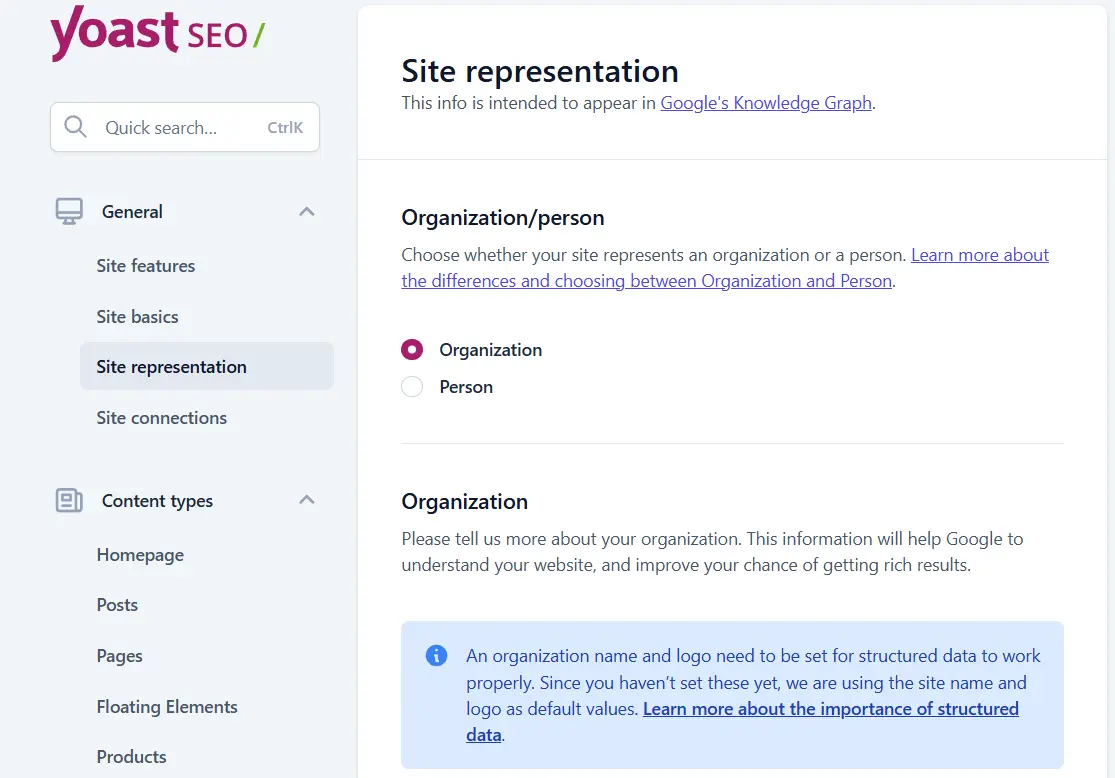
The “Site Representation” section in Yoast SEO is one of the parts that usually receives less attention, but it plays an important role in introducing the site’s identity to search engines. In this section, you specify whether your site represents a person or an organization. This information helps Yoast create more accurate structured data for the site and provide Google with a clearer picture of the owner and nature of the site.
Choosing Site Type: Person or Organization
The first step in this section is choosing the site type. If your site belongs to an individual and content is published under a personal name, choosing the “Person” option is more logical. Conversely, if the site relates to a business, brand, company, or educational group, you should select the “Organization” option. This choice is not merely an aesthetic one and directly affects the type of schema and information Yoast sends to search engines.
Entering the Brand Name
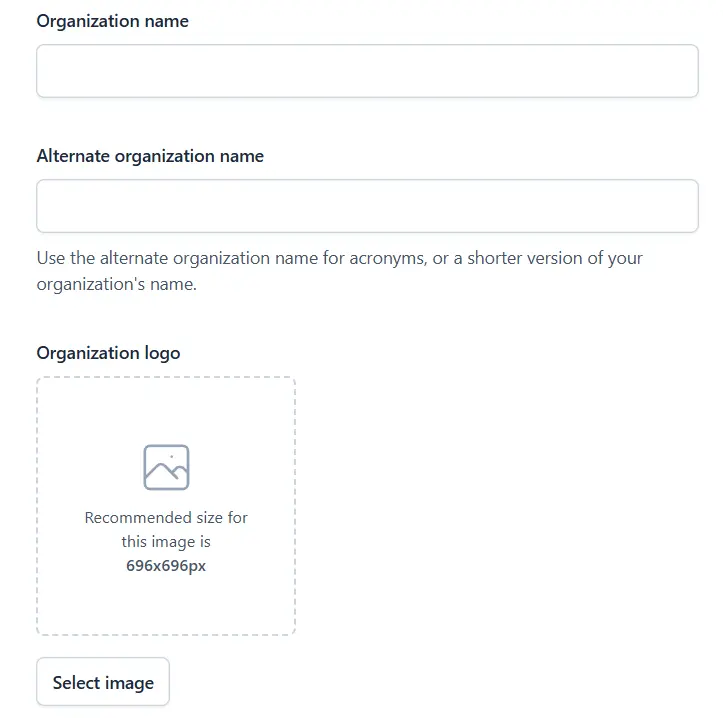
After specifying the site type, it is time to enter the brand name. This name should be exactly the name by which you want your site to be known. It is better to avoid writing long phrases or combining the brand name with extra descriptions; just enter the main brand name. This information is used in various parts of structured data and can help unify the site’s identity in search results.
Uploading a Standard Site Logo
In the site representation settings, it is possible to upload the official site logo. This logo should ideally have appropriate quality and standard dimensions so that Yoast can use it correctly in structured data. The site logo is one of the important elements of brand visual identity, and using a clear and professional image can help build trust with users and search engines. It is recommended to upload a logo that is also used as the main logo in other parts of the site.
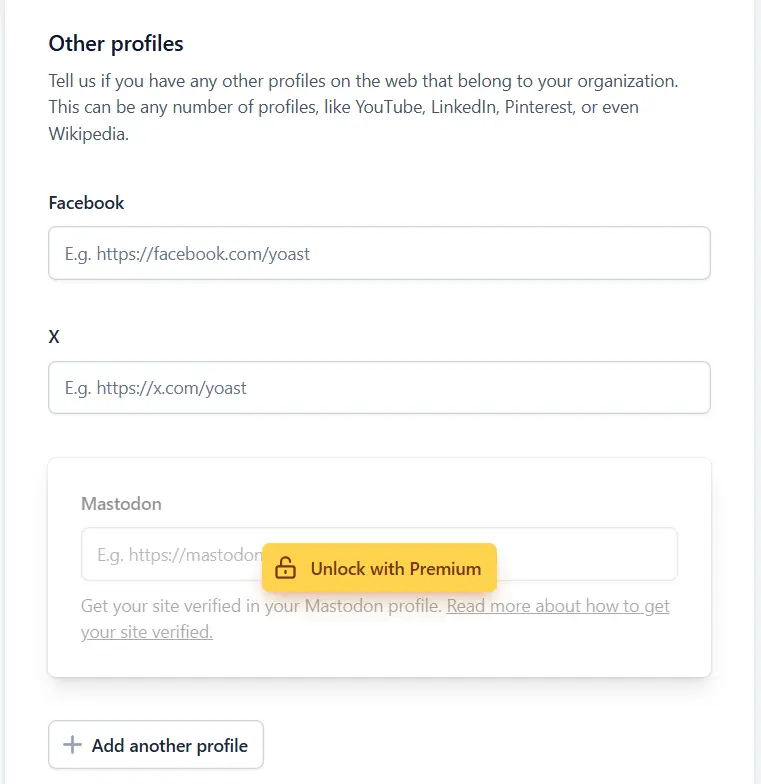
Adding Social Media
Yoast allows you to enter social media profiles associated with the site or brand in this section. By adding official social media addresses, the connection between the site and your social profiles becomes more transparent for search engines. This helps Google better distinguish which social pages belong to your brand and prevents ambiguity or errors.
Impact of These Settings on Google’s Trust in the Site
The information you enter in the site representation section is sent directly to search engines in the form of structured data. This data helps Google better understand the site owner, type of activity, and its connection to other online resources. The more accurate and consistent this information is, the more reliable the image of the site becomes.
In summary, correctly setting up the site representation section is one of the important steps in increasing the credibility and transparency of the site from Google’s perspective. Although these settings alone do not increase rankings, alongside high-quality content production and correct technical structure, they can play an effective role in strengthening search engines’ trust in your site.
Connecting the Site to Google and Webmaster Tools
After installation and initial configuration of Yoast SEO, one of the most important things to do is to connect the site to search engine webmaster tools. These tools help you check the site’s status from the search engine’s perspective and understand exactly how Google and other services perceive your site. Yoast has simplified this process, providing the ability to verify the site without the need to manipulate code.
Verifying the Site in Google Search Console
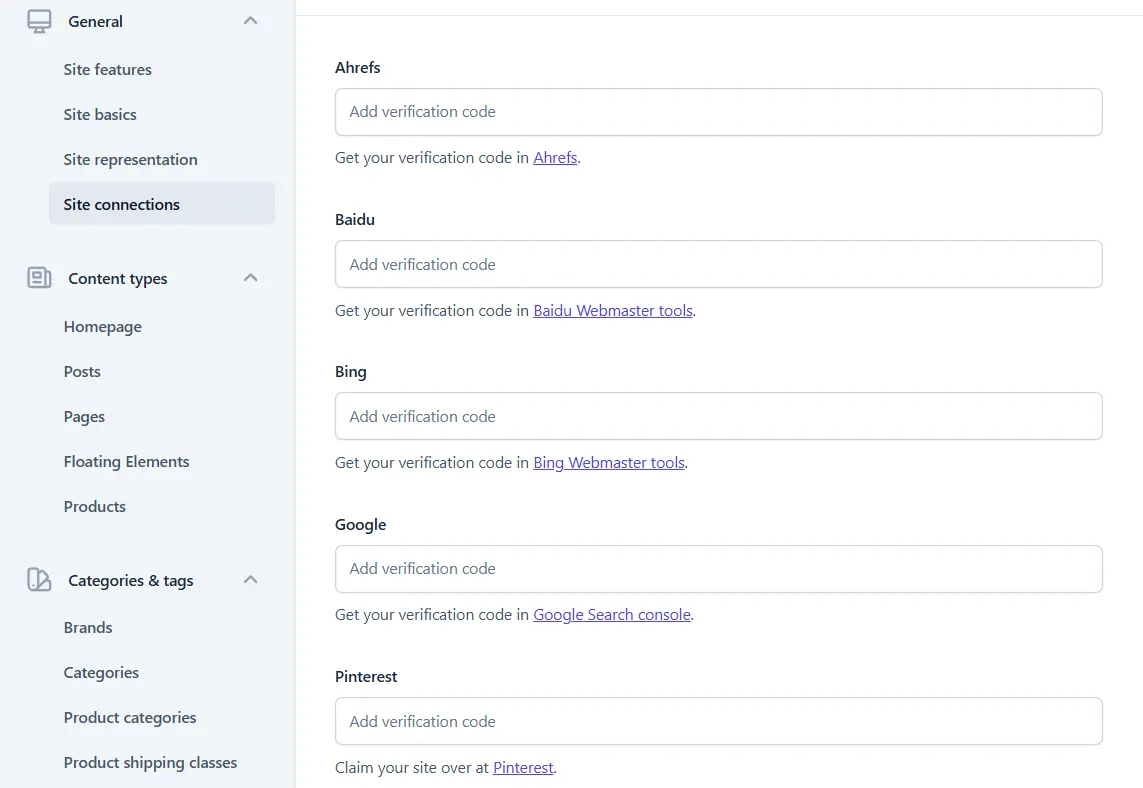
Google Search Console is the primary tool for checking a site’s SEO status on Google. Using Yoast settings, you can verify your site very easily in Search Console. Simply enter the code provided by Google into the relevant section to confirm site ownership. After doing this, Google can provide accurate information regarding page indexing, technical errors, site display status in search results, and keyword performance. This connection is considered the most fundamental step for any site serious about SEO.
Connecting the Site to Bing Webmaster Tools
Alongside Google, the Bing search engine also has its own webmaster tool. Although Bing’s market share is less than Google’s, connecting the site to this service can help improve indexing coverage and check the site’s status in Bing results. Yoast provides the ability to enter a Bing verification code and makes the site ownership confirmation process very simple. Having this connection active usually does no harm and can be considered a complementary action in SEO.
Connecting to Other Services if Needed
In addition to Google and Bing, Yoast provides the possibility of verifying the site in services like Pinterest or similar tools. These connections are more applicable to sites that have a serious presence on social media or publish visual content. If your site is not dependent on these services, not activating them causes no problems, but if needed, you can easily confirm site ownership from this same section.
Why is This Method Better than Coding?
Using Yoast to verify the site is a safer and simpler method compared to manually adding codes to the theme or site files. In this method, there is no need to edit theme files or the site header, and there is no risk of codes disappearing when updating themes or plugins. Furthermore, management of these settings is done from within the WordPress dashboard, and everything is accessible and controllable if a change or removal is needed.
Overall, connecting the site to webmaster tools through Yoast SEO allows you to both save time and manage the site’s connection with search engines with peace of mind. This stage is one of the important foundations of SEO and should ideally be done very soon after launching the site.
Search Appearance Settings in Yoast SEO
Home Page SEO Settings
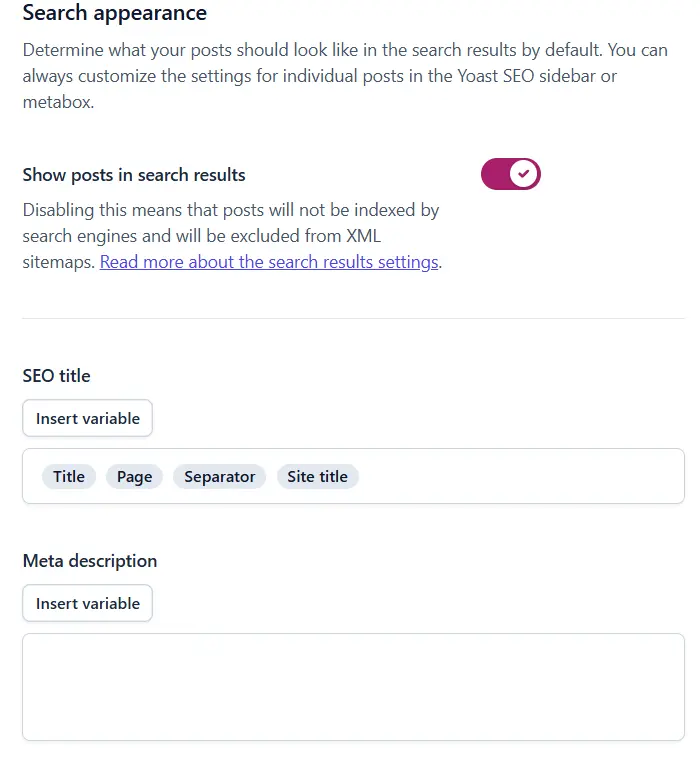
The “Search Appearance” section in Yoast SEO can be considered the most important part of this plugin’s settings because it specifies exactly what title and description your site’s pages should display in search results. Among these, settings related to the home page carry double importance, as the home page is usually the first point of contact for users and search engines with your site and plays a direct role in the initial impression of the brand and site topic.
Home Page Title
The home page title is the text displayed as your site’s headline in Google search results. This title should clearly and accurately specify the overall topic of the site while being attractive and understandable. It is better for the home page title to be a combination of the brand name and a short description of the site’s activity, without becoming overly long or crowded.
In setting this title, you must maintain balance. Excessive use of keywords not only fails to help SEO but may also produce a counterproductive result. A natural and readable title that is both understandable for the user and gives a clear message to Google is the best choice for the home page.
Home Page Meta Description
The meta description is a short summary of your site’s content displayed under the home page title in search results. This description does not directly affect the site’s rank, but it plays an important role in increasing the click-through rate (CTR). A good meta description should tell the user exactly what they will receive by entering your site and why they should click on this result.
In writing the meta description, it is better to use simple and smooth sentences and avoid the aimless repetition of keywords. If meta descriptions are not written correctly, Google might automatically display a part of the site’s content instead, which usually does not yield a desirable result.
Home Page Appearance on Social Media
Yoast SEO provides the possibility of separately configuring the appearance of the site’s home page on social media. These settings determine what title, description, and image should be displayed when the home page link is shared on networks like LinkedIn, Facebook, or other platforms.
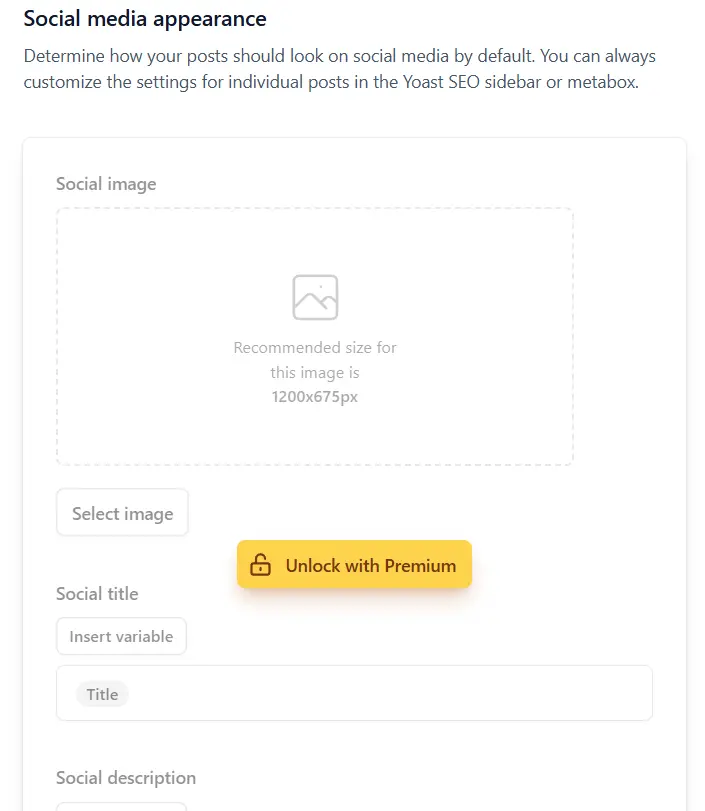
It is better to choose a title and description for the home page that is appropriate for the social media environment and upload a high-quality image related to the site’s brand. This makes your site link appear more professional and increases the likelihood of user clicks, even if your main focus is not on social media.
Correct Use of Variables in Home Page Settings
Yoast SEO uses variables to automatically construct titles and descriptions. These variables dynamically place information such as the site name or general descriptions into the SEO title. Using variables is useful when you want the title structure to be uniform and organized, but on the home page, it is better to use them with more care.
In many cases, manually setting the home page title and description yields a better result because you can convey exactly the message you intend. If you do use variables, it is better to keep their combination simple and check the search results preview before saving settings to ensure the final title is readable and logical.
Correctly configuring home page SEO in the Search Appearance section is the most basic step for building a professional image of your site in search results. If this section is done carefully, both users and search engines will have a better understanding of the nature and value of your site.
Post Settings in Yoast SEO
The post settings section in Yoast SEO specifies how your site’s articles are displayed in search results and what information is sent to Google along with them. Since on many sites posts are the primary source of attracting traffic, correctly configuring this section is of great importance and can have a direct impact on content visibility in search results.
Displaying Posts in Google Results
In post settings, the first important topic is specifying whether posts are allowed to be displayed in Google results or not. In most content sites, posts should be indexed because the main goal of producing them is to attract users from search engines. Disabling the display of posts in search results is usually only applicable in specific circumstances and is not recommended for normal sites.
It is better to ensure what your site’s content strategy is before changing this option, as disabling post indexing can lead to the loss of a large portion of the site’s organic traffic.
Post SEO Title Structure
The SEO title structure determines how the title of posts is displayed in search results. Yoast allows you to define a general template for the titles of all posts using variables. This template usually includes the post title and the site name and helps keep the title structure consistent and organized across the entire site.
In choosing a title structure, you must ensure the final title looks readable and natural. Excessive use of keywords or adding unnecessary elements to the title not only fails to help SEO but can also decrease the result’s attractiveness in the eyes of the user. A simple and understandable structure is usually the best choice.
Meta Descriptions: Default or Manual?
Yoast SEO allows you to define a default meta description for your posts, but this description is not always the best option. Meta descriptions play a crucial role in persuading users to click on a result, and each post typically has a different message and goal. For this reason, in most cases, writing a custom meta description for each individual post yields better results.
While having a default description can be useful for times when a meta description is forgotten, it should not be relied upon entirely. It is better to view the meta description as a short advertising text that must convince the user to enter your page.
Post Schema Type
In the post settings, you can specify the schema type associated with your site’s articles. Schema helps search engines better understand the page content and identify what type of content they are encountering. For most content-based sites, the “Article” schema type is an appropriate choice, transmitting basic information such as title, author, and publication date to Google.
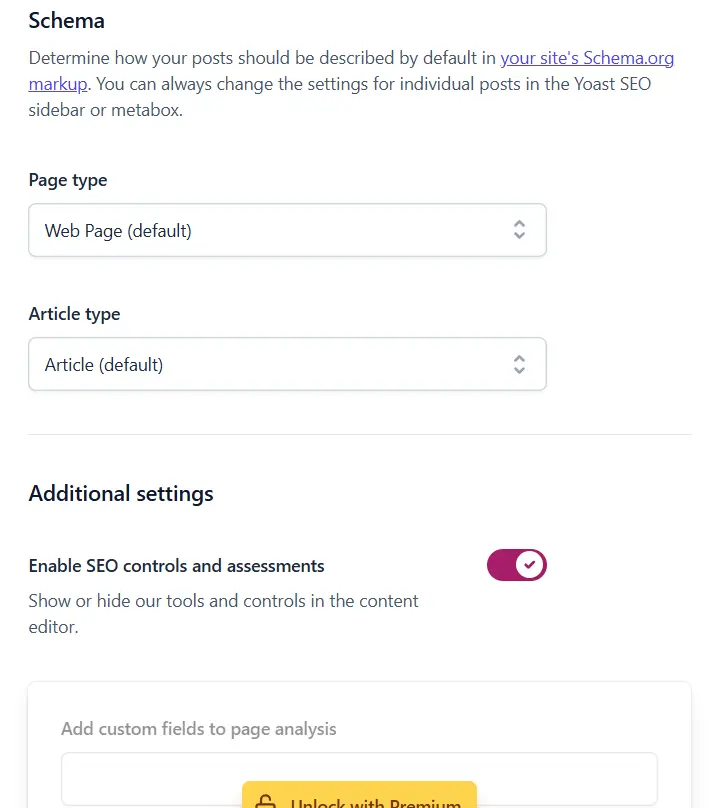
Choosing the correct schema does not increase rankings on its own, but it helps clarify the content structure and, alongside other SEO factors, can play a positive role in displaying pages better in search results. In most cases, Yoast’s default setting for post schema is completely sufficient and logical.
Overall, post settings in Yoast SEO should be configured in a way that is both understandable for search engines and improves the user experience. If this section is adjusted with care, the path for your site’s articles to be seen on Google will be much smoother.
Page Settings in Yoast SEO
Pages in WordPress are typically used to display static and important site content and play a different role compared to posts. Therefore, Page SEO settings in Yoast SEO must be approached with a different perspective. In this section, you specify which pages should be displayed in search results and what information should be sent to search engines along with them.
The SEO Difference Between Pages and Posts
In terms of technical structure, pages and posts do not differ much, but their application leads to different SEO approaches. Posts are usually published to attract traffic through content and answer user queries, while pages serve more as introductions, guides, or to complete the site’s structure. Consequently, the SEO focus in posts is on keywords and expandable content, whereas in pages, the focus is more on clarity, the page’s objective, and user experience.
Which Pages are Worth Indexing?
Not all pages necessarily need to appear in Google results. Pages that contain valuable, complete, and independent content and can provide a specific answer to a user’s need are generally suitable candidates for indexing. For example, pages such as “About Us,” “Services,” “Contact Us,” or pages introducing the site’s main products and services usually deserve a presence in search results.
In contrast, pages that are purely technical or supplementary, such as “Thank You” pages, internal policies, or temporary pages, usually do not need to be indexed. Indexing these pages can create low-value pages on the site and distract Google’s focus from more important pages. Therefore, in Yoast settings, it is better to keep only those pages active for search results that truly have a clear goal and useful content.
Appropriate Schema for Pages
Yoast SEO allows you to specify the schema type for pages so that search engines have a better understanding of the nature of these pages. The page schema is usually chosen based on the content type. For introductory or explanatory pages, the “Web Page” schema type is a common choice, conveying general page information to Google.
If a specific page has a different role, such as a contact page or a services page, selecting a schema tailored to it can help clarify the site’s structure. However, on most sites, Yoast’s default setting for page schema is completely sufficient, and there is no need for complex changes.
In summary, correctly configuring pages in Yoast SEO helps ensure that only valuable site pages are displayed in search results and makes the overall site structure clearer for search engines. This, alongside post optimization, will play an important role in improving the quality of the site’s SEO.
Managing Custom Post Types in Yoast SEO
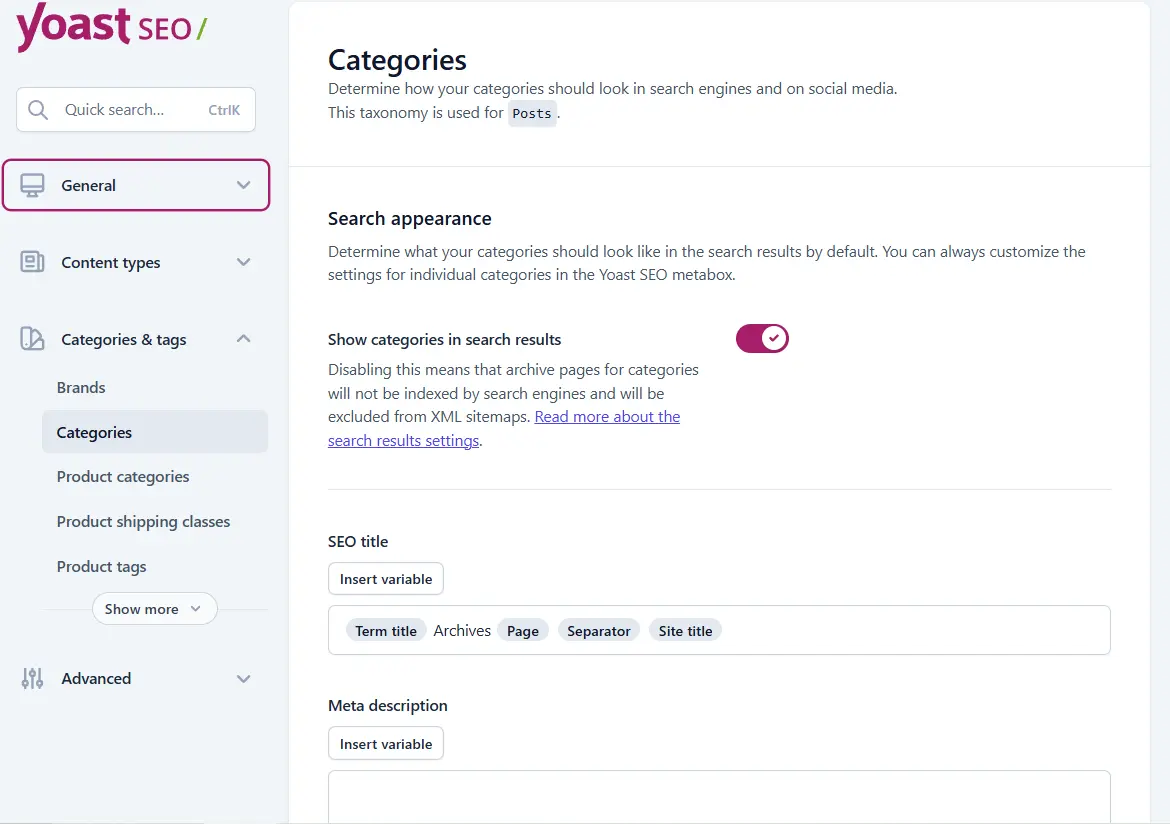
Custom post types in WordPress allow you to manage site content beyond regular posts and pages. These post types are usually created by themes or plugins, each having a specific purpose. However, the important point is that not all custom post types are suitable for display in search results. Therefore, correctly managing their indexing in Yoast SEO is of great importance.
Which Post Types Should Not Be Indexed?
Generally, post types that do not have independent and valuable content for the user should ideally not be displayed in search results. These pages usually do not provide a specific answer to a user’s search on their own and serve more as a supplementary role in the site structure. Indexing these types of pages can lead to an increase in low-value pages on the site and move Google’s focus away from main and important pages.
Common Examples of Low-Value Post Types for Indexing
One common example is the post type related to “Team Members.” These pages usually provide brief information about each individual and, except in personal or specific brand-oriented sites, do not hold independent SEO value. In most cases, displaying these pages in search results neither helps attract users nor follows a specific goal.
Post types related to “Elementor” are another example of pages that should not be indexed. These pages are typically used to build internal sections of the site and do not contain usable content for search engine users. Indexing them can clutter the site’s results in Google and create duplicate or low-quality pages.
“Portfolios” or “Case Studies” can also have different conditions depending on the site type. If each portfolio entry has a complete description, appropriate images, and a clear goal, indexing it might be logical. However, on many sites, portfolio pages have short, repetitive content and do not create high SEO value. In this case, it is better to exclude these post types from the index and keep the focus on service or project introduction pages.
Preventing the Indexing of Low-Value Pages
Yoast SEO provides the ability to easily control the indexing of any custom post type. By disabling the display of these pages in search results, you signal to Google that the site’s main focus is on more important pages. This helps the site’s crawl budget be consumed correctly and ensures valuable pages are reviewed faster and more accurately.
In summary, managing custom post types is one of the important parts of technical site SEO that is often overlooked. If this section is configured correctly, the site structure will be more organized, and the overall quality of indexed pages in search results will improve noticeably.
Settings for Categories, Brands, and Other Taxonomies in Yoast SEO
Taxonomies in WordPress play an important role in organizing content, and if managed correctly, they can have a positive impact on site SEO. Categories, tags, brands, and other similar structures help content be displayed in an organized and understandable manner for users and search engines. However, the important point here is that not all of these pages have equal value for indexing and must be configured with care.
Which Categories Should Be Displayed in Google?
Categories that have clear, targeted, and expandable content are usually suitable candidates for indexing. These types of categories typically include a collection of posts or products related to a specific topic and can serve as a reference page for that subject. If a category can answer a part of the user’s need on its own and has an appropriate description, its presence in search results is logical.
In contrast, categories that have scattered, thin, or repetitive content usually do not create high SEO value. Indexing these pages can result in low-value pages and move Google’s focus away from the site’s more important pages. Therefore, it is better to only display categories in Google that truly play a useful role in the site’s content structure.
Should We Enable Tags or Not?
Tags are usually used to link posts with finer details and serve an internal purpose on many sites. If tags are used purposefully and sparingly, with each covering specific content, they can be useful. In practice, however, tags are created without a plan on many sites, leading to duplicate or low-value pages.
For this reason, in most projects, disabling the indexing of tags is a more logical decision. This simplifies the site structure and prevents repetitive or aimless pages from entering search results. Of course, if you have a specific strategy for tags and there is sufficient content within each tag, they can be kept active in a controlled manner.
How is Product Brand SEO Handled?
On e-commerce sites, product brands are usually defined as a separate taxonomy. Brand pages can be valuable if they have a sufficient number of products and provide appropriate information about that brand. If a brand page is merely a short list of products without any specific description, indexing it usually does not create much value.
For better brand SEO, it is best for each brand page to have a custom description, appropriate textual content, and a clear structure. In this case, brand pages can act as reference pages for searches related to the brand name and attract targeted traffic.
Why is a Global Setting Not Enough, and Why Should Each Category Be Edited Separately?
Global settings in Yoast SEO only specify the basic framework, but they are not enough for effective SEO. Each category or taxonomy has a different condition and goal and must be reviewed individually. For example, one category may be worth indexing, while another within the same structure might be better off excluded from search results.
Additionally, the SEO title, meta description, and content for each category must be written according to its topic. Using default settings for all categories usually results in duplicate titles and descriptions, which negatively affects SEO. Editing each category individually helps create more targeted pages and makes the site structure appear clearer and more professional to Google.
Overall, the correct management of categories and other taxonomies is one of the important foundations of site SEO. If this section is configured carefully, both the user experience will improve and the quality of indexed pages in search results will increase.
Advanced Yoast SEO Settings
The advanced settings section in Yoast SEO is where you gain finer control over how search engines behave toward your site. This section focuses more on technical SEO, aiming to ensure Google’s resources are consumed correctly and that bots’ attention remains focused on the truly important pages of the site. If these settings are performed carefully, they can noticeably improve the overall quality of the site’s SEO without producing new content.
Crawl Optimization
Search engine bots have limited time and resources to crawl your site, which is referred to as the “Crawl Budget.” If the site includes a large number of low-value or aimless pages, a portion of this budget is wasted. In the advanced settings, Yoast SEO helps make the bots’ path through the site clearer, focusing their attention on the main pages.
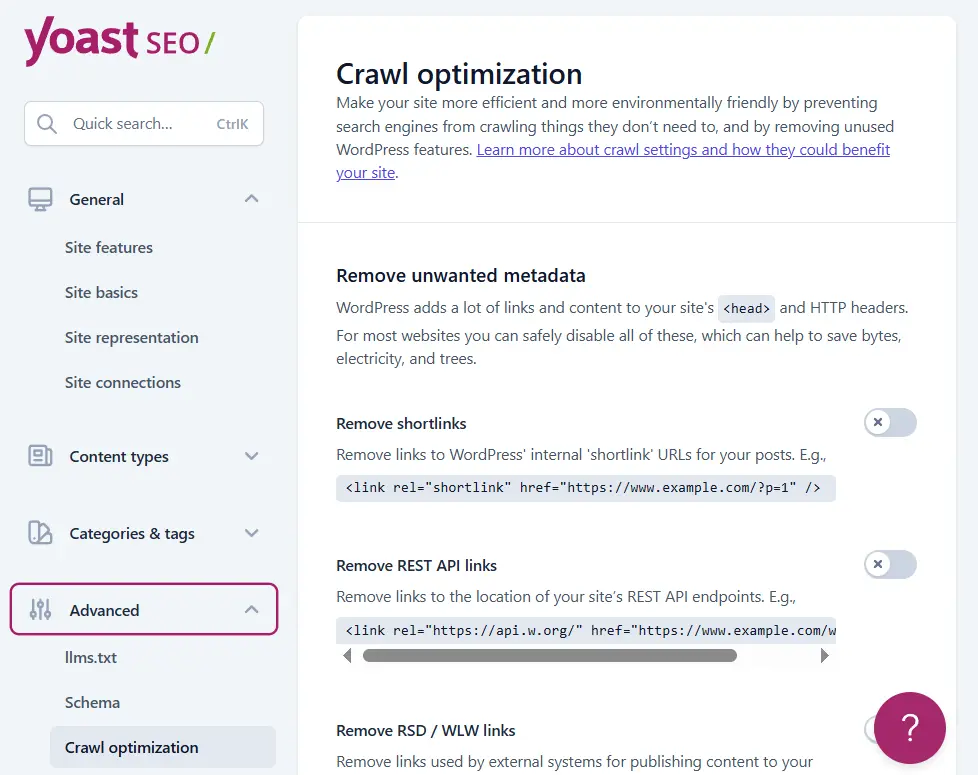
By correctly managing this section, Google can more easily distinguish which pages are more important and which sections serve merely a supplementary or technical role. This becomes increasingly important for large sites or sites that produce a lot of content.
Removing Extra and Unused URLs
On many sites, URLs are unintentionally created that have no specific content or hold low SEO value. These URLs can include unnecessary archive pages, repetitive internal links, or addresses created solely for technical reasons. Indexing these pages usually does not help site growth and can even clutter the site’s results in Google.
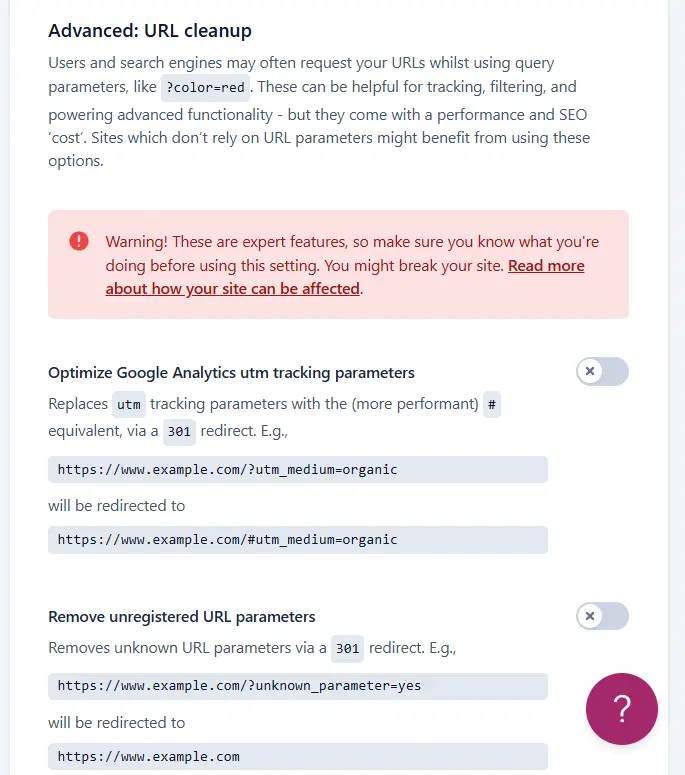
Yoast provides the ability to limit the display of these types of URLs in search results. By removing or controlling these addresses, the site structure becomes cleaner, and search engines can identify important pages more easily.
Increasing Googlebot’s Focus on Important Pages
One of the main goals of Yoast’s advanced settings is to draw Googlebots’ attention to the site’s key pages. When low-value pages are removed from the indexing path, Google spends more time reviewing important pages like main posts, service pages, or targeted categories.
This focus allows valuable pages to be crawled and indexed faster, and their changes to be applied to search results sooner. In the long run, this can lead to improved ranking stability and increase the quality of the site’s presence in search results.
Simple but Practical Security Tips
Part of Yoast’s advanced settings relates to restricting access to sensitive information. For example, preventing non-administrator users from accessing important SEO settings can prevent unintentional mistakes. This is particularly important on sites with multiple authors or managers.
Additionally, by controlling unnecessary outputs and simplifying the information sent to search engines, the risk of misuse or disruption in the site structure can be reduced. These measures may seem simple, but collectively they contribute to greater site security and stability.
Ultimately, Yoast SEO’s advanced settings are designed more for improving technical quality than for visual changes. If this section is configured with the right perspective and without excess, it can create a solid foundation for the site’s long-term SEO and smooth the path for site growth.
Archives and Preventing Duplicate Content in Yoast SEO
Archives in WordPress are automatically created to organize content, but the problem is that many of these pages display a duplicate version of the site’s posts without adding any new content or value. If these pages appear in search results without control, they can cause duplicate content issues and harm the overall quality of the site’s SEO. For this reason, archive management is considered an important part of Yoast SEO settings.
Author Archives
The author archive usually displays a list of posts published by a specific author. On sites with only one author, this archive is practically a duplication of the main blog page and creates no new SEO value. Even on multi-author sites, these pages usually lack unique content and only filter posts by the author’s name.
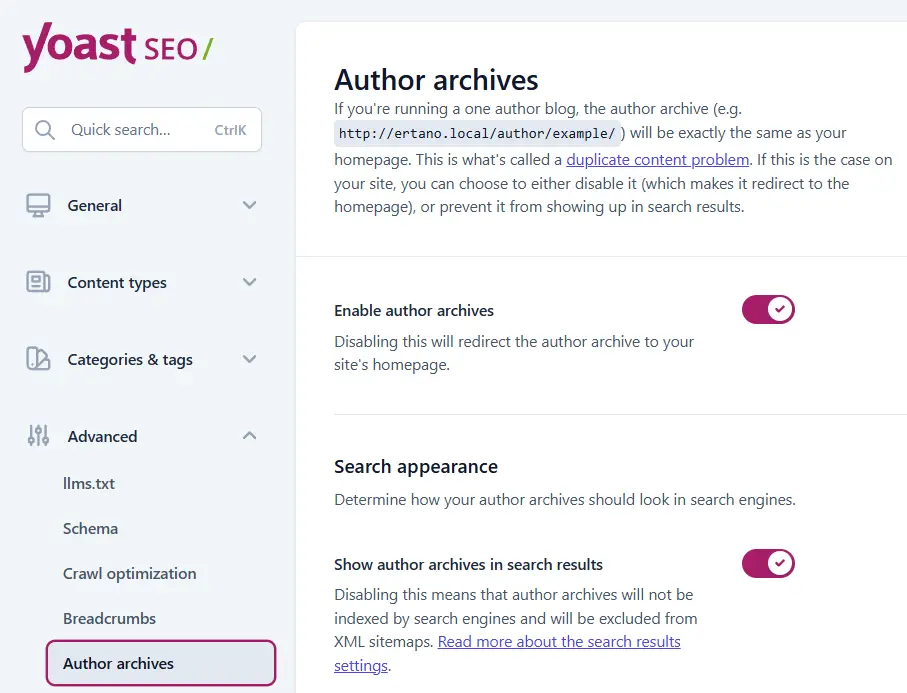
Indexing author archives on many sites leads to duplicate pages and moves Google’s focus away from more important pages. Therefore, in most projects, disabling the indexing of these types of archives is a more logical decision.
Date Archives
The date archive categorizes posts based on the day, month, or year of publication. These types of archives are more chronological in nature and usually do not create specific value for users, except in specific news or archival sites. On most sites, the date archive just shows the same posts in different formats and offers no new content.
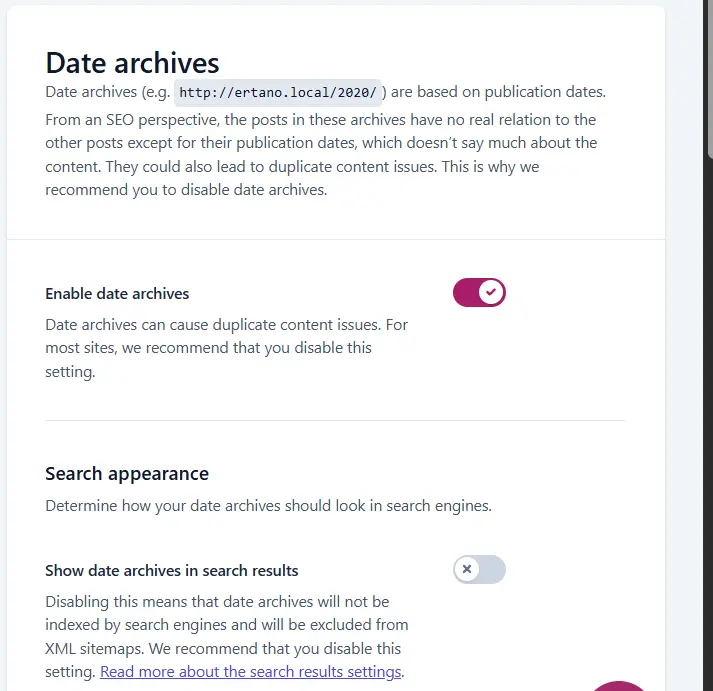
From an SEO perspective, these pages are usually one of the primary sources of duplicate content. Indexing them can create a large number of low-value URLs that serve no specific purpose and merely clutter the site structure.
Search Archives
Search archives are pages that display the results of user searches on the site. These pages are built dynamically, and their content changes depending on the search query. Since these pages are not controlled and can display endless combinations of results, indexing them usually results in aimless and duplicate URLs.
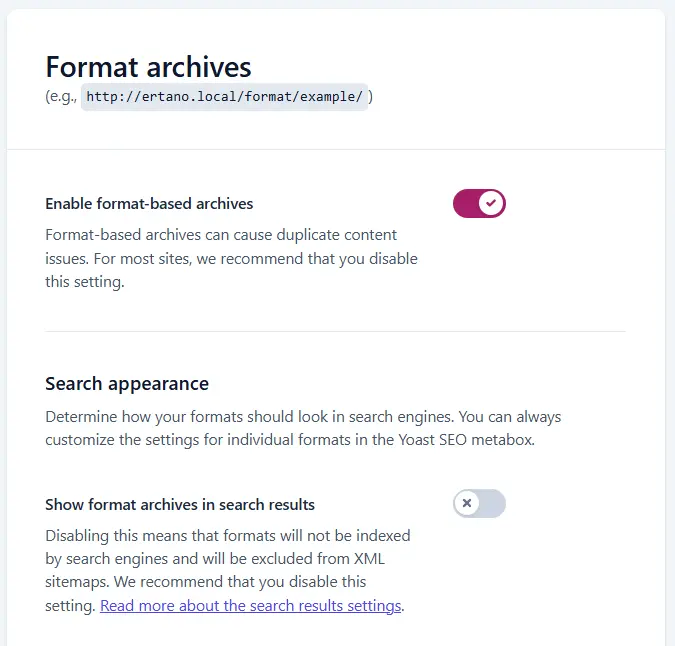
For this reason, search archives should be excluded from the index on almost all sites. These pages are useful for internal user use, but their presence in Google results adds no SEO value.
Why Do These Pages Usually Hurt SEO?
The main reason archives are damaging is that they do not produce unique content and only show a different arrangement of existing posts. When Google encounters a large number of similar pages, it becomes harder for it to distinguish the main and important page, which can lead to a decrease in the site’s indexing quality.
Furthermore, indexing archives wastes the site’s crawl budget. Googlebots spend their time and resources reviewing pages that have no real value, while more important pages may be reviewed later. Therefore, controlling and disabling the indexing of unnecessary archives is one of the important steps in improving technical site SEO and helps create a clean and targeted structure.
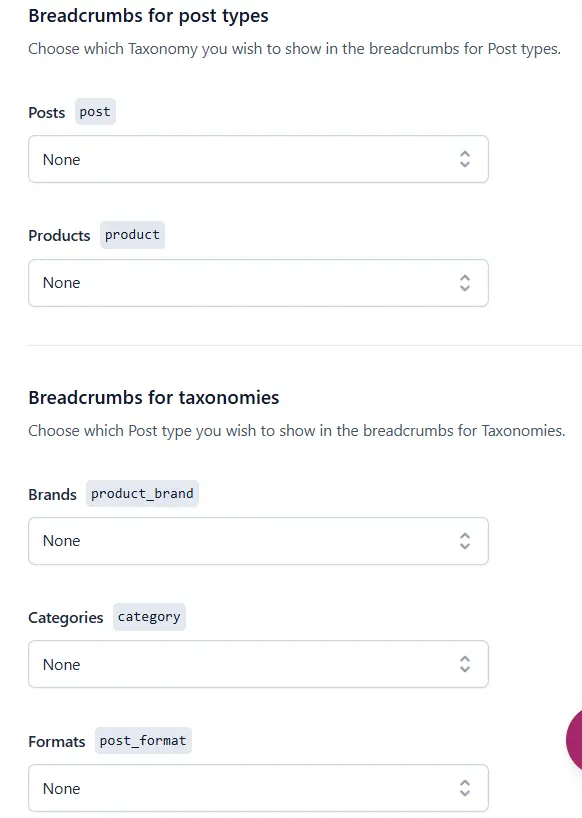
Breadcrumbs in Yoast SEO
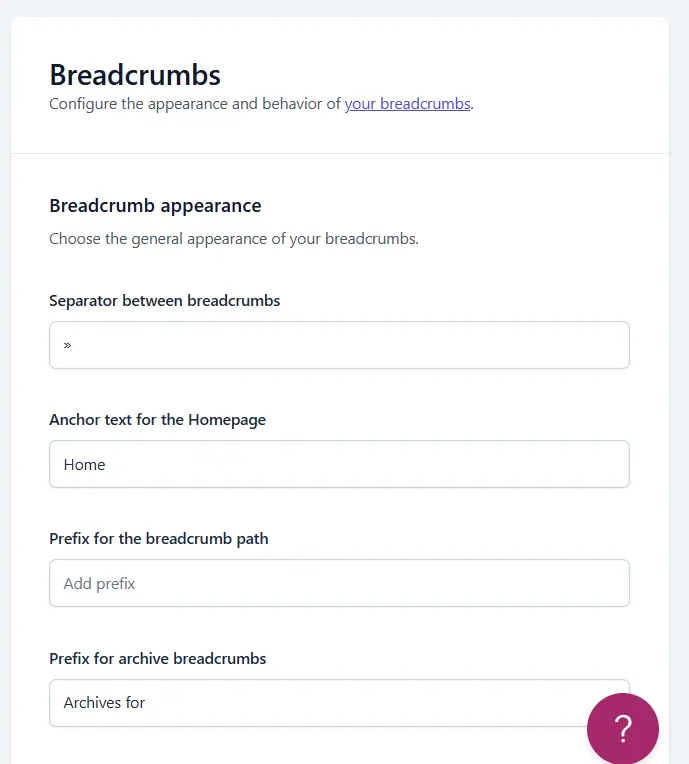
Breadcrumbs are an important element in the site’s navigation structure that serve both users and search engines. This feature is usually displayed as a text path at the top of pages and shows exactly which section of the site the user is in. Yoast SEO provides the ability to enable and manage these breadcrumbs to make the site structure clearer and more understandable.
What are Breadcrumbs?
A breadcrumb is effectively a small map of the user’s path through the site. This path usually starts from the home page and ends at the category or page where the user is currently located. The main goal of breadcrumbs is to allow the user to identify their current position in the site structure without confusion and, if necessary, return to higher-level sections.
Technically, breadcrumbs also help search engines better understand the site structure. When this path is correctly implemented, Google can more clearly distinguish the relationship between pages and better understand the content hierarchy.
Impact of Breadcrumbs on User Experience and SEO
From a user experience perspective, breadcrumbs make it easier for the user to navigate the site and not feel lost. This is especially important on sites with multi-layered structures or those that publish a lot of content. When a user can return to the previous category or section with one click, the likelihood of them staying on the site and checking more pages increases.
From an SEO perspective, breadcrumbs play an indirect but important role. This navigation path helps Google better understand the connection between pages and makes the internal site structure clearer. Additionally, Google often displays the breadcrumb instead of the URL in search results, which can make the result look cleaner and more understandable, thereby increasing the click-through rate.
When is it Logical to Use Breadcrumbs?
Using breadcrumbs is most beneficial when the site has a clear and hierarchical structure. Content, e-commerce, and educational sites that include various categories and sub-branches usually benefit most from this feature. On such sites, breadcrumbs help the user find their way faster and access related pages.
In contrast, on very simple or single-page sites, using breadcrumbs is usually not necessary and may even create visual clutter. Therefore, before enabling this feature, it is best to review the site structure and user needs.
Overall, if used correctly and in the right place, breadcrumbs can both improve user experience and help make the site structure clearer for search engines. For this reason, on many professional sites, this feature is considered part of technical SEO.
Tools and Supplementary Settings in Yoast SEO
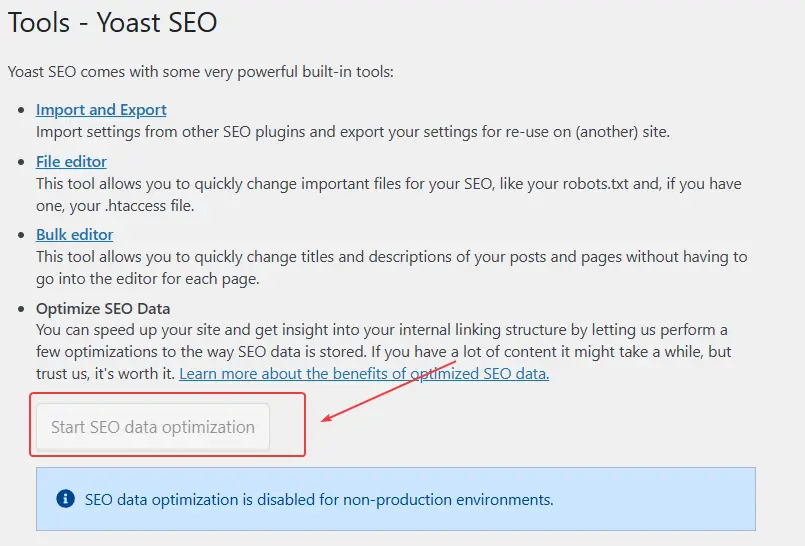
The tools and supplementary settings section in Yoast SEO is designed more for managing, transferring, and synchronizing the plugin with other parts of the site. This part usually receives less attention at first glance, but it plays an important role in situations like site migration, changing the SEO plugin, or using other tools simultaneously. A proper understanding of this section helps manage SEO settings with the fewest errors and maximum harmony.
Exporting and Importing Yoast Settings
Yoast provides the ability to save the plugin’s settings as an export file and re-import them if necessary. This feature is useful when you want to implement the settings of one site onto another or have a backup of current settings before making significant changes.
However, it should be noted that every site has its own specific conditions and structure. Directly using the settings of one site for another without review can cause SEO problems. Therefore, it is better to perform the export and import of settings carefully and review all sections again afterward.
Transferring Settings from Other SEO Plugins
If you have previously used plugins like Rank Math or All in One SEO and have decided to migrate to Yoast, this section can be helpful. Yoast allows for the transfer of basic information like titles and meta descriptions from other plugins so that this data is not lost.
Of course, automated transfer is not always complete and perfect. After transferring settings, it is best to review the site’s important pages and ensure that titles, meta descriptions, and indexing status are correctly configured. This step prevents unintentional errors in search results.
Integrating Yoast with WooCommerce and Elementor
Yoast SEO is compatible by default with many popular WordPress plugins, with WooCommerce and Elementor being among the most important. On e-commerce sites, integrating Yoast with WooCommerce ensures that products, categories, and shop pages are better optimized for search engines. Titles, meta descriptions, and structured data for products are managed more orderly, giving you more control over the shop’s SEO.
Regarding Elementor, Yoast harmonizes well with the editor environment of this page builder. This harmony ensures that the SEO settings of each page are performed easily and without conflict, and that the technical structure of the page is not affected by the visual design. This is particularly important for sites with a heavy focus on design.
Overall, Yoast SEO’s tools and supplementary settings serve more as a support role, but they can prevent serious problems during critical times. If this section is correctly understood and utilized, site SEO management will be simpler and more reliable.
Final Summary
At the conclusion of this tutorial, if we take a realistic look at Yoast SEO, it must be said that this plugin remains one of the reliable options for managing the SEO of WordPress sites. Rather than focusing on flashy features, Yoast works on order, standards, and simplicity, and this characteristic has made it a suitable choice for many sites.
All the settings mentioned in this article are the foundation and infrastructure of site SEO. But real SEO begins where you produce content. In the next article, we will head fully into a tutorial on working with Yoast while writing content, examining how to use this plugin to optimize posts without obsession or excess.
If you have followed this tutorial this far, it means you have started the path correctly. From now on, your focus should be on content quality and conscious decisions; Yoast is only meant to make this path clearer for you. Be happy and successful. 🙂
Ahura WordPress Theme
The Power to Change EverythingElementor Page Builder
The most powerful WordPress page builder with 100+ exclusive custom elements.
Incredible Performance
With Ahura’s smart modular loading technology, files load only when they are truly needed.
SEO Optimized for Google
Every line of code is carefully aligned with Google’s algorithms and best practices.

To post a comment, please register or log in first.