
 Tutorials


 Ahura
Ahura Plugins

 Blog
BlogWhere Are WordPress Pages and Posts Stored?
- Tutorials
- Updated on

When you install WordPress and the setup is done, the first thing you come face to face with is the WordPress dashboard. It’s a busy environment with tons of different sections and menus, each doing its own thing. Within this dashboard, there are two very important sections that are actually the heart of your site’s content: “Posts” and “Pages.”
Now, a question that comes up for a lot of people is: all these articles and pages we create on the site — where do they end up being stored? In this article, we’re first going to get familiar with posts and pages and the difference between them, and then, step by step, we’ll go see exactly where on the site they’re stored. So stick with us to the end.
Table of Contents
What Are Posts in WordPress?
In the WordPress dashboard, you have a menu called “Posts.” Posts are the content that gets published on the site in an orderly, sequential manner and is shown to users. For example, this very article you’re reading, or news items and blog content — they all count as posts.
The truth is, most of the content you see on a WordPress site is published in the form of these posts. Writers usually write and publish the site’s everyday, up-to-date content from this very section.
What Are Pages in WordPress?
You might think to yourself that “pages” simply means the site’s pages, but that’s not the case. Pages are another type of content for WordPress sites that have one important difference from posts: pages have no categories at all, and they weren’t built for publishing daily content.
We usually turn to pages when we want to create fixed, static content — content we’re not going to keep updating. Take the “Contact Us” and “About Us” pages, for example. These kinds of pages are exactly what pages were built for.
The Difference Between Posts and Pages in WordPress
Now let’s get a little more technical and go into more detail about the difference between pages and posts, since each has its own characteristics.
Dynamic Pages (Posts)
Since the number of posts on a site is usually very high, if we don’t come up with a plan for them, everything gets messy. That’s exactly why we use categories and tags. This way, pieces that are related to each other end up side by side, and the user doesn’t get lost among all this content.
A few of the important characteristics of posts are these:
- They’re editable: you can go to them whenever you want and edit them at short intervals.
- They display the author’s name: at the end of each post, the author’s name plus a short blurb introducing them is shown.
- They have a comments section: users can write their comment or question under the piece, and the admin or author can reply to them.
- They have dates: the publication date and the last update of the piece are also visible to the user.
- To create a new post, all you have to do is click the “Add Post” option from the WordPress menu.

Static Pages (Pages)
Pages, or static pages, are pages that either don’t get edited at all or that we touch very rarely. A few of their main differences from posts are:

- Unlike posts, they don’t have a comments or discussion section.
- The author’s name isn’t included in them.
- Categories and tags have no meaning for them.
- They have no time constraints, and the publication date isn’t shown either.
Since pages don’t need constant changes, they’re mostly used for pages like “Contact Us,” “About Us,” forms for collecting user information, and landing pages. A nice advantage of pages is that you can apply your own preferred template to them and build pages with the design you have in mind.
Where Are Pages and Posts Stored?
Alright, now we’ve reached the main part — the very thing you were after. To find out where the data for posts and pages is kept, we need to head to the site’s database. It makes no difference at all whether your hosting uses cPanel or DirectAdmin; in both cases, all you have to do is enter phpMyAdmin from your hosting control panel.
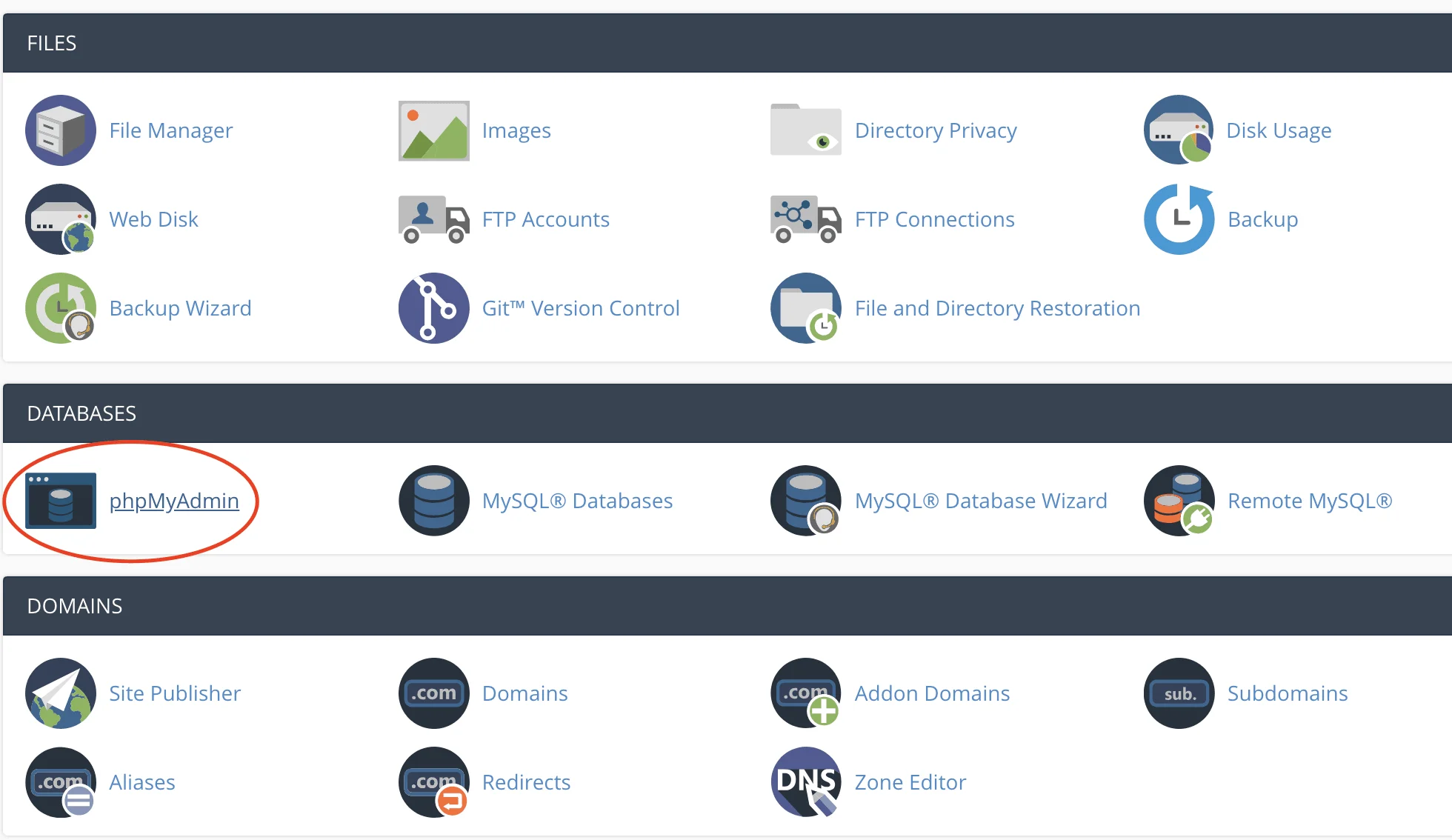
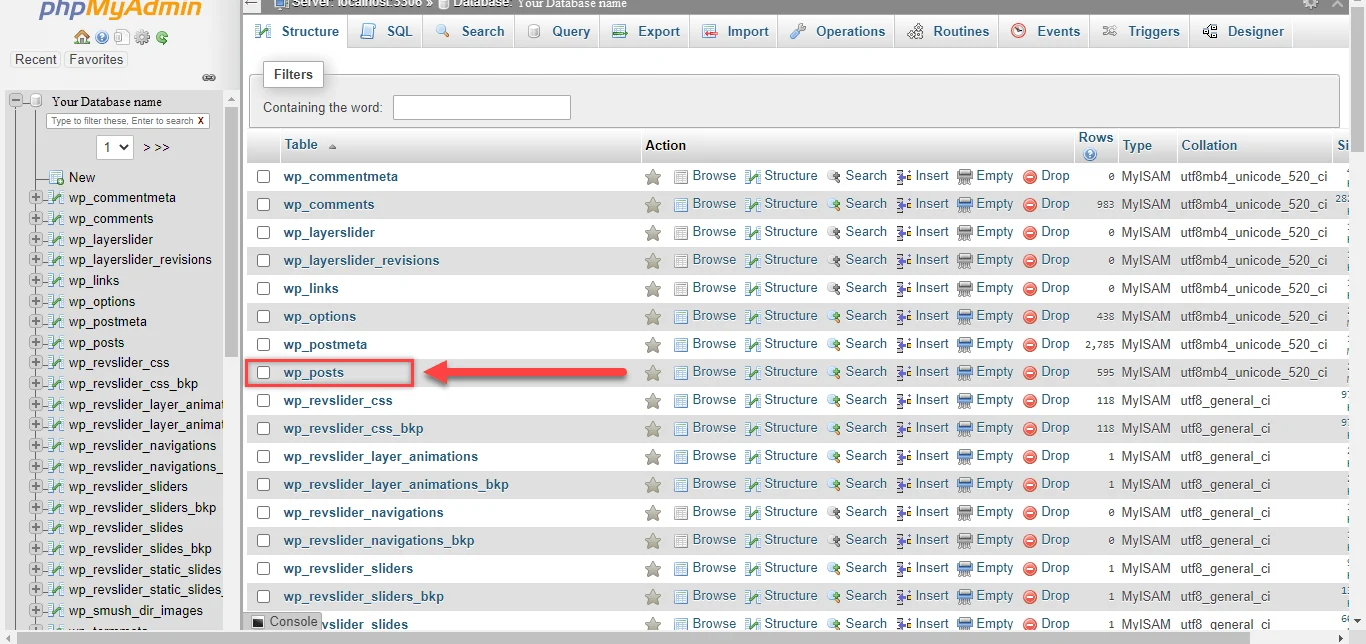
Let me tell you one thing right up front to make this easier: all of your site’s pages and posts, all together, are stored in a single table called wp_posts.
Accessing the Database on cPanel Hosting
After you’ve entered phpMyAdmin, select the name of your site’s database from the left side of the screen. As soon as you select it, a list of your site’s tables opens up for you. In this list, look for the wp_posts table; all your posts and pages are stored there.
Accessing the Database on DirectAdmin Hosting
If your hosting uses DirectAdmin, don’t worry at all, because the process is no different. Again, you enter phpMyAdmin from the hosting control panel, select the site’s database, and head to that same wp_posts table.
Storage in Local Simulators Like XAMPP
Maybe instead of hosting, you use server simulator software like XAMPP. There, the story is exactly the same and there’s no difference. All you have to do is enter the phpMyAdmin section, select your site’s database, and head to the wp_posts table. As I said, posts and pages are stored right here.
Conclusion
Well, as you saw, even though posts (dynamic pages) and pages (static pages) differ from each other quite a bit, in the end both of them are stored in a shared place — namely, that same wp_posts table in the WordPress database. Once you understand this structure, managing and optimizing your site becomes much easier too.

Ahura WordPress Theme
The Power to Change EverythingElementor Page Builder
The most powerful WordPress page builder with 100+ exclusive custom elements.
Incredible Performance
With Ahura’s smart modular loading technology, files load only when they are truly needed.
SEO Optimized for Google
Every line of code is carefully aligned with Google’s algorithms and best practices.

To post a comment, please register or log in first.