
 Tutorials


 Ahura
Ahura Plugins

 Blog
Blog10 Ways to Speed Up Your WordPress Site, NASA X-43 Style

It’s probably happened to all of us: we click a site’s link, and because it’s slow to open, we give up and go to another one. It’s surely happened. Now imagine this same thing is happening to your site and you have no idea. Site speed is exactly the thing many of us overlook during design and SEO, even though it directly affects your Google ranking, traffic, user satisfaction, and even your sales.
The good news is that speeding up a site isn’t nearly as complicated as you might think. In this article, we’ll first look at what the standard speed even is and which tools you can test your site with, and then we’ll get to 10 practical techniques that let you turn your WordPress site into one of the fastest out there. So let’s get started.
Table of Contents
The Importance of Site Speed
Site speed is one of those factors many people underestimate, yet it directly affects a site’s success or failure. The faster your site loads, the more Google favors it and the higher your ranking climbs. The result is more traffic, more satisfied users, and ultimately higher sales and conversion rates.
Now imagine you’ve designed a wonderfully beautiful, professional site, but it moves like a turtle when it’s loading. Do you know what happens? Nothing. The user won’t wait. Most people aren’t willing to hang around for a few extra seconds; they close the site and head to your competitor. In other words, all your hard work goes up in smoke over a delay of a few seconds.
A Speed Lesson from the NASA X-43
Here’s something interesting for you. NASA built an unmanned hypersonic aircraft called the X-43, one of the fastest vehicles humankind has ever made. The story of your site is exactly the same; it needs to be one of the fastest sites a webmaster has ever built.
Look, right now, while many of your competitors are spending their time on Instagram and side distractions, you can pull ahead by focusing on the site itself. Let’s turn your site into your very own NASA X-43.
Standard Site Load Speed
Let me give you some numbers here so you get a sense of where you stand. With the advancement of optimization methods, the global standard for a site to load is now somewhere between 1 and 3 seconds.
If your site loads in 3 to 7 seconds, you could say you’re still in an acceptable range, but you’re gradually losing traffic. But if it goes past 10 seconds, you need to take serious action, because you’re driving users away and a whole lot of problems will crop up in your path.
Speed Testing Tools
Before we get to the solutions, you need to know where your site’s weak point is. Fortunately, there are good tools that show you the problems in fine detail. I’ll introduce four of the best.
GTmetrix

This is one of the most popular. Its job is to analyze your site and lay out the errors in detail. Its reports are built on Google Lighthouse, which is the current standard for measuring speed. In the newer report, instead of the old scores, you’ll see three main indicators: the overall grade (GTmetrix Grade), the Performance score, and the Structure score. Alongside them, it shows you the Core Web Vitals metrics, which are exactly what Google cares about for ranking. The Waterfall chart, the page-load video, and the test history are all there too. Another nice thing is that after signing up, you can choose the server location and test device type and compare the results side by side.
Website Speed Test

With this tool, you can get a complete picture of your site’s performance. What’s interesting is that it checks your site from 14 different countries. Its report includes both chart-based analysis and a preview of the site, so you quickly get a sense of the load time and page sizes.
Google PageSpeed Insights

This one is provided by Google itself. It examines your site’s speed and gives you solutions too. This tool scores your site from 1 to 100, and the higher that number, the better your site performs. Its big advantage is that it gives the report for both the mobile and desktop versions, and it helps you optimize images and CSS files.
Pingdom

This one also gives you very good information about your site’s condition and is especially great for finding heavy pages and broken links. Its report has four parts: an overall review of the template, a performance grade, a page analysis, and the site’s history.
The nice thing about it is that it checks your site’s speed from four main points around the world: Dallas (Texas, USA), Melbourne (Australia), San Jose (California, USA), and Stockholm (Sweden). It also gives you suggestions for improving performance, such as reviewing HTTP requests, URL redirects, and DNS lookups.
10 Techniques to Speed Up Your Site
Alright, so far you’ve learned why speed matters and how to test it. Now let’s get to the part that’s the heart of the matter. If you implement these 10 techniques, your site will genuinely move up a level.
Choosing the Right Hosting and Domain
This is the first step and perhaps the most important. Many webmasters go for shared or cheap hosting without a second thought, and that very carelessness can easily bring their site to its knees.
Look, shared hosting means sharing CPU, RAM, and disk space with a whole lot of other sites. That’s exactly what makes it so you can’t count on speed. So before buying, be sure to evaluate the quality of the provider’s service and support, and steer clear of free or dirt-cheap hosting and domains. If you can, go for dedicated hosting where the space is yours alone. With this one right decision, you can get ahead of many of your competitors.
Optimizing Your Site’s Images
Images are one of the main components of any site and have a huge effect on load speed. A high-quality image is good for SEO and boosts views and clicks, but be careful; bulky images both take up your hosting space and drag your speed down.
The solution is to use low-size but high-quality images. For compression, you can get help from sites like tinyjpg.com, Compressor.io, Image Optimizer, and compressjpeg.com.
Using a Lazy Load Plugin
I really like this one because its effect is immediate. Lazy Load makes it so that when a user enters your site, only the images within their browser’s viewport load. Then, as they scroll further down, the next images come up in sequence. In other words, the browser isn’t forced to load all the images at once, and this significantly boosts speed.
Optimizing or Replacing Your Site’s Template
One important cause of speed loss is the site’s template and theme itself. Many people use old, default, or pre-built templates, and that’s exactly what eats up speed. If you use these templates, be sure to optimize and update them with the help of a specialist; otherwise, it’s better to replace them entirely.
Let me mention one more thing: many of these templates come with a bunch of non-functional plugins. Don’t let any plugin you’re not using slide; delete it.
Removing Unnecessary, Non-Functional Sections
On many sites there’s a set of scripts that really serve no purpose; things like social media boxes, polls, and the like. These only weigh the site down. The best way to identify them is that same Pingdom I mentioned earlier. Use it to find these extra sections and delete them mercilessly.
Using a CDN (Content Delivery Network)
A CDN, or Content Delivery Network, is a network of multiple servers that makes accessing information easier for users. These servers, known as Edge Servers or Cache Servers, are distributed across various points on the globe. So any site that uses a CDN effectively delivers its content from the server nearest to the user.
Among the best international options, I can point to Cloudflare, Amazon CloudFront, NetDNA MaxCDN, and Incapsula.
Developing the Mobile Version of Your Site
Today, almost everyone browses on mobile, and the desktop version has become far less prominent. That’s why you need a site that loads fast on mobile, even faster than on desktop. Take this seriously, because a large part of your traffic comes from here.
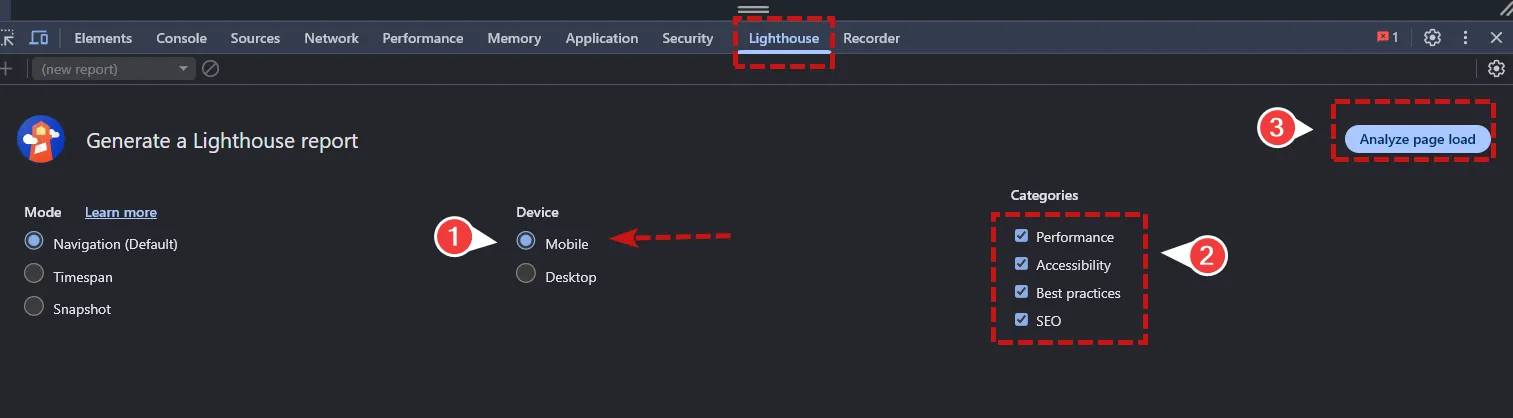
An important note: Google retired the old Mobile-Friendly Test tool in December 2023, and it’s no longer available. The best way now to check your site’s mobile compatibility is to use Google Lighthouse, or the mobile tab of the PageSpeed Insights tool.

Just enter your site’s address and click the mobile tab; there it also checks things like font size, spacing between buttons, and the absence of horizontal scrolling. Lighthouse is also built into the Chrome browser’s developer tools, and you can use it directly from there.
Enabling Browser Caching
When a user enters your site, a set of elements like images, video, and text is stored on their hard drive. The first time, these have to be downloaded, but if you’ve enabled caching, the next time the user comes back, they no longer need to load again, and this boosts speed.
To enable it, you can either make a few simple changes in the code or use a plugin. In WordPress, the W3 Total Cache, WP Super Cache, and LiteSpeed Cache plugins get the job done. If you work with Drupal, use Varnish Cache, and in Joomla you can configure it via System > Global Configuration and the Cache Settings section.
Hosting Video Files on Other Services
If you have video or podcasts on your site, a mistake you shouldn’t make is uploading them directly to your own hosting; this really drags your speed down. Instead, put the videos on YouTube or Vimeo, or a dedicated video-hosting service, and then link to them. This one small change makes a big difference.
Reducing the Number of CSS and JavaScript Files
If your site has a whole bunch of CSS and JavaScript files, then every time a user wants to access a section, the browser is forced to exchange a lot of separate HTTP requests, and that slows the site down.
The solution is to reduce the number of these files and minify them. There are good tools for this, like WillPeavy, Script Minifier, and Grunt, which compress your HTML, CSS, and JavaScript files for you.
Why Should We Know How to Do This?
Look, competition between businesses has gotten really serious, and a whole lot of new sites come online every day. In these conditions, a site that has its SEO factors right, has good speed, and has user-friendly content can truly raise its owner’s income. In other words, these aren’t a cost, they’re an investment.
Conclusion
Honestly, there are far more speed-boosting techniques than these 10, but the ones I’ve mentioned are the most important, and if you implement just these correctly, you’ll get very close to an ideal site. So get to work and turn your site into your very own NASA X-43. Wishing you all the best. 🙂

Ahura WordPress Theme
The Power to Change EverythingElementor Page Builder
The most powerful WordPress page builder with 100+ exclusive custom elements.
Incredible Performance
With Ahura’s smart modular loading technology, files load only when they are truly needed.
SEO Optimized for Google
Every line of code is carefully aligned with Google’s algorithms and best practices.

To post a comment, please register or log in first.