
 Tutorials


 Ahura
Ahura Plugins

 Blog
BlogHow Many Characters Should an SEO Meta Description Be?

The last time you searched for something on Google, what made you click on one specific link instead of the others? Very often, the answer is those few short lines of text you see under the blue title of each result—the thing we call the meta description.
Now the main question is: how many characters should a meta description have for SEO so that it’s both fully visible and able to attract the maximum number of clicks?
Honestly, this is one of those questions where the internet is full of contradictory answers. One source says 160 characters, another says 320, and some even claim it doesn’t matter at all. So which one is correct? If you’ve previously written long descriptions, should you be worried? Is Google really that strict about character count?
In this article, I’m going to answer all of these questions clearly. We’ll review the history behind this issue (and why the numbers have changed so much), look at what Google actually wants in 2026, and in the end, I’ll give you a safe and reliable number so you can feel confident. So let’s dive in.
Table of Contents
What Is a Meta Description and Where Is It Seen?
Let’s define it very simply first. A meta description is the short summary text that appears in Google search results, right below the blue title of each page. It’s usually one or two lines long, and its job is to give users a preview—so before they click, they understand what the page is about and whether they’ll find the answer to their question there.
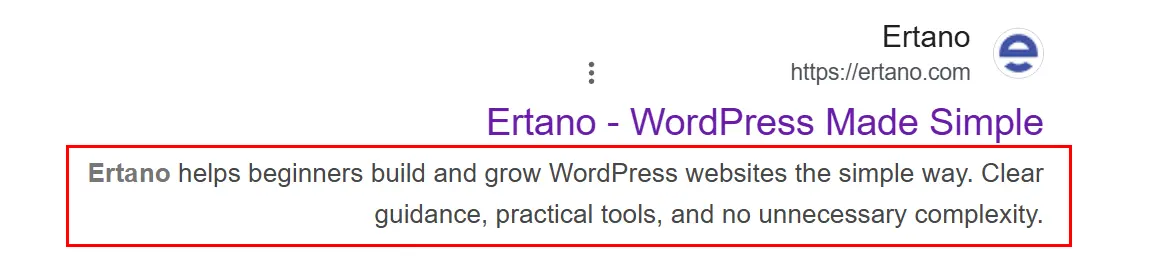
The next time you search for something on Google, take a moment to notice: under each link, there’s a short piece of text. That’s exactly the meta description. You can think of it as a small “advertising teaser” for your page—a few words that should convince users, among dozens of results, to click on yours.
But there’s an important point you should know right away: the text you see under the link isn’t always what the site owner wrote! Sometimes Google shows your exact meta description, but other times it pulls a snippet from the page content and displays that instead. This is one of the most important points we’ll explore later, because the key to understanding the whole issue of “meta description length” lies here.
So for now, remember this: a meta description is a golden opportunity for you to decide what users see before entering your site—provided you write it well enough that Google prefers to show it. Now let’s see what impact this description actually has on your SEO.
Does the Meta Description Affect SEO?
This is a question that confuses many people, and the answer is an interesting “yes and no.” Let me explain it clearly and without exaggeration, because this is where many Persian articles get it wrong.
Direct impact? No. Google has repeatedly and explicitly confirmed that the meta description is not a direct ranking factor. That means no matter how beautifully you write your meta description, Google won’t move you up several positions just because of that text. John Mueller (Google’s Search Advocate) has clearly stated that meta descriptions are essentially used to build the search result snippet—not for ranking. So if someone tells you, “Write meta descriptions to boost your rankings,” that’s not accurate.
Indirect impact? Yes—and this is where it gets interesting. While the text itself doesn’t directly influence rankings, there’s an indirect chain: an engaging and relevant meta description encourages more users to click on your link. This is called increasing your click-through rate, or CTR.
Now, how does CTR relate to rankings? Here’s where we need to be honest and mention an important nuance that’s often oversimplified: this topic is somewhat debated. On one hand, Google representatives (like Matt Cutts, Gary Illyes, and John Mueller) have repeatedly said that CTR is not a direct ranking factor, because click data can be “noisy” and easily manipulated. On the other hand, more recent evidence (such as leaked portions of Google’s internal documents and testimony from one of its senior engineers in court) suggests that Google has a system called NavBoost that uses user click data as a kind of “ranking adjustment layer.”
So the fair conclusion is this: we can’t say with certainty that “higher CTR = better rankings,” but evidence suggests that user click behavior can indirectly influence your position. And even if we assume it has no effect on rankings, one simple fact remains: higher CTR means more traffic. If you’re in third place but your meta description is so compelling that more users click on you instead of the first and second results, you win—whether Google factors that into rankings or not.
So the takeaway from this section is: don’t write meta descriptions because they’re a “ranking factor” (they’re not); write them because they’re your best free opportunity to persuade users to click. And that benefits you, directly or indirectly. Now that we understand why they matter, let’s move on to the issue of length and why you hear so many conflicting numbers about it.
The History of Meta Description Length: From 160 to 320 and Back
To understand why there’s no fixed number today, we need to look back and see the ups and downs of this story. It’s short—but it’s the key to understanding the whole issue.
Chapter One: The Stable Era (Until 2017). Until 2017, almost all SEO professionals agreed on one number: 160 characters. Google typically displayed about this much, and anything longer would be cut off with an ellipsis (“…”). It was simple and predictable—you wrote your description within 160 characters and felt confident.
Chapter Two: The Expansion to 320 (December 2017). Suddenly, without prior notice, Google nearly doubled the display length to around 320 characters. Content creators were thrilled! Now they could write more detailed descriptions and provide more information to users. Many sites quickly updated all their meta descriptions to take advantage of the new space.
Chapter Three: The Rollback (May 2018). But the celebration didn’t last long. About five months later, Google quietly reduced the length again, returning it to around 155–160 characters. All those sites that had invested effort into writing 320-character descriptions suddenly saw half their text no longer displayed. (Don’t worry—we’ll explain later what to do if you’re in that group.)
Here’s the interesting and important part: Google officially announced none of these changes—not the increase to 320, nor the return to 160. All these numbers came from experiments and careful observation by SEO specialists who measured thousands of search results. There’s a big lesson here: Google doesn’t treat these numbers as a fixed “rule.” Instead, it constantly experiments and prefers to dynamically adjust description length based on conditions—not according to a single magic number. And this “dynamic adjustment” brings us to today’s situation.
The 2026 Situation: Why There Is No Fixed Number Anymore
Now we’ve reached the most important truth of this article, and I’ll say it plainly: in 2026, there is no fixed or magical number for meta description length. Yes, you read that right. You can no longer say with certainty, “A meta description must be exactly 160 characters” or “320 is best.” Anyone giving you a definitive number is oversimplifying.
Why? Because Google no longer uses a fixed ruler. It has become smart enough to decide individually for each search how much of the description to display. This decision depends on several factors:
- User device. On mobile, where the screen is smaller, Google usually shows shorter descriptions (around 120–130 characters). On desktop, where there’s more space, it may display up to about 150–160 characters.
- The user’s search query. If the phrase the user searched for appears directly in your meta description, Google is more likely to display your exact text (and even bold that phrase to draw attention).
- The page content itself. If your meta description is too short—or if you haven’t written one at all—Google will step in and pull a snippet from your page content instead. That snippet can be any length and may not be what you would have preferred.
To give you a quick overall view, take a look at the following table:
| Display Location | Approximate Display Range |
|---|---|
| Mobile | About 120–130 characters |
| Desktop | About 150–160 characters |
| Safe mode (both) | Below 120–150 characters |
An important clarification: these numbers are “display limits,” not “writing limits.” That means you’re free to write longer text, but you should know that Google might not show the ending. So always put your most important points first. Now, with this information, let’s get to everyone’s main question: “So, how many characters should I actually write?”
So, How Many Characters Should We Write? (Practical Recommendation)
I know that after all this talk about “there’s no fixed number,” you probably want to say, “Alright, but just give me a number so I can get to work!” And you’re right. So let’s get straight to the point.
Despite all these complexities, SEO experts—after lots of testing—have reached a practical conclusion: if you want to write a safe and effective meta description that displays well on most devices and for most searches, the 150 to 160 character range is still the best option.
Why this number? Because it strikes a good balance: it’s long enough to include your main message and keyword, yet short enough to be fully visible on desktop. If you want to be even more cautious and feel completely safe on mobile as well, keep your description between 120 and 150 characters; this way, it will almost always display in full.
But—and this is the most important sentence in this section—the quality of the text matters far more than the character count. An engaging, click-worthy 120-character description performs a hundred times better than a dry, repetitive 160-character one. So instead of obsessively counting characters, focus your energy on how compelling your text is and how much it tempts users to click.
A simple rule to always remember: first write an engaging, natural description that truly reflects your page’s value, then check whether it falls within the safe range. Not the other way around. Quality first, counting second.
I’ve Previously Written 320-Character Descriptions—What Should I Do?
This is a great question and probably applies to many of you. If you’re among those who, during 2018 to 2020 (when Google was showing longer descriptions), carefully wrote 300–320 character meta descriptions, first of all, take a deep breath: nothing bad is going to happen.
Let me completely reassure you about one thing: Google does not penalize you or give you negative points for long descriptions. This is a common misconception. Long descriptions are not a “violation”; they’re simply a “missed opportunity.” What does that mean? It means Google likely won’t show the entire long description. It will display only the first part and truncate the rest with “…”. So the second half of the text you worked hard on basically goes unseen.
So what’s the solution? It’s simple: whenever you have time, shorten those descriptions and bring them into the safe 150–160 character range. But please don’t rush and try to do it all overnight!
There’s no need to cancel your entire schedule one day and edit all 500 pages of your website at once. Do it gradually. A good approach is this: each week, pick 10 of your highest-traffic pages and optimize their descriptions. Priority should always go to pages with the most traffic and importance, because optimizing them has the greatest impact. Google isn’t in a hurry—so you shouldn’t be either. This is a marathon, not a sprint.
6 Golden Tips for Writing Click-Worthy Meta Descriptions
Alright, now that we’ve settled the length issue, let’s move on to the artistic side of things: how do you write a meta description that users simply can’t scroll past? Follow these 6 tips to boost your click-through rate.
Put the Main Keyword First
Both Google and users pay more attention to the beginning of a text. Try to include your main keyword and the core summary of your message within the first 60 characters. This way, at a glance, users understand that your page is exactly what they’re looking for. (Remember we said Google bolds the searched keyword? That means it stands out even more at the beginning.)
Ask a Question or Promise a Solution
A good meta description should spark curiosity or point to the user’s pain point. For example, instead of the neutral sentence “In this article, you’ll read about mobile SEO,” write something like: “Has your site’s mobile ranking dropped? 8 quick fixes to escape Google penalties.” See how much more tempting the second one is to click?
Use Numbers and Symbols (But Don’t Overdo It)
Numbers in meta descriptions are like magnets. “5 Golden Methods” performs much better than “Some Good Methods” because it’s specific and tangible. Emojis (like ✅ or 🔥) can also help your text stand out among competitors—but only if you use just one. A whole row of emojis makes your text look spammy and unprofessional.
Write a Unique Description for Each Page
Never copy the same meta description for multiple pages. Here’s a precise point: contrary to popular belief, duplicate meta descriptions do not directly cause a Google penalty (Google itself has said it’s not a major issue). However, the real reason to write unique descriptions is that when users see multiple results from your site with similar descriptions, they get confused and don’t click. So this is more about user experience and CTR than penalties.
Be Honest and Don’t Exaggerate
If you promise “a guaranteed diabetes cure in 24 hours” in your description and the user lands on a regular article, what happens? They’ll leave immediately and never trust your site’s links again. That means you’ve damaged your own credibility. Make promises that your page can genuinely deliver.
Align the Meta Description with the Page Title
The title and meta description should complement each other—not repeat the same thing or contradict one another. If your title is “Best Gaming Laptops of 2026,” your description should talk about the features and benefits of those laptops—not suddenly jump to monitor prices! This alignment gives users a sense of coherence and professionalism.
Common Mistakes You Should Avoid
So far, we’ve learned what’s right. Now let’s go over a few common mistakes that many people make and, without realizing it, lose a lot of clicks because of them.
First Mistake: Not Writing a Meta Description at All
Some website managers think, “Well, the meta description isn’t a ranking factor, so I’ll just skip it.” This is a big mistake. It’s true that it’s not a direct ranking factor, but as we mentioned, through click-through rate it can indirectly benefit you a lot. When you don’t write one, Google automatically pulls a random snippet from your page, which might not be attractive or even relevant. So why hand over this opportunity to chance?
Second Mistake: Copying the Page Text into the Description
The user doesn’t need to read your article’s introduction again in the Google results. They want to know how this page will solve their problem. A meta description should be a summary of the page’s value and benefit—not a copy-paste of the content itself. The difference is like a “movie trailer” versus “showing the entire movie.”
Third Mistake: Keyword Stuffing
Something like: “laptop, buy laptop, best laptop, cheap laptop, gaming laptop.” Not only does this not help your SEO, but it also looks awful and spammy in search results and drives users away. Remember, you’re writing for a human, not a robot. Write naturally and in a human tone.
The Role of the Yoast Plugin in Managing Meta Descriptions
If you work with WordPress, I have good news for you: you don’t need to count characters manually! The popular Yoast SEO plugin does this automatically for you and is one of the best tools for managing meta descriptions and other SEO elements.
This plugin includes a colored progress bar that shows the length of your description as you type. Its logic is very simple: a green color means you’re within the ideal range (about 150 to 160 characters) and everything is good. Orange means you’ve either written too little or you’re going over the limit. Red means something isn’t right and you need to revise it.
However, let me mention one fair point: Yoast still works based on the classic character counts. So if one day you notice that Google displays your page’s description longer or shorter than what Yoast marked as “green,” don’t be surprised or assume the plugin is broken; this is the same “dynamic adjustment” by Google that we mentioned earlier in the article. The Yoast bar is a helpful guideline, not a strict rule.
Here’s a small but effective tip: Yoast reminds you to include your main keyword in the description (naturally and without forcing it). Why? Because if a user searches for that exact keyword, Google will bold it in your description. This makes your link more noticeable and increases the likelihood of getting clicks.
Frequently Asked Questions About Meta Description Length
How many characters should a meta description be?
The safe and recommended range is 150 to 160 characters. If you want to make sure it’s fully displayed on mobile devices as well, keep it between 120 and 150 characters. However, remember that there is no fixed number, and Google decides how much to show based on the device and the user’s search query.
Do meta descriptions affect SEO rankings?
Not directly; Google has confirmed that meta descriptions are not a ranking factor. But indirectly, yes. An engaging description can increase your click-through rate (CTR) and bring you more traffic. There is also evidence that user click behavior can indirectly influence rankings.
What happens if I don’t write a meta description?
Google will automatically pull a portion of text from your page and display it instead. The problem is that this snippet may not be attractive or even relevant. So it’s better to write your own meta description to maintain control.
Why doesn’t Google display my meta description and shows different text instead?
Because Google always has the final say. If it believes another section of your page is more aligned with the user’s query, it will display that instead. To increase the chances of your own description being shown, include your target keyword and make sure the text is accurate and relevant to the page content.
Is there a problem with my old long (320-character) meta descriptions?
No, there’s no penalty. Google may simply not display the full text and truncate the ending. There’s no need to rush and change them all at once; update them gradually, starting with your most visited pages, and bring them into the 150 to 160 character range.
Is it good to use emojis in meta descriptions?
They can be helpful and make your text stand out among competitors, but only if you use one and it fits the topic. A row of emojis can make your description look spammy and have the opposite effect.
Conclusion
Let’s summarize the entire article in a few sentences. The meta description is a small element that can have a big impact. In 2026, obsessing over an exact character count no longer makes sense, because Google dynamically decides how much to display. The 120 to 160 character range is a safe and smart target, but more important than length is the quality and appeal of the text.
If there’s only one thing you remember from this article, let it be this: instead of counting characters, focus on how to entice users to click. Think of the meta description as a small advertising teaser that needs to attract users to your result among dozens of others.
And finally, remember that Google always has the last word. Sometimes it may even ignore your excellent description and use text from the page instead. But that’s not an excuse for laziness. Writing a strong meta description is a habit of a professional SEO specialist—something that may not always be visible, but when it is, it makes a difference. 🙂

Ahura WordPress Theme
The Power to Change EverythingElementor Page Builder
The most powerful WordPress page builder with 100+ exclusive custom elements.
Incredible Performance
With Ahura’s smart modular loading technology, files load only when they are truly needed.
SEO Optimized for Google
Every line of code is carefully aligned with Google’s algorithms and best practices.

To post a comment, please register or log in first.