
 Tutorials


 Ahura
Ahura Plugins

 Blog
BlogWhat Is Linux? An Introduction to Free Software and Distributions
- Tutorials
- Updated on

If you’ve started down the road of learning WordPress and running your own site, sooner or later you’ll run into one particular name: Linux. You may have assumed Linux is something only professional developers need to worry about, but the truth is that every webmaster should be familiar with it. Why? Because almost every server your site could be hosted on runs Linux.
In this article, we’re going to cover everything about Linux and an important idea called “free software” — simply, and with no technical background required. We’ll look at where Linux came from and how it got here, what the difference is between “free as in freedom” and “free as in price,” why free software tends to be more secure than closed-source software, how you can contribute to its development, and finally, which Linux distributions are the most popular. So if you’re ready, stick with us to the end.
Table of Contents
What Is Linux?
Now that we understand why Linux matters, let’s get to the heart of it. In the simplest terms, Linux is a free and open operating system — just like Windows and macOS are operating systems, with the difference that its source code is open to everyone, and anyone can look at it, change it, and redistribute it.
But to really understand what Linux is, we need to go back a bit and see where it came from.
History: From Unix to Linux
The Linux story actually starts with an older operating system called Unix. Unix was built in the late 1960s and early 1970s at Bell Labs by two people: Ken Thompson and Dennis Ritchie. At the time, Unix was a powerful operating system that mostly ran on large, expensive machines — this was back when personal computers in people’s homes weren’t a thing yet.
Unix had some genuinely great ideas, but it had one problem: it wasn’t free or open. Using it meant paying for it. That’s what gradually got people thinking about building a free, open version with the same philosophy. And this is where two important — and completely separate — things happened that eventually gave us modern Linux: the GNU Project and the Linux kernel.
Linus Torvalds and the Linux Kernel
In 1991, a Finnish student named Linus Torvalds, then studying at the University of Helsinki, decided to write the core of a new operating system as a personal project. That “heart” of an operating system — the part responsible for communication between hardware and software — is called the kernel.
That kernel is what he named “Linux.” The important detail here is that Torvalds only built the kernel, not a complete operating system. A kernel on its own can’t do much of anything; to become a usable operating system, it needs a whole pile of surrounding tools and programs.
And that’s where the GNU Project enters the picture.
The GNU Project and the GNU/Linux Relationship
A few years before Torvalds — in 1983 — a brilliant programmer named Richard Stallman had started a project called GNU. Stallman’s goal was to build a completely free and open operating system in the spirit of Unix. The GNU team had built a lot of excellent tools and utilities, but they were missing one thing: a stable, finished kernel.
You can probably guess what happened next. Those ready-made GNU tools were combined with the kernel Torvalds had written, and the result was a complete, free operating system. This is why many people argue the correct name for this operating system is “GNU/Linux,” not just “Linux.”
Let’s clear up an important point here, because a lot of people get it wrong: Stallman and Torvalds did not do this together as a joint effort. They were two people with two entirely separate projects, started years apart. It was only later — precisely because both projects were free and open — that the two pieces naturally came together and completed each other. So “GNU/Linux” isn’t the story of a planned collaboration. It’s the beautiful byproduct of the free software ecosystem.
Why Choose Linux?
Now that we know what Linux is, let’s answer a fair question: why Linux at all? Why not Windows or macOS, which most people are more comfortable with already? There are a few good reasons.
It’s Free — and It’s Free
The first and most important reason is that Linux is both free of charge and free as in freedom. Those two things aren’t the same (we’ll get into that in detail shortly), but for now it’s enough to know that using Linux requires neither buying a license nor sourcing any particular hardware.
For comparison: if you want to run macOS, you effectively have to buy an Apple machine like a MacBook or an iMac, and that isn’t cheap. Windows licenses run into the hundreds of dollars in many places. Linux, on the other hand, can be downloaded, installed, and used freely by anyone, anywhere in the world, without paying a cent.
Linux Is the Dominant Operating System for Servers and Hosting
This reason matters especially for those of us who run websites. Nearly every company you’d buy hosting from runs Linux on its servers. Which means your WordPress site is, right now, sitting on a Linux machine.
The logic is straightforward: if servers had to run a paid operating system, that heavy licensing cost would land directly on the price of hosting — and ultimately come out of your pocket. Linux being free is one of the reasons web hosting became as affordable as it is.
So knowing Linux means knowing the environment your site actually lives in. And that means when something breaks, you have far more room to move.
A Quick, Fair Comparison with Windows and macOS
Let’s be fair here: no operating system is “bad,” and each one was built for a purpose. This short table lays out the differences without taking sides:
| Feature | Linux | Windows | macOS |
|---|---|---|---|
| Cost | Free | Paid license | Requires Apple hardware |
| Open source | ✅ | ❌ | ❌ |
| Primary use | Servers, development, hosting | General use, gaming, office work | Design, content production |
| Software compatibility | Most development tools; some software (Photoshop, for example) has no official version | The widest software support | Professional creative software |
| Good for webmasters? | Excellent (the real server environment) | Good | Good |
As you can see, Windows has real strengths for everyday use, and macOS for graphics and content production. But when the conversation turns to servers, development, and running a website, Linux is the natural and obvious choice. Which is exactly why we’re using it in this course.
What Is Free Software?
Now we get to the most important part of this article. We’ve said a few times that Linux is “free,” but what does that word actually mean? There’s a common misunderstanding here that’s worth clearing up right away.
“Free as in Freedom” vs. “Free as in Price”
In English, the word “free” carries two meanings: free of charge, and free as in liberty. And that’s exactly where people get tripped up. When we say WordPress or Linux is free software, we don’t just mean you don’t pay for it — the real point is that you have freedom in how you use it.
There’s a famous line in this world: “Free as in freedom, not free as in beer.” The distinction is this: when software is free, you’re free to read its source code, understand what’s going on behind the curtain, change it, and even publish your modified version. That freedom is something you simply don’t get with closed-source software like Windows and macOS.
It’s worth noting that this ambiguity is a quirk of English. Other languages avoid it entirely — which is why you’ll sometimes see the words libre (free as in freedom) and gratis (free as in price) borrowed to keep the two apart.
The Four Essential Freedoms
The Free Software Foundation says software is truly “free” only when it gives its users these four freedoms:
- Freedom 0: The freedom to run the program for any purpose you like, without restriction.
- Freedom 1: The freedom to study the program’s source code and change it, so the program does what you want it to do.
- Freedom 2: The freedom to redistribute copies, so you can help others.
- Freedom 3: The freedom to distribute your own modified versions, so the whole community benefits from your changes.
Put plainly, free software says: “Take me for free, open me up and see how I work, change whatever you like — just share your changes with everyone else.” That simple philosophy is why Linux and WordPress keep getting bigger and better every day.
The Free Software Foundation and Richard Stallman
As we mentioned above, Richard Stallman is the father of this movement. He started the GNU Project in 1983, and shortly afterward, in 1985, founded an organization called the Free Software Foundation (FSF). The FSF is a non-profit whose work is to support the GNU Project and the free software movement generally. Stallman isn’t just a brilliant programmer — he’s a technology philosopher who laid the groundwork for this entire way of thinking.
Free Software vs. Open Source
There’s a subtle distinction here that a lot of people get wrong, but knowing it will put you a head above the crowd. You might assume “free software” and “open source” are exactly the same thing. Technically they’re very close — but in philosophy and outlook, they differ.
Free software puts its emphasis on the ethical argument and on user freedom; it holds that the user’s freedom is a right and a moral value in itself. The open source movement, by contrast, focuses more on the practical and technical benefits: that when source code is open, code quality goes up, bugs get found sooner, and development moves faster.
Put simply, both describe roughly the same kind of software, but one looks at it through the lens of “freedom is your right” and the other through the lens of “this is how we build better software.” Linux and WordPress are both free and open source.
The Security of Free vs. Closed Software
Now we come to an important question you may have been wondering about: if Linux’s source code is open to everyone and anyone can look at it, doesn’t that make it easier to hack?
The answer is interesting: it’s precisely the opposite. Open code doesn’t make Linux weaker — it’s one of the biggest reasons it’s secure. Let’s look at why.
Why Source Code Transparency Raises Security
Imagine you’re using a closed-source piece of software like Windows. You have no way of knowing what exactly is happening behind the curtain. How can you be sure your data isn’t being sent somewhere? Or that your microphone or webcam isn’t being switched on without permission? In practice, you just have to trust the company that made it, because you can’t see the code.
Now consider Linux. Its source code is visible to millions of programmers around the world. If someone wanted to hide malicious code in it, there are thousands of sharp eyes that would spot it very quickly. This is what we mean by transparency. Just as a thief has a harder time working on a busy, well-lit street than in a dark, empty alley, malicious code has a much harder time staying hidden in an open project.
The other important point is that every change made to these projects is logged and public. Anyone can see what code was added, by whom, and when. That level of transparency makes concealment nearly impossible.
This isn’t only theory, either. One of the most notorious backdoor attempts in recent memory — a piece of malicious code slipped into a widely used Linux compression library — was caught before it ever reached most users, because a single engineer noticed that something was running a fraction of a second slower than it should have been. That’s what thousands of eyes on open code buys you.
Is Free Software 100% Secure?
To be fair and precise, there’s a reality we have to state: no software — none of it — is 100% secure. In theory, even in a free project, malicious code could stay hidden for a while. But here’s the key difference: in free software, the odds of that being discovered are far, far higher, and it usually comes to light sooner or later.
The truth is there’s no escaping the risks of technology unless we stop using it altogether. History is full of examples showing that even products from major companies can be vulnerable — from smart cameras that got hacked to televisions that were listening in on their owners. So the discussion isn’t about “absolute security.” It’s about which approach gives you the better chance of finding and fixing a problem. And here, the transparency of free software is a genuine trump card.
How Can You Contribute to Linux?
One of the loveliest features of free software is that you aren’t just a “consumer” of it. If you want to, you can have a hand in it and add whatever code you like. Let’s look at how that works.
Linux’s source code is available to everyone on platforms like GitHub and other official repositories. That means any programmer anywhere in the world can look at the Linux code, find a flaw in it, or add a new capability. But it isn’t the case that whatever anyone writes goes straight into Linux; there’s a careful, controlled process.
Here’s how it goes: you send your change to the project’s core team as something called a pull request, or merge request. The project’s maintainers then review that code — they check that it has no security flaws, that it’s written to standard and done properly, and that it genuinely benefits the project. If everything checks out, your change is merged into the mainline Linux kernel, and from that point on, it’s part of an operating system used by millions of people around the world.
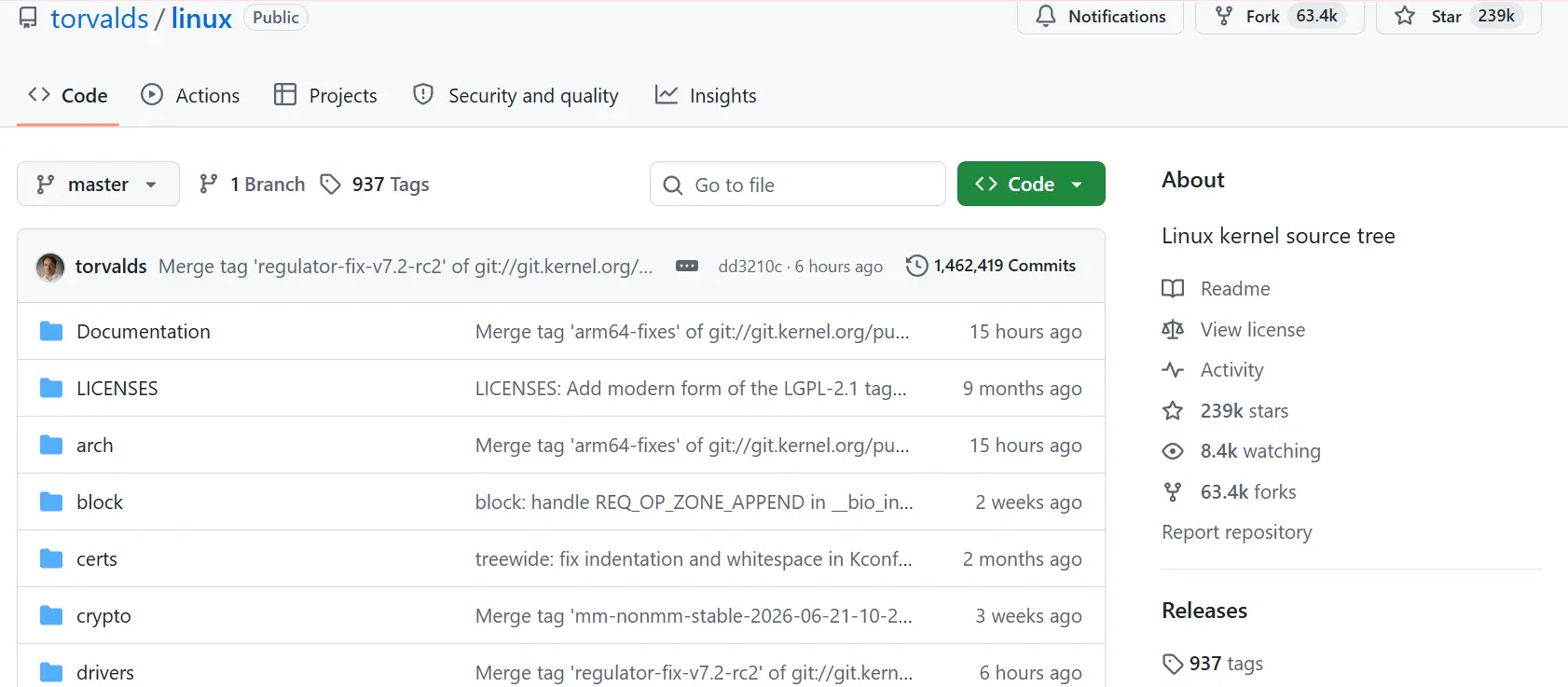
And this isn’t just talk — the scale of it is genuinely large. To get a precise picture, look at the official numbers: version 6.18 of the Linux kernel, in 2025, drew contributions from 2,134 developers, the highest level of participation in the project’s entire history. If you count a full year, the number gets much bigger still: across the 2025 development cycle, a total of 5,275 unique developers worked on the various kernel releases. More interesting still, over 1,780 organizations and companies play a role in developing Linux — from giants like Intel and Google all the way to independent programmers.
The important point is that you can do exactly the same thing for WordPress, because it’s free software too. So if one day you feel a capability is missing in WordPress, or there’s a bug that keeps annoying you, you can roll up your sleeves and propose your change. Which means you can be part of this global community, not just a spectator.
Popular Linux Distributions
Unlike Windows, which is built by one company (Microsoft) and comes in one defined version, Linux doesn’t work that way. Because its source code is free, different people and companies have come along and built different versions on top of that same core kernel. These are called distributions, or “distros” for short.
All of these distributions share the same core kernel (Torvalds’ Linux), but their graphical environment, the way they work, and their commands and tools differ a bit. It’s a bit like a car engine staying the same while different companies bolt a different body and different features onto it. Let’s look at the most popular ones.
Ubuntu — Our Recommendation for Getting Started
If you’re just stepping into the world of Linux, Ubuntu is the best place to start. Thanks to its simplicity, its clean graphical environment, and its enormous user community, it’s the most popular choice among newcomers. And it’s completely free.
Ubuntu matters especially for those of us running websites, because a great many of the world’s web hosting servers use this exact distribution. It’s worth knowing that WordPress servers and a large chunk of the web run on distributions like Ubuntu — to the point that Ubuntu alone is the operating system of roughly 15% of the websites whose operating system is known. So learning Ubuntu means learning the environment your site actually lives in.
Ubuntu has two main editions, which we’ll explain in detail shortly, but for now it’s enough to know that its newest long-term support (LTS) release is Ubuntu 26.04, released in April 2026 — the first LTS release to ship with version 7 of the Linux kernel.
Other Popular Distributions
Ubuntu isn’t the only option. Depending on your needs and skill level, these distributions are excellent too:
- Fedora: A modern, up-to-date distribution that always uses the newest technologies. Its latest release, Fedora 44, came out in April 2026. If you want to be on the cutting edge of new capabilities, it’s a good choice.
- Debian: One of the oldest and most stable distributions — and, as it happens, the one Ubuntu itself is built on. It’s a popular choice for servers where stability comes first.
- Arch Linux: A distribution for more advanced users who like to configure everything themselves from scratch and have complete control. It’s highly flexible, but a bit of a challenge for beginners.
- Deepin: A distribution with a very beautiful graphical environment whose look bears a strong resemblance to macOS. Appealing for people who care about visual polish.
If you’re new to this, our honest recommendation is to start with Ubuntu or Fedora and stay away from more complicated options like Arch until you’ve got your footing in this world.
The Difference Between the Server and Desktop Editions
A common question is why, when you go to download Ubuntu, you see two options: “Desktop” and “Server.” The difference matters:
Desktop edition: This is the one you install on your personal computer or laptop. It has a full graphical environment, meaning you work with a mouse and icons and windows, just like Windows. For everyday use and for learning, this is the edition you want.
Server edition: This one is designed to be installed on servers, and it usually has no graphical environment at all; everything is managed through the command line (the terminal). The reason is that a server has no need for a graphical interface, and dropping it frees up system resources for the real job — hosting websites. When you buy hosting from a company, your site runs on this kind of edition.
In short: if you want to learn Linux on your own computer, go with the desktop edition. And if one day you want to set up a real server, the server edition is what you’ll need.
Wrapping Up
In this article we took a complete journey — from zero to a real familiarity with the world of Linux and free software. We saw why Linux matters for every webmaster: because it’s free and open, and because nearly every web hosting server in the world runs on it. So learning it means understanding the environment your site actually lives in.
Then we went into the history and found out how Linux took shape out of Unix’s ideas: how Linus Torvalds built the Linux kernel and Richard Stallman, through the GNU Project, built the necessary tools, and how those two pieces eventually came together to make a complete, free operating system. We learned that “free” doesn’t only mean “free of charge” — it means the freedom to see the code, change it, and share it. We also saw why that same transparency makes free software more secure, how you can take part in its development, and finally we got acquainted with the most popular Linux distributions, like Ubuntu and Fedora.
Now that you know the what and the why of Linux, it’s time to roll up your sleeves and get to work. The best way to learn Linux is to actually use it. Our suggestion for your next step is to download the desktop edition of Ubuntu and install it on your machine — or even on a virtual machine to start with — so you can get your hands on it directly.
We hope this article has given you a clear picture of Linux and the beautiful philosophy of free software. If you have questions, or if something stayed unclear, we’d be glad to hear from you in the comments. Good luck out there. 🙂

Ahura WordPress Theme
The Power to Change EverythingElementor Page Builder
The most powerful WordPress page builder with 100+ exclusive custom elements.
Incredible Performance
With Ahura’s smart modular loading technology, files load only when they are truly needed.
SEO Optimized for Google
Every line of code is carefully aligned with Google’s algorithms and best practices.

To post a comment, please register or log in first.