
 Tutorials


 Ahura
Ahura Plugins

 Blog
BlogFixing Video Indexing Issues in Google

We actually faced this exact same problem ourselves on one of our project websites. Most of the results belong to Youtube, Vimeo or other dedicated video-sharing platforms. It really raises the question: why is only one specific type of source appearing in the video results, while sites like ours are nowhere to be found?
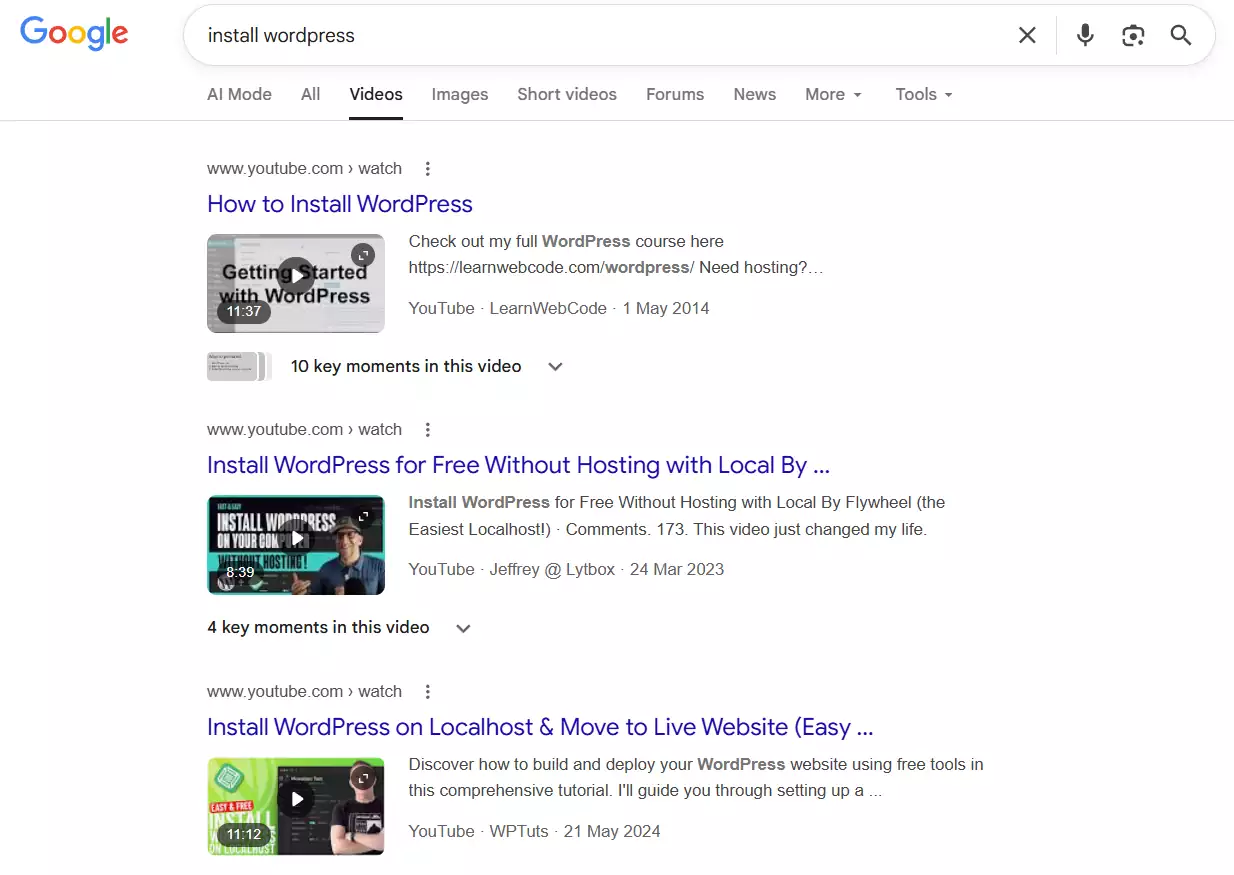
In this article, we want to dive into exactly this issue. Why aren’t a website’s videos being indexed in Google’s video results, and how can we fix this problem?
Table of Contents
Video Indexing Investigation Results
To figure out where the problem was coming from, we headed over to the Google Search Console for that specific website. As you know, Search Console is the most accurate tool for checking the indexing status of pages, especially for specific content like videos.
When we analyzed the data, we saw that we had over 628 pages on that site that contained videos—either as full video tutorials or as part of a guide. But the strange thing is that not a single one of these pages has been indexed in Google’s video results!
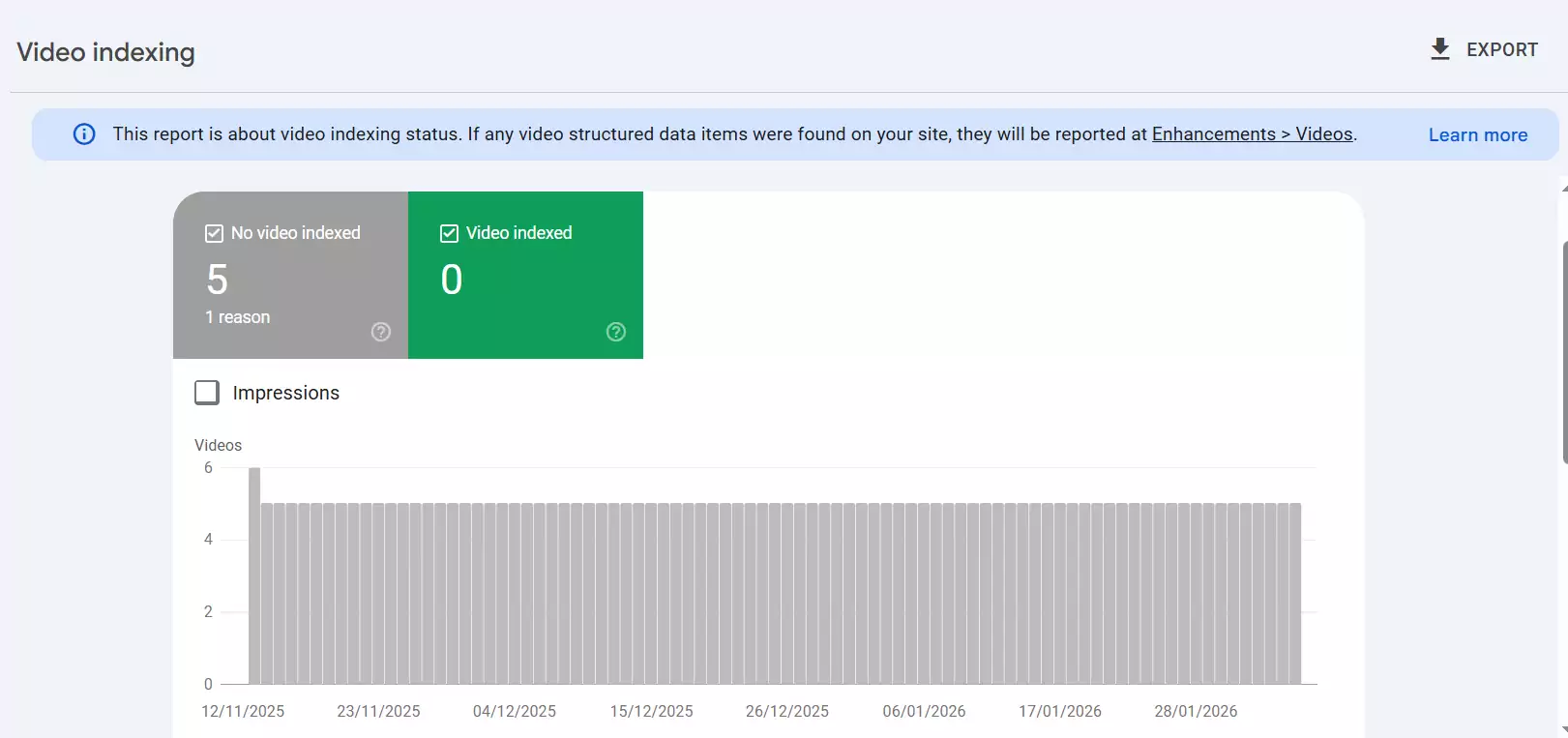
This means Google hasn’t identified the videos within these pages as “Videos” at all to display them in the “Videos” section. This becomes even more frustrating when you see that the exact same page is present in the regular results (the “All” tab), but not in the video section!
So, it’s clear here that we don’t have a problem with a lack of content or low quality. The content is there, the video is there, and the page is indexed. But Google “doesn’t see” the video!
Why Doesn’t Google Index Our Videos?
When we started digging into Google Search Console, we encountered a specific error that essentially showed us the main reason the videos weren’t being indexed. Google stated very clearly: “Video is not the main content of the page.” or “Video is not on a watch page.” This single sentence illuminated our entire path toward solving the problem.
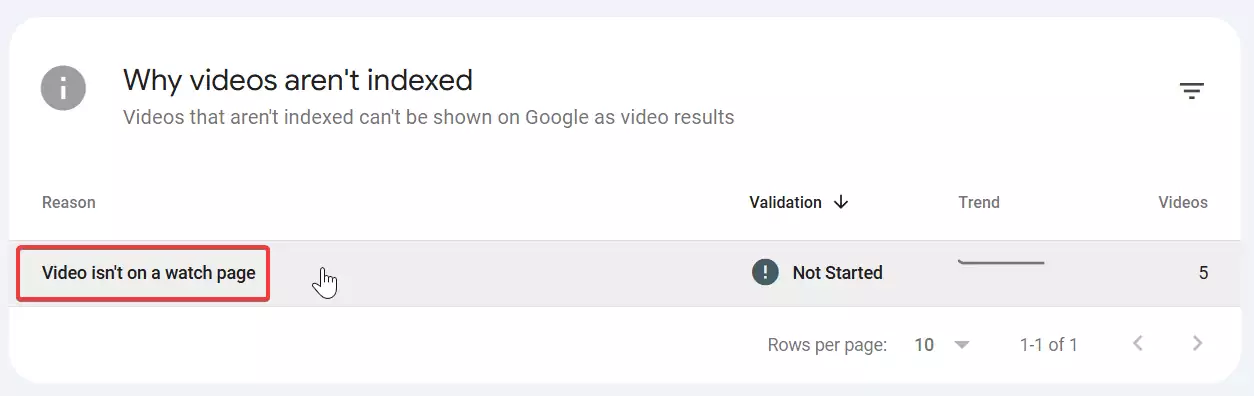
On that website, we have over 600 pages that either contain a video tutorial or at least one video as supplementary content. But the point is, none of these pages are visible in the video section of Google results. Not only are they not visible, but when we inspect these pages in Search Console, we realize that Google hasn’t considered the video as the primary element of the page. This means Google might index the page, but not in the video section.
To find out exactly what the issue was, we started testing the video’s position on the page. We placed the video right after the first paragraph. Then we moved it to the middle of the content, after two or three paragraphs. We even tested placing the video at the end of the article. But none of these methods changed Google’s mind. It still insisted that the video was not the main content of that page.
After a lot of investigation, a clear pattern emerged. When we looked at Google’s video results, almost all the links shown were from sites like YouTube or Vimeo. Now, what does this mean? It means Google has correctly identified those pages as “video pages.”
Why? Because when you enter one of those links, practically everything you encounter is the video itself. There might be a few lines of description, but the main part of the page is just the video. In fact, that page is designed solely to display a video, nothing else.
But on sites like ours, the structure is completely different. We write a full article, include lots of text and image content, and the video is placed alongside it. This causes Google to see that video merely as “supplementary content”—not as something it can show a user in the “Videos” tab.
Ultimately, the only way we found was to design our page structure similarly to major video hosting sites. Meaning, when a user enters the page, the primary and featured content of that page should only be the video. It shouldn’t be hidden in the middle of a long article or under several paragraphs.
This was the only scenario where we could convince Google and get the video into the video results. Of course, this approach brings a significant challenge: we might see a drop in text-based or regular search results. Since there isn’t much text content on these pages, they will naturally have lower SEO value in Google’s eyes.
What is the Solution?
Now that we’ve realized the only way to get indexed in Google’s video section is for the video to be the main content, we need to consider an even more important point: is focusing on video results even worth it?
The reality is that most Google users look for their answers right on the main page (the “All” tab) when they search for something. It’s quite rare for someone to click on the “Videos” tab after searching to find a specific result. You could say that 80 to 90 percent of users just open one of the links on the first page and get what they need.
So, if we change our entire page structure to be video-centric just to be seen in Google’s video tab, we are practically falling behind in the section that gets the most traffic. Because for Google to show a page in regular results, it cares about other factors like text content, heading structure, word count, internal links, and plenty of other SEO tips. If our page is only a video, we lose that opportunity.
That’s why my suggestion is to create a smart balance between video and text. I mean, if your content really is just a video and that’s exactly what the user is looking for, then it’s natural for the page to be video-oriented, and you don’t need much text.
But if your page is meant to rank well in Google’s general results, it’s better to place the video alongside strong text content. This is better for your site’s overall SEO, keeps the user on the page longer, and makes Google value that page more.
The Only Solution That Currently Works
To be honest, from everything I’ve analyzed and tested so far, the only solution that actually works has been making our page completely video-centric. That means the video comes out on top, at the very beginning of the page, becoming the main thing the user sees. The text and descriptions should be, at most, one or two short paragraphs—nothing more.
Now you might ask: “Should we always do this?” Not necessarily. This is just the only solution that’s working right now. We might discover a new method in a month or two, or Google might even change its algorithm. For example, it might turn out later that if we put the video inside a specific tag, Google notices it more easily.
Right now, though, the story is different. Unlike in the past where you just had to put a video on your page and Google would easily pull it up into the video results, it has now become very strict. It needs to be sure that the main focus of the page is on that video. Meaning, exactly what platforms like YouTube or Vimeo do.
In my opinion, until a better solution or a new update comes from Google, if it’s really important to you that a specific page ranks in Google’s video tab, you should go with this method: put the video center stage and push the text and other elements to the back. But if not, and it’s more important to you that the page looks good in regular Google results, it’s better for the video to be alongside the content.
Summary
Ultimately, if you, see many of your pages facing the “Video not indexed” status in Search Console, there’s no need to worry at all. Many people get stressed when they see this message, but the reality is that this isn’t a critical error; it’s an advisory report.
If your video can be indexed and show up in Google’s video results, it’s naturally a plus. But if it doesn’t, don’t worry—it won’t cause any problems for your site’s overall SEO.
All in all, my suggestion is to follow up on this without stress, perform your optimizations, but keep your main focus on content quality, page structure, and user experience. Over time, with updates to Google’s algorithms, this issue might be resolved more easily. Stay happy and successful. 🙂

Ahura WordPress Theme
The Power to Change EverythingElementor Page Builder
The most powerful WordPress page builder with 100+ exclusive custom elements.
Incredible Performance
With Ahura’s smart modular loading technology, files load only when they are truly needed.
SEO Optimized for Google
Every line of code is carefully aligned with Google’s algorithms and best practices.

To post a comment, please register or log in first.