
 Tutorials


 Ahura
Ahura Plugins

 Blog
BlogPhishing and its problems for online businesses
- Tutorials
- Updated on
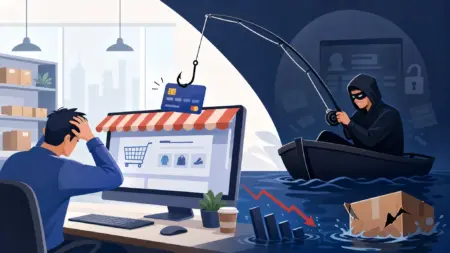
You’ve surely heard phrases like these before: “So-and-so’s account got phished,” “someone ran a phishing scam,” or the one that’s a nightmare for site owners: “a site manager got into serious trouble over a phishing purchase.”
Honestly, this topic isn’t nearly as far off as you might think. If you own a WordPress online store, or you’re thinking of starting one, this matter concerns you directly. So let’s take a look together at what phishing even is, why it’s so dangerous for site owners, and — most importantly — how you can prevent it.
Table of Contents
What Is Phishing?
The name “phishing” is originally derived from the phrase Password Harvesting Fishing. And the name tells its own story; it’s just like fishing. Someone who’s new and not paying attention gets caught on a hook like a fish and taken advantage of.
In the internet world, it’s exactly the same. Someone uses a trick to distract you and steal your information without you ever realizing what happened. The thing to note is that phishing doesn’t have just one method; it can happen in many different ways.
A Trip to the Past: The Yahoo Messenger Story
Let me give you an old example so the concept really sinks in. Remember back when everyone chatted on Yahoo Messenger? Back then, it was very easy to phish people’s accounts.
How did it work? Someone would build a fake form and put it on a bogus site — something like yahoooo, say (with a few extra “o”s that you wouldn’t notice the difference if you weren’t paying attention). Then it would ask you to go to that site and enter your information so that it could give you, say, the “new version of Yahoo Messenger”!
Well, a lot of people new to the net would fall for it, enter their information, and then… that was it! Their Yahoo Messenger credentials fell into a stranger’s hands.
Other Types of Phishing
Phishing isn’t just that fake form. Today it comes in several different flavors that are worth knowing:
Email phishing: An email arrives that looks like it’s from your bank or a reputable company. It says, “There’s a problem with your account, click this link right away.” You get worried and click, and you walk right into the trap.
SMS phishing (smishing): Same story, but this time via text message. They send you a malicious link with an enticing pretext, like “You’ve won” or “Your package is waiting.”
Phone phishing (vishing): This one is more personal! Someone calls you, poses as your bank’s support line or a company, and gradually draws your information out of you.
See? The hook is everywhere — only its shape changes.
Phishing Bank Accounts
Now let’s get to where things get serious. The very thing that used to happen to Yahoo Messenger can happen to your bank account too.
Someone builds a fake payment gateway that looks exactly like the real one. You think you’re making an ordinary purchase, but you’re actually handing your card details over to a fraudster. Card details, one-time password, everything!
What happens next? That person takes your card details, goes to some other online store, and orders, say, a $5,000 product. The money leaves your account, and the goods end up in their hands. And this is where an innocent site owner also gets caught up in the whole mess.
Why Is the Site Manager Held Responsible?
Here’s an important point that many people aren’t aware of. In this situation, the rule is: if a phishing purchase is made on your site, the manager of that very site is at fault, because they didn’t carry out proper identity verification!
What does that mean? It means if a fraudster comes along with someone else’s stolen card and makes a purchase from your site, then when the real cardholder files a complaint, the finger of blame points at you. Because you were the one who was supposed to make sure the buyer was the card’s true owner.
So identity verification isn’t a choice, it’s a requirement. Something you absolutely must have on your site.
One important note, though: for a few years now, phishing methods have become a bit harder to pull off, because all banking transactions now require a one-time code that’s sent only to the account holder — a code you should never, under any circumstances, give to strangers.
What Is Identity Verification and Why Is It So Important?
Identity verification means the buyer sends you their information, confirms their mobile number with a text message, and pays with a card that’s in their own name. This way you make sure the person is who they claim to be.
But there’s a subtle point here: you have to strike a balance!
If you make identity verification weak or incomplete, you once again become exposed to phishing purchases and land yourself in trouble. And if you’re too strict and add a ton of steps, a lot of customers get tired partway through and leave — meaning your sales drop.
So the art of it is making it both secure and easy enough that the customer doesn’t get scared off.
Preventing Fraudulent Purchases on Your Site
Let’s get to the point. There are a few general principles that help. First of all, take identity verification seriously and implement it fully, not halfheartedly. Confirming the mobile number, matching the card name with the user’s name — all of these need to be in place.
But there’s a key idea that many people don’t think about: set things up so that even if card details are leaked and someone manages to make a purchase with them, they at least can’t complete identity verification in your name. In other words, arrange the chain so that you always have a protective layer.
A Few Questions You Might Have
Can an official payment gateway be phished too?
The official gateway itself is secure, but fraudsters build a fake version of its appearance that looks just like the real one. So always check the site’s address to make sure it’s really the bank’s.
What should I do if my card details are leaked?
The fastest move: block your card. Call the bank or use your banking app to change your passwords and close the card. The faster you act, the smaller your loss.
What’s the difference between phishing and hacking?
In hacking, the attacker breaks into the system by force and technical trickery. In phishing, however, it’s you yourself who hands over your information with your own hands, because you fell for a fake appearance. That is, phishing is more about playing with trust and distraction than technical intrusion.
How can I tell if a site or gateway is fake?
Pay attention to the site’s address (extra letters or spelling mistakes, like that yahoooo), check whether it has the security lock (https), and don’t trust links that come to you via email and text. It’s better to type the bank’s address in manually yourself.
Wrapping Up
Look, the truth is today’s web is full of dangers; there’s no denying it. Phishing is one of those dangers that can hit an ordinary user as well as land the owner of an online business in trouble.
But the good news is that by observing a few simple principles, like proper identity verification and staying alert, you can easily stay safe in this space and even earn a good income from it.
So my final word is this: take identity verification seriously and make your site’s security complete. This one thing will save you from a whole lot of trouble. Take care! 🙂

Ahura WordPress Theme
The Power to Change EverythingElementor Page Builder
The most powerful WordPress page builder with 100+ exclusive custom elements.
Incredible Performance
With Ahura’s smart modular loading technology, files load only when they are truly needed.
SEO Optimized for Google
Every line of code is carefully aligned with Google’s algorithms and best practices.

To post a comment, please register or log in first.