
 Tutorials


 Ahura
Ahura Plugins

 Blog
BlogContent Ideas for Your Website – How to Find SEO-Friendly Topics
- Tutorials
- Updated on

Almost everyone who steps into the world of content creation—whether they’re running a YouTube channel, managing a blog, producing content for Instagram, or publishing on a personal website—eventually reaches the same question: “What should I create next?”
This challenge becomes even more noticeable if you’ve been producing content consistently for months or years. Over time, coming up with fresh, relevant ideas can feel harder, and content fatigue starts to creep in.
In this article, I’m going to share practical methods for finding content ideas that work in different situations. It doesn’t matter whether your website is newly launched with only a few pieces of content, or whether—like ours—it has been filled with articles and videos over the years.
In both cases, these strategies will help you discover new content opportunities, maintain consistency, and prevent your website from falling into stagnation.
Table of Contents
Content Creation Ideas for Websites
I’ve personally gone through this exact experience. Looking back, I’ve created over 700 educational videos focused solely on WordPress—without even counting written tutorials and blog posts. On our website, we’ve published more than 2,500 free educational articles, and I can confidently say that almost every idea that ever crossed my mind in the WordPress space has already turned into either a video or an article.
But when you reach a point like this, the first thought that comes to mind is simple—and honestly a bit scary: “There’s nothing left to say.”
I’ve felt this many times. Sitting in front of my laptop, ready to record a new video or write a fresh article, but nothing comes to mind. No clear topic. No spark.
It’s a strange and frustrating feeling, because in content creation, stagnation is dangerous. When you run out of ideas, production slows down. Your website stops updating, search engines gradually lose interest, and eventually, your audience does too.
That was the moment I realized I needed a solution—specifically for this problem. I knew for sure I wasn’t the only one dealing with it. Every content creator eventually reaches a point where their mind just goes blank.
So I started researching and testing different methods that could help “restart” the creative engine.
The result was a set of simple but highly practical techniques for generating new content ideas. I’ve tested these methods repeatedly—both on my own website and with people I’ve coached in content strategy. The interesting part?
They consistently work.
The Difference Between Finding Content Ideas for New Websites vs. Content-Rich Websites
When it comes to generating content ideas, the current state of your website matters a lot. A strategy that works perfectly for a newly launched website can be completely ineffective for an older site filled with hundreds—or even thousands—of articles.
I’ve experienced both scenarios many times. I’ve built websites from scratch and struggled to find the first set of content ideas, and I’ve also managed long-running educational websites with massive content libraries, where the real challenge was finding new angles rather than new topics.
New Websites: An Open Playing Field
In the first scenario, your website is newly launched and doesn’t have much content yet. Typically, you’ve published somewhere between a few pages and maybe 50–100 articles at most.
At this stage, your options are wide open. The playing field is still untouched, and even the most basic topics can turn into valuable, standalone pieces of content.
Most users who visit a new website are looking for foundational information. So instead of worrying about whether an idea is too simple or too obvious, you should focus on covering all the basics.
Every term, tool, or question that feels obvious to you as an expert can be a genuinely useful topic for beginners.
Established Websites: Change the Angle, Not the Topic
The second scenario is more complex. Imagine a website that has been consistently updated for years and already contains thousands of articles and educational videos.
In this case, you can’t rely on very basic topics anymore—they’ve already been covered.
Here, the key shift is changing how you think about content ideas. Instead of asking “What should I create?”, you need to ask “How can I approach this differently?”
A topic may have been discussed many times before, but you can revive it with:
- A new perspective
- A real-world case study
- A practical example
- Or even your personal experience
That’s why even content-heavy websites can continue growing—there’s always room for fresh ideas when you focus on depth and originality.
The Core Difference
- For new websites, basic and introductory topics are your best content ideas.
- For established websites, creativity becomes essential. Comparisons, in-depth guides, advanced use cases, and personal analysis help your new content stand out among existing articles.
Scenario One: Newly Launched Websites
In this case, your website is brand new and doesn’t have any content yet. Naturally, when there’s no existing content, you also don’t have an internal source of inspiration. So you need to look outside your website for ideas.
Some effective approaches include:
- Analyzing competitor websites
- Using SEO tools
- Leveraging AI tools like ChatGPT
- Searching directly on Google and reviewing autocomplete suggestions and related searches (LSI keywords)
Using SEO Tools for Content Ideation
I don’t recommend relying entirely on SEO tools to build a content strategy—even for English-language websites. While these tools can be helpful, their data isn’t always perfectly accurate or complete.
That said, as supporting tools for idea generation, they can be extremely useful.
One tool I personally find reliable is Ubersuggest by Neil Patel. When you enter a keyword—such as “WordPress” or “artificial intelligence”—the tool shows related search terms and popular queries in that topic area.

For example, if you search for artificial intelligence and notice that a phrase like “AI translation tools” has a high search volume, that insight alone can turn into a strong content idea. When you understand what users are actively searching for, you can transform those queries into articles, tutorials, or videos that directly match user intent.
In this context, SEO tools act like a roadmap. They show you which keywords are gaining traction and what people are actively searching for. From a single keyword list, you can extract dozens of potential content topics.
Even if the tool asks you to sign in to unlock deeper data, the initial preview alone is often full of fresh ideas and more than enough for early-stage content planning.
Using Google Search for Content Ideas
Another highly effective method for newly launched websites is simply using Google itself. Go to google.com and start typing a basic phrase. For example, try something like: “How to use AI to…”
As soon as you type it, Google automatically begins suggesting variations. You might see ideas such as:
- How to use AI to generate images
- How to use AI to create videos
- How to talk to AI
- How to use AI for music production
- How to create presentations with AI
Each of these suggestions can easily become a standalone article or tutorial.
An Important Note About Google Suggestions
It’s important to understand that Google’s autocomplete suggestions don’t necessarily mean those phrases have high search volume.
At this stage, your goal is not to find the most searched keywords.
Your goal is to find ideas.
These suggestions act as creative sparks. A single Google search can easily generate dozens of new content topics that you may not have thought about otherwise.
Focus on Long-Tail Keywords
This is where long-tail keywords become extremely useful—phrases that are longer and answer a very specific question.
Instead of searching for a broad term like “WordPress”, try:
- How to build an eCommerce website with WordPress
- How to localize WordPress for different languages
By using more detailed phrases, Google gives you much more specific suggestions, and each one of those can serve as a separate content idea.
So if you ever find yourself stuck and unsure what to create next, just search for a keyword related to your niche and let Google do the brainstorming for you.
Analyzing Competitor Websites
Another powerful way to generate content ideas is by studying competitor websites.
When I first launched my educational website, I often visited well-established international resources like WPBeginner to find inspiration. At the time, it was a go-to reference for me, and almost every visit to their blog section sparked multiple new content ideas.

Competitor analysis isn’t about copying content—it’s about understanding:
For example, I might see an article about integrating WooCommerce with Amazon. Instead of copying it, I would turn that idea into a localized version—teaching how to connect WooCommerce to a regional or alternative marketplace that better matched my audience’s needs.
Or let’s say they published a tutorial on sending WooCommerce order notifications to WhatsApp. I’d recognize that the core idea was valuable, then rebuild it using tools and workflows that were more accessible and practical for my own users.
I applied the same approach to many other topics. For instance, if a competitor wrote about accepting international donations in WordPress, I could take that concept and adapt it—expanding on it with different payment platforms, real use cases, and clearer step-by-step guidance tailored to my audience.
That’s why competitor websites—whether local or international—can be an excellent source of inspiration. Especially when your website is still new and has plenty of room to grow, you don’t need to invent ideas from scratch.
You simply:
- Review what others are publishing
- Identify topics that already resonate
- Recreate them with a new angle, better clarity, or a different audience focus
This way, you end up with a long list of ready-to-use content ideas—without starting from zero.
Using Google Trends for Content Ideation
Another powerful tool for discovering content ideas is Google Trends (trends.google.com). It genuinely works like an idea goldmine.
All you need to do is enter a simple keyword—such as “artificial intelligence”. Google Trends then shows you:
- What topics are currently gaining popularity
- Which search terms are trending right now
- What people are actively interested in at this moment
For example, when you search for artificial intelligence, you might see a trending topic like “Google Gemini AI.” From there, you’ll often find related queries such as:
- What is Gemini AI?
- How to use Gemini AI
- How to sign up for Gemini
- How to get help from Gemini AI
Each one of these queries can easily become a full article or video topic.
Why Google Trends Is Especially Valuable for New Websites
The biggest advantage of Google Trends is that it helps you understand what’s hot right now.
This is incredibly useful when your website is newly launched and you don’t yet have:
- User behavior data
- Search performance data
- Historical traffic insights
Instead of guessing in the dark, Google Trends allows you to align your content with real-time user interest.
A Simple Content Roadmap for New Websites
When your website is still small and you don’t have enough data to analyze, combining these tools can act as a complete roadmap:
- SEO tools like Ubersuggest
- Google autocomplete and related searches
- Competitor website analysis
- Google Trends
Together, they can consistently provide you with fresh content ideas and help you build momentum—one piece of content at a time.
Scenario Two: High-Traffic and Established Websites
When your website is newly launched, most of your content ideas need to come from external sources. But once you move past that stage and your site starts receiving organic traffic from Google, everything changes.
Now, you don’t just have visitors—you have a goldmine of data right in front of you: real questions, concerns, and feedback that your audience shares with you every day.
Using User Questions and Feedback as Content Ideas
At this stage, you no longer need to guess what people are searching for—they’re telling you directly.
One of the best sources of content ideas is the comments and questions users leave across your platform. Simply reviewing the comment sections of your articles can uncover dozens of potential topics. Every genuine question you see is a strong candidate for a full article or video.
And this goes far beyond your website.
- YouTube comments are often packed with very specific, practical questions. In many cases, these questions are even more valuable than ideas you find through SEO tools or trend reports—because they come straight from real user needs.
- Social media platforms like Instagram are also incredibly powerful. Direct messages and post comments frequently include repeated questions. And repetition is a signal: if multiple users ask the same thing, it clearly matters.
A Personal Observation
Many times, I’ve been asked questions that felt too simple—things I assumed everyone already knew. But when those exact questions were turned into content, they attracted significant traffic.
Why?
Because a large portion of any audience consists of beginners, and they are actively searching for answers to those “simple” questions.
So when your website reaches the stage where it receives consistent traffic, the first and best place to look for content ideas is your audience’s direct feedback. These are the most authentic and high-intent ideas you’ll ever find.
Using Analytics Tools Like Google Search Console
Once your website starts receiving organic traffic, it’s time to fully leverage your data. Unlike the early stage—where you rely mostly on external tools—your own website now tells you exactly what users are looking for.
The most powerful tool for this is Google Search Console.
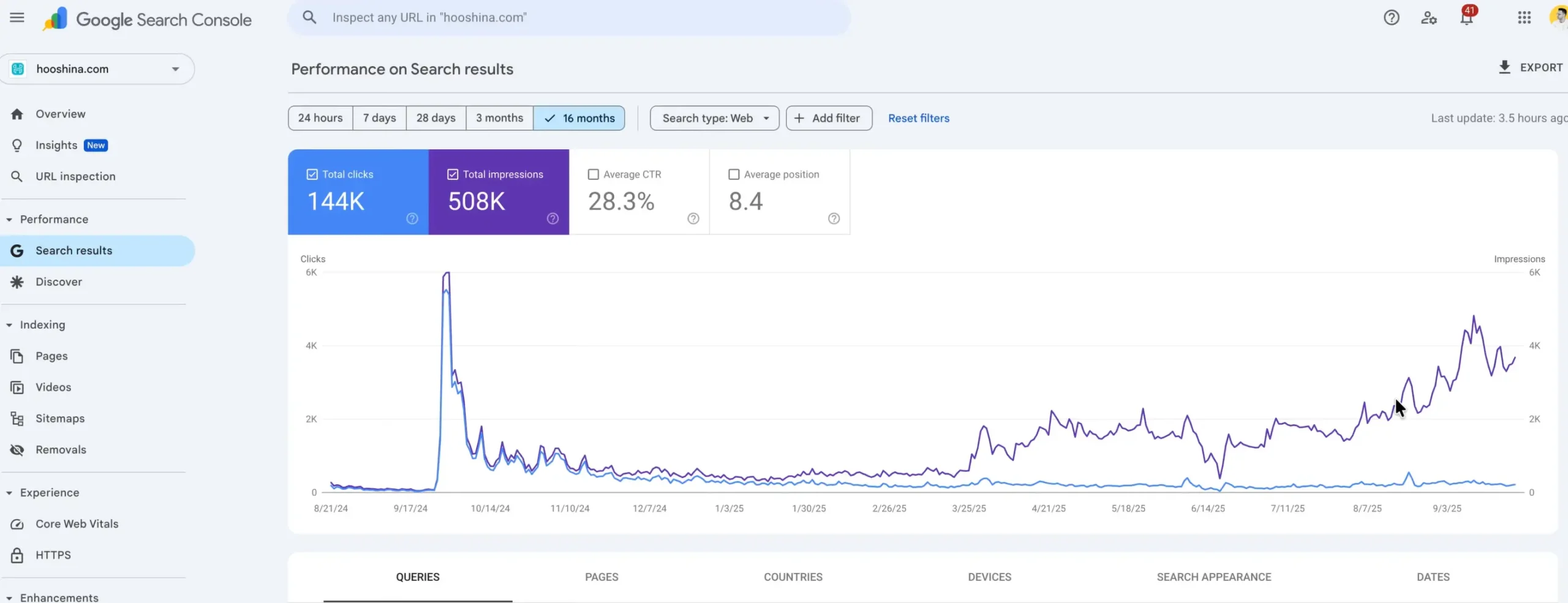
Inside Search Console, you can see:
- Which queries bring users to your site
- Which pages receive impressions and clicks
- Where opportunities for growth exist
Even if your website only has around 100 articles, that’s often enough to generate hundreds of impressions or visits per month—and each of those visits can lead to new content ideas.
Using the Insights Section in Google Search Console
One particularly useful area in Search Console is the Insights section. This feature shows:
- Pages that are trending up
- Pages that are trending down
This data acts as direct guidance for content creation:
- If a page is trending up, you can publish complementary content or update it to push rankings even higher.
- If a page is trending down, it likely needs optimization, a refresh, or a better angle.
Discovering Content Ideas from Search Queries
Another critical section in Google Search Console is Search Results.
Here, you can analyze a specific time range—such as the last three months—and see which search queries generated a high number of impressions. These are keywords users frequently searched for, where your site appeared in results.
What makes this powerful is that many of these queries have low click-through rates (CTR).
And that’s where the best ideas are hidden.
Low clicks usually mean one of two things:
- You don’t have a dedicated piece of content for that query—only a brief mention.
- You do have relevant content, but your title or meta description isn’t compelling enough.
For example, you might see queries like:
- AI image generation websites
- AI face image tools
- Cartoon images with AI
All of these can become standalone content pieces. You could publish:
- A complete guide to generating images with AI
- A step-by-step tutorial on creating cartoon images using AI tools
Create New Angles—Not Duplicates
The key here is not to copy or repeat existing content.
If you already have an article on AI image generation, you can still create a new, more focused piece like:
- How to Create Cartoon Images Using AI: A Step-by-Step Guide
This way, your content becomes interconnected while remaining fresh and valuable.
Google Search Console as a Treasure Map
At this stage, Google Search Console works like a treasure map:
- It shows what users searched for
- Where your site appeared
- And why clicks didn’t happen
Using this data, you can:
- Create new, highly targeted content
- Improve existing articles
- Increase CTR and overall organic traffic
And the best part?
You’re no longer guessing. Every decision is backed by real numbers and real user behavior.
Generating Content Ideas with AI and Building a Content Calendar
One of the most effective ways to generate creative content ideas today is by using AI-powered tools. And when we talk about AI, we don’t just mean ChatGPT—there are many other options as well, such as Google Gemini and various AI tools designed specifically for marketing and content strategy.
However, to keep things practical, let’s focus on ChatGPT as a clear example.
Imagine you run a website focused on AI education. You can simply go to ChatGPT and ask it to create a complete content calendar for you. For instance, you might say:
“I run a website focused on AI education. Please create a one-month content calendar for me, including main keywords, long-tail keywords, and article titles.”
This is where the real magic happens.
Within seconds, the AI generates a structured plan—suggesting which articles to publish in week one, what topics to cover in week two, and even how to balance articles and videos throughout the month.
This means you no longer need to spend hours searching for content ideas. You can focus entirely on execution. And you can get even more specific.
For example, you could say:
“My website is not educational—it’s an online service for AI image generation.”
The AI will instantly rewrite the entire content calendar, this time tailoring all topics specifically to your business model and audience.
Creating a Content Calendar with AI
This is where you truly experience the real power of AI.
With the right prompts, AI doesn’t just give you topic ideas—it can also:
- Suggest primary and secondary keywords
- Write draft meta descriptions
- Propose article outlines and content structure
In other words, before you even start writing, you already have a clear roadmap.
Combine AI with Other Idea Sources
One very important point: using AI does not mean abandoning other methods.
In fact, the best results come from combining AI with the strategies we discussed earlier.
For example:
- You can extract high-impression queries from Google Search Console, then ask ChatGPT to build a weekly content plan around them.
- You can analyze competitor websites, list their strongest topics, and ask AI to expand those ideas and generate new long-tail variations.
- You can take trending topics from Google Trends and turn them into a structured publishing schedule using AI.
This combination ensures that you never run out of content ideas.
The Bigger Picture
The result of all these efforts is a website filled with valuable, diverse, and user-focused content—a site where visitors can find clear answers to almost any question related to your niche.
This builds trust, increases time on site, encourages repeat visits, and ultimately strengthens your brand authority.
Final Thoughts
To be completely honest, after many years of consistent content creation, we’ve reached a point where almost every idea that comes to mind has already been turned into an article or a video. Sometimes, we even realize mid-recording that the same topic was published before!
That’s when content creation enters a new phase—one where creativity and audience insight matter more than ever.
And this is exactly where you, the real users and long-time readers, become incredibly important.
No one understands what content is missing better than you:
- What tutorial couldn’t you find?
- Which topic needs a deeper explanation?
- What problem still hasn’t been solved?
Your questions and feedback are the most valuable source of inspiration.
So if you ever browse a website and don’t find the answer you’re looking for—or feel a topic deserves more clarity—share it in the comments. No idea is too small. Every question can turn into a piece of content that helps not only you, but thousands of others as well.
Ultimately, the goal is simple:
to build a website that people trust—a place where users know they can find clear, up-to-date, and practical answers. With your help, that journey can continue. Good Luck! 🙂

Ahura WordPress Theme
The Power to Change EverythingElementor Page Builder
The most powerful WordPress page builder with 100+ exclusive custom elements.
Incredible Performance
With Ahura’s smart modular loading technology, files load only when they are truly needed.
SEO Optimized for Google
Every line of code is carefully aligned with Google’s algorithms and best practices.

To post a comment, please register or log in first.